









Mastering Acceptance Criteria for User Stories

Think of acceptance criteria as the fine print on a contract, but for your user stories. They are the specific, non-negotiable conditions a feature must meet before anyone can call it "done". It's the official sign-off sheet that confirms a user story is fully baked and ready for users.
Jump To Section

Earn As You Learn
Earn 25% commission when your network purchase Uplyrn courses or subscribe to our annual membership. It’s the best thing ever. Next to learning,
of course.
What Acceptance Criteria Are and Why They Matter
Let's say you're building a custom car. Your user story might be, "As a driver, I want a fast car so I can enjoy spirited driving." That's a great start, but what does "fast" actually mean? Without more detail, the engineering team is left guessing.
Acceptance criteria are the specific benchmarks that define "fast". They'd look something like this: "The car must go from 0-60 mph in under 4 seconds" or "It must have a top speed of at least 150 mph". Suddenly, a vague desire becomes a measurable, testable goal.
In product development, these criteria build a bridge between the product owner's vision and the development team's execution. They create a shared understanding that stops misunderstandings in their tracks and ensures the final product is what everyone agreed upon.
The Foundation of Agile Clarity
Acceptance criteria really came into their own with the rise of Agile development. As teams moved faster, they needed a way to stay aligned without pages and pages of documentation. These simple, clear conditions became a cornerstone of modern development, an idea that gained serious traction after the 2001 Agile Manifesto changed how people thought about building software.
The impact was undeniable. By 2010, a major industry report found that teams using clear acceptance criteria saw their project failure rates drop by an average of 25%. That’s a massive improvement, all driven by the simple act of agreeing on what "done" looks like before starting the work.
This clarity isn't just about efficiency; it directly leads to higher quality and a better user experience. For a learning platform like Uplyrn, a story like, "As a new student, I want to enroll in a course" is just the beginning. The acceptance criteria would detail every step, from clicking "enroll" to seeing the course on your dashboard, guaranteeing a smooth and intuitive process.
Acceptance criteria transform a vague request into a concrete, testable outcome. They are the bridge between a user's need and the developer's solution, ensuring both sides are looking at the same blueprint.
Core Benefits of Strong Acceptance Criteria
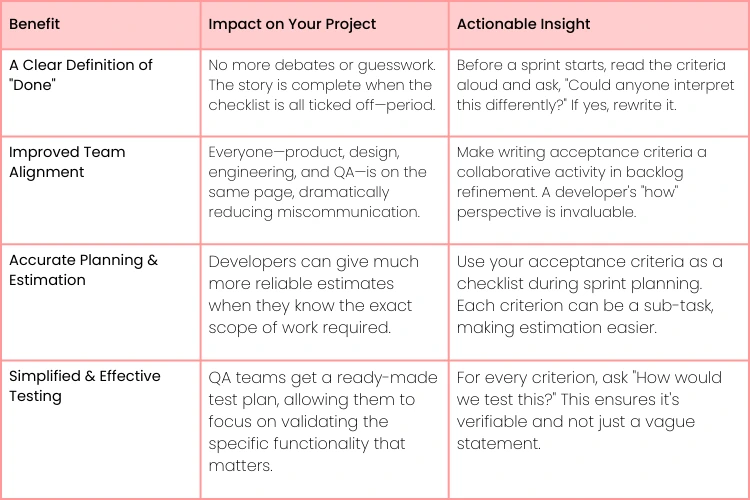
By getting these conditions ironed out upfront, teams unlock some serious advantages that make the entire development process smoother for everyone involved—from developers and testers to stakeholders and, most importantly, the end-users.
Below is a quick breakdown of the biggest wins you get from writing solid acceptance criteria.
Ultimately, investing a little time in writing clear criteria saves a massive amount of time, money, and frustration down the line. It's one of the simplest ways to set your project up for success.
Choosing the Right Format for Your Criteria
Okay, so you're sold on the why of acceptance criteria. Now comes the how. How do you actually write them down?
Think of it like this: a carpenter doesn't use a sledgehammer to drive a finishing nail. You need the right tool for the job. In the world of user stories, your main tools are two distinct formats: the scenario-driven Given/When/Then structure and the straightforward checklist. Picking the right one can be the difference between a feature that sails through development and one that gets stuck in endless feedback loops.
Each format has its own superpower. Your job is to match that power to the user story at hand to give your development team the clear, actionable guidance they crave.
The goal is to provide a crystal-clear recipe. When the recipe is clear, you get happy, efficient developers. When it's not? Well, things get messy.
This simple idea—that clarity is everything—is the bedrock of good acceptance criteria. The format you choose is your primary way of delivering that clarity.
The Storytelling Power of Given/When/Then
The Given/When/Then format, which you'll often hear called Gherkin syntax, is all about telling a story. It's perfect for mapping out user interactions and workflows that have a few moving parts. It works by setting the scene, describing what the user does, and then defining what should happen as a result.
Here's the breakdown:
- Given: This sets the stage. What’s the situation before the user takes action?
- When: This is the action itself—the click, the tap, the form submission.
- Then: This is the outcome. What does the system do in response?
This format is a lifesaver for features with a clear sequence of events. Let's take a feature for a platform like Uplyrn. For the user story, "As a student, I want to add a course to my wishlist so I can save it for later", the criteria could be written like this:
Practical Example: Adding a Course to a Wishlist
- Scenario: A logged-in user saves a course for later. Given I am logged into my Uplyrn account and viewing a course page, When I click the "Add to Wishlist" button, Then the button text changes to "In Wishlist" and a confirmation message appears.
See how that reads like a mini-story? It makes the requirement incredibly easy for everyone on the team to grasp, even stakeholders who don't live and breathe code.
The Simplicity of Rule-Oriented Checklists
While Given/When/Then is great for describing behavior over time, sometimes you just need a list of non-negotiable rules. This is where the checklist format shines. It's direct, clean, and perfect for user stories where a feature simply needs to meet a set of conditions that aren't tied to a complex user flow.
Checklists are your go-to for things like UI consistency, data validation rules, or system performance requirements. For a Uplyrn user story like, "As a user, I want to update my profile information so my details are current", a checklist is far more efficient.
Practical Example: Updating a User Profile
Scenario: A user successfully updates their profile name and bio. Verify that:
- The "First Name" field accepts up to 50 alphabetic characters.
- The "Last Name" field cannot be left blank.
- The "Bio" field has a character limit of 300.
- A "Profile Updated Successfully" message is displayed after saving.
- An error message appears if the "Last Name" field is empty.
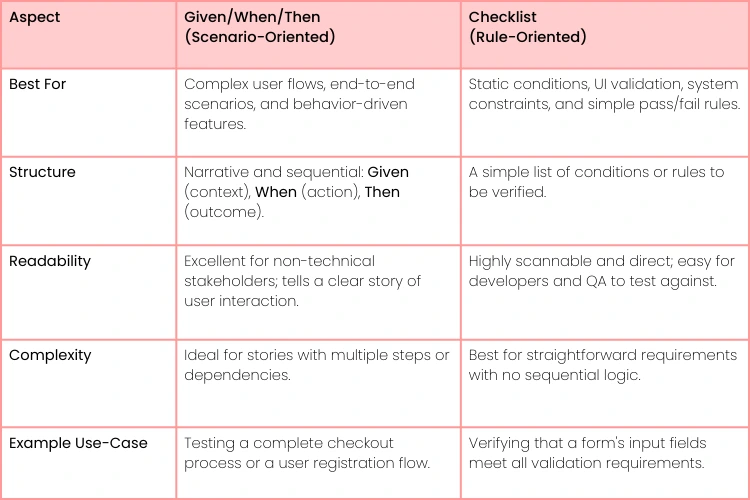
Comparing Acceptance Criteria Formats Given-When-Then vs. Checklist
Choosing between these two isn't about which one is "better" overall, but which is better for the specific user story you're working on. This table breaks down their core differences to help you decide.
- Actionable Insight: Don't be afraid to mix and match. For a single user story, you can use a Given/When/Then scenario for the main "happy path" and then a checklist for all the validation rules and edge cases. This gives you the best of both worlds: narrative clarity and technical precision.
For features that are core to the user experience, like Uplyrn's "As a professional, I want personalized learning paths so that I can advance my career", the scenario-based approach is incredibly powerful. In fact, some analyses show that Given/When/Then can boost requirement clarity by up to 40%. More importantly, teams that nail their criteria see 25% fewer bugs in production and report 85% better alignment between developers and product owners. You can find more discussions on this in the Scrum community forums.
How to Write Great Acceptance Criteria
Let's be honest, writing acceptance criteria isn't about creating pages of documentation that no one will read. It’s a conversation. The whole point is to take a cool idea and break it down into a clear, testable checklist that leaves zero room for guessing games. You have to put yourself in the user’s shoes and ask, "What does 'done' really look like for them?"
A good user story tells you the "what" and the "why" but the acceptance criteria nail down the crucial "how well". Think of them as the guardrails on a windy road—they keep development on track and focused on shipping something that actually works the way it's supposed to. This isn't a solo job; getting the whole team involved is where the magic happens, uncovering all those tricky edge cases one person would definitely miss.
A Step-by-Step Practical Example
Okay, let's move from theory to reality with an example from a platform like Uplyrn. Let's say the team is building a new feature to help graduates find jobs.
- User Story: As a recent course graduate, I want to apply for matched jobs directly through the platform so I can streamline my job search.
This story gives us a great starting point, but the dev team is going to have questions. What exactly does "apply" entail? How do we define a "matched" job? This is where acceptance criteria come in to fill the gaps.
- Get Everyone in a Room: The Product Owner (PO), a couple of developers, and a QA tester huddle up. The PO explains that "matched jobs" are based on skills from the student's completed course. A developer immediately asks about which application fields are mandatory. The QA tester, already thinking about what could go wrong, brings up potential error messages.
- Pick the Right Format: For a feature like this, one size doesn't fit all. A Given/When/Then scenario is perfect for mapping out the main user journey of applying. But for all the little rules about the application form, a simple checklist is much cleaner.
- Start Writing It Down: With a shared understanding, the team starts drafting the criteria together.
Actionable Insight: Writing acceptance criteria is a team sport, not a solo homework assignment. This back-and-forth is where you find and fix problems before a single line of code gets written. The Product Owner leads, but the developers' and testers' input is what makes the criteria robust and realistic.
Writing the Given/When/Then Scenario
For the main user flow, the scenario-style format makes the expected behavior crystal clear for everyone.
Scenario: Graduate successfully applies for a matched job.
- Given I am logged in as a graduate and am viewing the "Matched Jobs" page,
- When I click the "Apply Now" button on a job listing,
- And I fill in all mandatory fields in the application form,
- And I click the "Submit Application" button,
- Then I see a "Application Submitted Successfully!" confirmation message,
- And the status of that job changes to "Applied".
Creating the Checklist for Rules
For all the nitty-gritty validation details and UI behaviors, a straightforward checklist is far more efficient. It gives developers and testers a simple list to tick off.
Scenario: Application form validation rules. Verify that:
- The resume upload field only accepts PDF or DOCX files under 5MB.
- An error message appears if a required field is left empty.
- An error message appears if the uploaded file is in an unsupported format.
- The "Submit Application" button remains disabled until all required fields are completed.
By combining these two formats, we've covered the entire feature, from the user's journey down to the specific technical constraints. And this isn't just theory—the data backs it up. A 2023 report showed that 92% of organizations that use clear acceptance criteria get much better at estimating their work, and their sprint velocity jumps by an average of 28%. You can learn more about these Agile best practices and how they impact teams to see the full picture.

Putting Acceptance Criteria to Work: Real-World Examples
Theory is great, but seeing acceptance criteria in action is where it really clicks. Let's move from the abstract to the practical and look at how these rules translate into clear, actionable instructions for your team.
We'll walk through a few different scenarios—from a basic e-commerce function to a technical performance standard—to see how choosing the right format makes all the difference in bringing a user story to life.
Think of these as templates. You can adapt them for your own projects to get a solid starting point for defining what "done" truly looks like.
Example 1: E-commerce Cart Update
For a classic user flow like adjusting items in a shopping cart, the Given/When/Then format is a perfect fit. It lays out the user's journey step-by-step, making the expected outcome crystal clear.
- User Story: As a shopper, I want to update the quantity of an item in my cart so I can purchase the correct amount.
Acceptance Criteria (Given/When/Then):
Scenario: User increases the quantity of an item. Given I have an item in my shopping cart with a quantity of 1, And I am on the cart page, When I increase the quantity of that item to 2, Then the line item's subtotal should update to reflect the new price, And the cart's total price should also be updated.
There’s no ambiguity here. A developer knows exactly what state to start in, what action to perform, and what results to look for. This makes the feature simple to build and even easier to test.
Example 2: Non-Functional Requirement
Not every story is about what a user does. Some are about how the system performs. These are often called non-functional requirements (NFRs), and for them, a straightforward checklist is usually the best approach.
- User Story: As a user, I want the course catalog page to load quickly so I can browse courses without frustration.
Acceptance Criteria (Checklist):
Verify that:
- The page's initial HTML content loads in under 1.5 seconds on a standard broadband connection.
- All images on the page are fully rendered within 3 seconds.
- The page achieves a Google PageSpeed Insights performance score of 85 or higher on mobile.
- The server response time (TTFB) is less than 400ms.
This format gives the team a set of specific, measurable targets. Each point is a simple pass or fail, which is exactly what you need when dealing with technical specs.
Common Mistakes to Avoid
Knowing how to write good acceptance criteria is only half the story. You also need to know what not to do. It’s easy to fall into a few common traps that can quickly turn a helpful tool into a source of confusion and rework.
Learning to sidestep these mistakes is just as important as mastering the formats themselves. Let's walk through the most common blunders we see teams make.
One of the biggest culprits is writing criteria that are simply too vague. When you use fuzzy language, you leave everything open to interpretation. This forces developers to guess what you mean, and their guess rarely matches what's in your head.
On the flip side, some teams go too far in the other direction and become too prescriptive. Acceptance criteria should always focus on the "what" not the "how". Dictating the technical implementation handcuffs your developers, stifling their creativity and preventing them from finding the best solution.
Finally, a classic oversight is forgetting about negative scenarios and edge cases. It's easy to focus on the "happy path" where the user does everything perfectly. But what happens when they don't? A feature that only works under ideal conditions is a fragile one.
Vague Language vs. Specificity
Vague criteria are a tester's nightmare because they're impossible to verify. They rely on subjective words like "fast", "easy" or "user-friendly" without any concrete definition.
- Before: The course catalog page should load fast for the user.
- After: The course catalog page loads in under 2 seconds on a standard 4G connection.
Actionable Insight: Turn subjective words into objective measurements. Replace "fast" with a time in seconds, "easy to find" with "accessible in 3 clicks" and "large" with a specific pixel dimension or file size.
Being Too Prescriptive
It can be really tempting to spell out exactly how you think a feature should be built, but that’s not the job of acceptance criteria. The development team needs the freedom to figure out the best way to deliver the outcome you want.
- Before: When the user clicks the "Enroll" button, the system must use a POST request to the /enrollments API endpoint, which adds a new record to the Enrollments database table.
- After: When a logged-in user clicks the "Enroll" button, the selected course appears on their "My Courses" dashboard.
The "after" version keeps the focus on what the user experiences. It describes the result, not the behind-the-scenes mechanics. This is the sweet spot.
A great user story invites a conversation about the best way to solve a problem. Prescriptive acceptance criteria shut that conversation down before it even starts, limiting your team's potential to find the best solution.
By steering clear of these common missteps, you can ensure your acceptance criteria are consistently clear, testable, and genuinely useful. This is how you pave the way for smoother development and build products people love.
Common Questions About Acceptance Criteria
Even after you get the hang of the basics, some practical questions always come up when teams first start using acceptance criteria. Let's tackle some of the most common ones to clear up any confusion so you can put these ideas into practice with confidence.
Who’s Supposed to Write Acceptance Criteria?
The short answer? The Product Owner. They own the "what" and "why" behind a user story, so they have the final say. But the best acceptance criteria are written as a team.
Think of it this way: The Product Owner brings the vision, but developers and QA engineers are the ones on the ground. They’re essential for making sure the criteria are technically possible, easy to test, and don't have any hidden “gotchas”. It’s a classic case of collaboration leading to a better outcome.
- Actionable Insight: For anything tricky, pull in the "3 Amigos"—your Product Owner, a developer, and a QA engineer. A quick huddle before development starts can catch misunderstandings and edge cases, saving you a massive headache and hours of rework down the line.
When Should We Write Them?
The sweet spot is before a user story gets pulled into a sprint. Most teams do this during their backlog refinement (or backlog grooming) sessions. This "just-in-time" approach keeps the criteria fresh and relevant to what the team understands right now.
If you write them too far in advance, you risk them becoming outdated as priorities inevitably shift. And if you wait until after the sprint has already started? That’s a classic recipe for scope creep, confusion, and missed deadlines.
- Actionable Insight: Treat acceptance criteria like a living document during backlog refinement. Start with a draft, then let the team ask questions and poke holes in it. Finalize the criteria at the end of the refinement discussion for that story, not before.
How Many Criteria Should a User Story Have?
There's no hard-and-fast rule, but if you're in the 3 to 7 range, you're probably in good shape. If you find yourself creeping past 10 or 12, that’s a huge red flag. It almost always means your user story is way too big and needs to be broken down.
An overly long list of acceptance criteria is a classic symptom of an oversized user story. It's not a sign of thoroughness; it's an indicator that the scope is too broad for a single, focused piece of work.
A story like "Manage User Profile" for instance, is an epic in disguise. You're better off splitting it into smaller, more focused stories like "Update Profile Name", "Change Password" and "Upload Profile Picture". Each of those can have its own clear, concise set of criteria.
Can We Change Acceptance Criteria After a Sprint Starts?
You really, really shouldn't. Once the sprint is underway, the acceptance criteria should be set in stone. Changing the finish line while the race is running is just scope creep, and it throws the team's entire plan into chaos. It completely undermines the commitment everyone made during sprint planning.
Now, if the team finds something that’s genuinely ambiguous, a minor clarification is fine. But if a major change is needed, the right move is to pull that story out of the sprint, put it back in the backlog, and create a new story for a future sprint. This protects the team's focus and ensures that any changes get the proper attention they deserve.
- Actionable Insight: If a stakeholder requests a change mid-sprint, log it as a new user story for the backlog. This makes the new work visible, allows the team to prioritize it properly, and protects the integrity of the current sprint.
Ready to build a team that masters these skills? At Uplyrn, we provide courses that turn development theory into practical expertise, empowering your team to deliver high-quality products efficiently. Explore our learning solutions today.


Leave your thoughts here...
All Comments
Reply