









How to Improve Technical Skills: A Practical Guide

Improving your technical skills isn't just about watching a bunch of tutorials. It’s a full-on cycle of honest self-assessment, smart goal-setting, and—most importantly—consistent, hands-on practice. The real magic happens when you move from passively consuming information to actively building projects that solve real problems. That's what solidifies your knowledge and gives you tangible proof of your abilities.
Jump To Section

Earn As You Learn
Earn 25% commission when your network purchase Uplyrn courses or subscribe to our annual membership. It’s the best thing ever. Next to learning,
of course.
Pinpoint Your True Starting Line
Before you can map out where you’re going, you need to know exactly where you're standing. The first step in any real skill-building journey is a brutally honest self-assessment. This isn't just about listing every piece of tech you’ve ever heard of; it’s about creating a clear, objective snapshot of what you can actually do right now.
Without this clarity, you risk spinning your wheels, wasting time on skills that are either too advanced for you or just not aligned with where you want to go in your career.
Create a Personal Skills Inventory
First things first, let’s get everything down on paper. Open a spreadsheet or a doc and list every single technical skill you have, from programming languages like Python or JavaScript to software tools like Figma or Excel.
Now for the hard part: rate your proficiency for each one. Be real with yourself.
- Beginner: You get the basic ideas and can follow a tutorial, but you'd struggle to build something from scratch without a lot of help.
- Practical Example: You can write a basic "Hello, World!" in Python and understand what a variable is, but you couldn't build a web scraper without a step-by-step guide.
- Intermediate: You can build projects on your own, figure out common problems, and understand the core concepts without needing constant hand-holding.
- Practical Example: You can build a multi-page website using React, connect it to a simple API, and deploy it on your own.
- Advanced: You're at a point where you can design complex systems, mentor others, and you really get the nuances and best practices of the technology.
- Practical Example: You can design a microservices architecture for a large application, optimize database performance, and teach junior developers how to write clean code.
This list is your baseline. If you're truly just starting out and the page is looking a little empty, this guide on basic computer skills you need to know is a fantastic place to start building that inventory.
A critical part of self-assessment is acknowledging what you don't know. Identifying these "known unknowns" is just as important as listing your strengths, as it directly informs your learning priorities.
Use Job Descriptions as Your North Star
One of the best ways to figure out what matters is to look at what employers are asking for. Find 5-10 job descriptions for the role you want in the next two to three years.
- Actionable Insight: Create a simple spreadsheet. In the first column, list every skill or technology mentioned in the job posts. In the next column, put a tally mark each time that skill appears. This quickly shows you which skills are non-negotiable versus "nice-to-have".
Now, compare that list to your personal inventory. The gaps you see? That’s your learning roadmap, handed to you on a silver platter.
For instance, maybe you're a junior web developer gunning for a senior position. If every single job post mentions "AWS" and "containerization (Docker)" but those aren't on your list, you've just found your next two learning priorities.
This data-driven approach takes the guesswork out of the equation and makes sure your efforts are directly tied to what the market actually wants. This is more important than ever.
Build Your Assessment Matrix
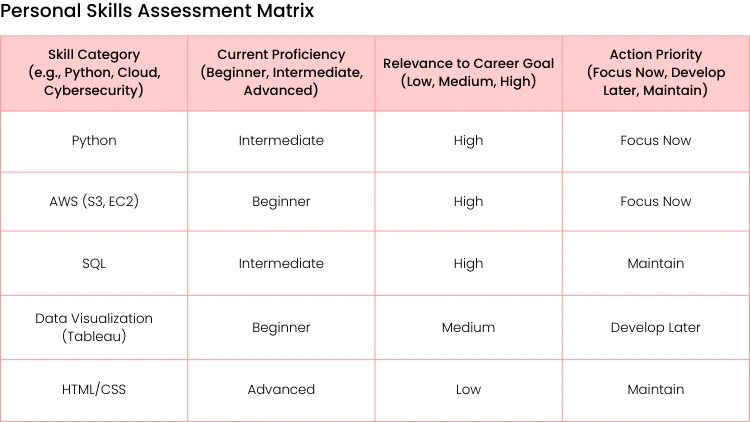
To bring all this together, you can organize your self-assessment into a simple matrix. This framework helps you categorize and prioritize your skills based not just on what you know, but on what's most relevant to your career goals.
Filling this out gives you a visual, actionable plan. The skills marked "Focus Now" are your immediate priorities—the ones that will give you the biggest bang for your buck in moving toward your career goals.
Set Goals That Actually Drive Progress
Once you've mapped out your starting point, it's time to set goals that will actually pull you forward. Let's be honest, vague ambitions like “learn Python” or “get better at cloud computing” are recipes for burnout. They're just too fuzzy—they don't have a clear direction or a finish line.
To see real improvement in your technical skills, your goals need to be specific and actionable. The whole journey starts with clear intentions. Learning how to set and achieve professional and personal goals is the foundation that gives your effort direction and keeps you motivated. It's about turning a wish into a concrete project with a deadline.
For example, instead of just saying “I want to learn cloud computing”, a much more powerful goal would be: “Deploy a scalable web application on AWS using EC2, S3, and RDS within the next 90 days”. See the difference? This goal works because it’s specific, measurable, and time-bound. You have a clear target to aim for.
Break Down Intimidating Skills
Big goals can feel overwhelming. We've been there. The key is to chop them up into smaller, manageable micro-goals. This trick turns a massive undertaking into a series of achievable steps, which is absolutely crucial for staying motivated when things get tough. This detailed guide on how to set personal goals can help you really nail this technique.
Let's break down that AWS goal into a more digestible plan:
- Month 1: Knock out a foundational AWS course. Get your AWS free tier account set up and successfully launch a single EC2 instance.
- Actionable Step: By the end of week 1, successfully host a static "Hello World" HTML page on your new EC2 instance.
- Month 2: Figure out how to configure an S3 bucket for static file storage. Then, create a simple RDS database and get it connected to your EC2 instance.
- Actionable Step: By the end of week 6, upload your project's images to an S3 bucket and serve them from there.
- Month 3: Containerize the application using Docker and deploy the final version. Make sure to document the entire process in a GitHub repository.
- Actionable Step: Create a Dockerfile for your application and successfully build a local image before trying to deploy it.
Each of these steps is a small win. They build momentum and make the final outcome feel much more attainable. This systematic approach is essential in a field where skills can become outdated in the blink of an eye.
According to the World Economic Forum, workers can expect that around 39% of their existing skills will be transformed or become obsolete between 2025 and 2030, which highlights the urgent need for continuous, goal-oriented learning. Discover more insights from The Future of Jobs Report 2025.
Setting clear, project-based goals not only makes learning less daunting but also gives you tangible proof of your progress. You're not just learning—you're building something real.

Find Your Ideal Learning Method
Okay, so you’ve got your goals locked in. Now comes the fun part: figuring out how you’re actually going to learn this stuff. The options can feel like a buffet—structured online courses, hands-on projects, personal mentorships.
The real secret isn’t picking just one. It’s about creating a blended strategy that fits how you learn best. There’s no single "right" way to build technical skills; the most effective path almost always combines different methods. A formal course might give you a solid theoretical foundation, but a real-world project is where that knowledge truly sticks and you learn to think on your feet.
Striking a Balance: Courses vs. Projects
Online platforms like Uplyrn are fantastic for laying the groundwork. They offer a clear curriculum and a defined path, which is perfect when you're just starting out. The danger, though, is falling into "tutorial purgatory"—that endless cycle of watching videos without ever building anything yourself.
- Actionable Insight: Implement the 50/50 Rule. For every hour you spend watching a tutorial or reading documentation, spend at least one hour applying that knowledge in your own code editor on a personal project. This forces you out of passive learning mode.
Project-based learning is the complete opposite. It throws you right into the deep end. You decide to build a portfolio website or a data analysis dashboard, and you figure things out as you go. This approach is incredible for retention, but it can feel directionless if you don't have some initial guidance. The sweet spot is usually somewhere in the middle.
It's also smart to keep an eye on what's in demand. Choosing learning paths that align with hot market trends is always a good move.
The Human Element: Mentors and Communities
Don't ever underestimate the power of connecting with other people. Finding a mentor—someone who has already walked the path you’re on—is one of the best things you can do for your career. They can offer guidance that saves you from months of banging your head against the wall.
A mentor isn't just a teacher; they're a guide. They provide personalized feedback, share valuable industry insights, and help you navigate your career. You can find them by reaching out to a senior colleague or connecting with pros on LinkedIn.
A pro tip for finding a mentor: Don't just ask, "Will you be my mentor?" That’s a lot of pressure. Instead, start by asking for advice on a specific problem you're stuck on. Practical Example: "Hi [Name], I saw your post on optimizing SQL queries. I'm working on a personal project and struggling with a slow query. Would you mind taking a quick look at this specific line of code if you have a moment?" It's a much more natural way to build a relationship based on mutual respect.
Joining a community is another game-changer. Whether it’s a local meetup, an online forum like Reddit, or a Discord server, these groups give you a support system. They're the perfect place to ask questions, share what you're working on, and get a dose of motivation when you inevitably hit a wall.
Different learning methods actually engage different parts of your brain. Finding that perfect mix for you can make all the difference. To learn more about the science behind it, check out this piece on how the brain learns for an insightful journey.
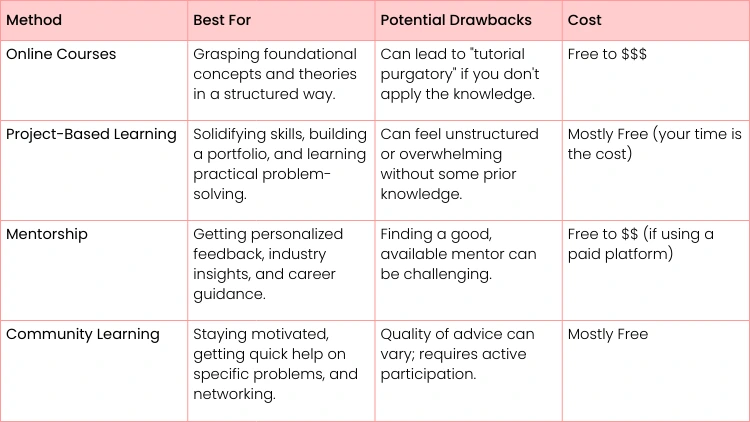
Comparing Technical Skill Learning Methods
To help you decide which mix is right for you, here’s a quick overview of the most common approaches. Think about your goals, your budget, and how you prefer to learn as you review them.
Each of these has its place. You might start with a course, build a project to apply what you've learned, and lean on a mentor and community when you get stuck.
Move from Watching to Building
It’s easy to get trapped in "tutorial hell" where you feel like you're making progress just by watching videos. But real, lasting skill doesn't come from passive consumption. The magic happens when you close that video tab, open your code editor, and actually start building.
This jump from watching to doing is absolutely critical. Building something from scratch forces you to tackle the messy problems that tutorials may edit out. You'll learn the invaluable art of debugging and problem-solving, which is how you truly learn how to improve technical skills—by getting your hands dirty.
Design Your Practice Routine
Logging hours isn't enough; you need to be intentional with your practice. A solid routine should always be pushing you just a little bit past what you already know. This is a concept called deliberate practice, and it’s where the real growth happens.
Your focus should be on application. A good rule of thumb is for every hour you spend learning something new, plan to spend at least two hours putting it to use. Just finished a module on API endpoints? Your next move should be to fire up a small project that fetches and displays data from a public API.
Here are a few ways to structure your practice:
- Rebuild and Extend: Take a simple tutorial project you've already completed. Now, try to build it again from memory. Once you've got it working, think of a new feature that wasn't in the original guide and add it.
- Practical Example: You followed a tutorial to build a weather app. Now, add a feature that saves the user's last five searches to local storage.
- Code Katas: Jump on platforms like Codewars or LeetCode for quick, daily coding challenges. These are great for sharpening your problem-solving logic and building consistency.
- Actionable Insight: Spend 15 minutes every morning on one kata. It's a small, consistent habit that acts like a warm-up for your brain.
- The "One-Feature-a-Day" Challenge: Spend 30-60 minutes each day adding one small feature to a personal project. This breaks a huge goal down into manageable chunks and keeps the momentum going.
Breaking Down Complex Problems
Staring at the finish line of a big project can be paralyzing. The secret is learning how to break down a complex problem into its smallest possible pieces. Don't start with the goal "build an e-commerce site". That's way too big.
Instead, break it down like this:
- First, set up the basic project folder and database connection.
- Next, create a "Product" model with just a name and price.
- Then, build a page that simply displays all the products from the database.
- Finally, add a button that lets you add one product to a shopping cart.
This approach makes any project feel achievable. It also helps you pinpoint exactly where you’re stuck, making it much easier to Google a solution or ask someone for help. This is how you build a portfolio of projects that show off what you can really do.
You'll learn more from spending three hours debugging a single, frustrating error than you will from passively watching three hours of tutorials. Embrace the struggle—it's the most effective teacher you'll have.
Project Ideas to Get You Started
Honestly, the best projects are the ones that solve a problem you actually have. That personal motivation will be the fuel that gets you through the tough spots. If you're stuck for inspiration, checking out a curated list of Node.js project ideas for various skill levels can be a great way to find your next challenge.
Here are a few more ideas across different domains to get the wheels turning:
- Full-Stack Web App: Build a personal blog from scratch, a recipe manager for your favorite meals, or a simple workout tracker.
- Data Analysis: Find a public dataset—like local crime statistics or housing prices—and build a dashboard to visualize it.
- Cybersecurity Script: Write a basic Python script that scans a network for open ports or checks for common web vulnerabilities.
Every project you finish is more than just practice. It’s a new piece for your portfolio and concrete proof of your skills.

Stay Consistent and Overcome Plateaus
That initial rush of learning a new skill is powerful. It can carry you for weeks, even months. But eventually, that high-octane motivation starts to sputter. Progress slows down, and the finish line feels impossibly far away. This is the moment where true mastery is forged—not with flashy bursts of inspiration, but with steady, relentless consistency.
Think of it as a marathon, not a sprint. The real goal is to build a system that keeps you lacing up your shoes and hitting the pavement, even on the days you'd rather stay on the couch.
Make Your Progress Tangible
When you're buried in code or complex documentation, it’s shockingly easy to lose sight of how far you've come. Actively tracking your journey isn't about vanity; it's about creating tangible proof of your growth. That proof becomes a powerful reserve of motivation when you inevitably hit a wall.
Here are a few practical ways we've seen this work wonders:
- Start a Learning Journal: This doesn't have to be a masterpiece. Just spend 5-10 minutes after each session jotting down what you learned, what tripped you up, and one key insight.
- Practical Example: "Today I learned about CSS Flexbox. I struggled with align-items vs. justify-content but finally figured it out by building a simple navigation bar."
- Key insight: "Flexbox direction changes how these properties work."
- Lean on Version Control: If you're coding, make Git your best friend. Commit your changes often with clear, descriptive messages. Your commit history becomes a living, breathing timeline of your project, showing every bug you’ve squashed and every feature you’ve brought to life.
- Actionable Insight: Use a convention for commit messages like feat: Add user login functionality or fix: Correct alignment on homepage. This makes your progress easy to scan.
- Schedule Quick Feedback Sessions: Don't wait for a formal review. Set up brief, informal check-ins with a mentor or a trusted peer. A quick "Hey, can you look at this function?" can provide external validation and highlight progress you were completely blind to.
How to Navigate the Inevitable Roadblocks
Every single person learning a new technical skill hits a wall. Period. The two biggest culprits are usually imposter syndrome and the dreaded learning plateau. Knowing what they are and how to push through is what separates the pros from the quitters.
Imposter syndrome—that insidious voice whispering that you’re a fraud and about to be exposed—thrives in the tech world. The most effective weapon against it is cold, hard evidence. This is where your journal and Git history come in. You can’t argue with the documented proof of your own work.
A learning plateau isn’t a sign that you’ve stopped improving. It’s your brain’s way of saying, "Hang on, I'm busy consolidating all this complex stuff you've thrown at me." It's a feature, not a bug, in the learning process.
When you feel stuck, don’t just bang your head against the same problem. Switch gears. Try a different learning method or tackle a new, but related, challenge to get the gears turning again.
If you want to dig deeper into making this a sustainable practice, this guide on how to create an ongoing learning cycle has more strategies to keep the momentum going.
Build a Mindset That Bounces Back
Ultimately, consistency boils down to your mindset. It’s about reframing challenges as opportunities, not failures. When you get stuck, your first reaction might be frustration. Train yourself to replace it with curiosity. Why did that break? What is the system trying to tell me?
This small mental shift is a game-changer. For more technical insights on staying efficient and motivated, this guide to improving developer productivity offers some excellent, actionable advice.
Your ability to just show up, day after day, track your small wins, and push through the plateaus is what will eventually transform all that hard work into genuine, undeniable expertise.

Got Questions? We've Got Answers
Diving into a new skill always brings up a few questions. It's totally normal. Here are some of the most common ones we hear, along with some straight-shooting advice from our own experience.
What’s the Absolute Fastest Way to Learn a New Technical Skill?
Forget just watching videos. The fastest path is to get your hands dirty with project-based learning. While courses are great for laying the groundwork, you only truly learn when you start building something real.
Think of it this way: instead of just passively watching Python tutorials, your goal should be to build a simple web scraper or a small data analysis tool. This active approach forces you to apply what you've learned and solve problems on the fly.
The real learning kicks in when you hit a wall and have to figure out how to get past it. Projects are designed to create these moments, and that’s how you build skills that actually stick.
How Do I Figure Out Which Tech Skills to Focus On?
Work backward from where you want to be. It's that simple.
- Actionable Insight: Go to a major job board and search for your dream role. Use the site's analytics tools (or manually count) to find the top 5 most frequently mentioned technologies in the first 20 job descriptions. That's your high-priority list.
Pull up job descriptions for the roles you're aiming for in the next 2-5 years. What technologies pop up again and again? Make a list. That’s your starting point—a roadmap driven by what the market actually wants.
Then, do a quick sanity check. Cross-reference your list with a few industry trend reports to make sure you’re betting on skills with staying power, like AI, cloud computing, or cybersecurity. Focus on whatever closes the biggest gap between where you are today and where you want to be tomorrow.
How Can I Actually Show Employers What I’ve Learned?
A killer portfolio is your best friend. It’s the difference between saying you can do something and proving it.
Here’s how to make your new skills impossible to ignore:
- Build a Showcase on GitHub: Your GitHub profile is your new resume. Fill it with your projects, but don't just dump code. Write clean, commented code and include detailed README files that explain what each project does and how someone can get it running.
- Talk About Your Process: Start a simple blog or record short screen-capture videos. Explain a concept you just mastered or walk through how you solved a tricky problem.
- Practical Example: Write a short blog post titled "How I Built a To-Do App with React: 3 Things I Wish I Knew Before I Started."
- Put Numbers on It: Update your resume and LinkedIn profile with concrete results. Instead of "automated a task", say "Developed a Python script that automated data entry, reducing processing time by 80%." Numbers get attention.
When you land an interview, be ready to dive deep into these projects. Talk about the roadblocks you hit and, more importantly, how you figured out a way around them.
I’m Super Busy. How Do I Find Time to Learn?
Consistency trumps cramming, every single time. It's better to find 30-60 minutes every day than to burn yourself out with a five-hour session on a Saturday. Small, steady efforts build massive momentum over time.
- Actionable Insight: Identify "dead time" in your day. Is it your 20-minute commute? The 15 minutes you spend waiting for lunch? Use these small windows to watch a quick tutorial, read an article, or review flashcards. These micro-learning sessions add up.
Try time-blocking techniques like the Pomodoro method—work for a focused 25 minutes, then take a 5-minute break. You'd be amazed what you can get done. Weave learning into your day-to-day life, like listening to a tech podcast on your commute or using flashcard apps during your lunch break.
The trick is to treat your learning time like any other important appointment. Put it on your calendar and protect that time. It's an investment in yourself.
At Uplyrn, our expert-led courses provide the tools you need to master the technical skills that will actually move your career forward. Whether you’re just starting out or looking to get to the next level, we've got a path for you. Start your learning journey with us today!


Leave your thoughts here...
All Comments
Reply