









How to Learn Programming for Beginners: A Practical Guide

Learning how to code is a journey, but it's probably not the one you're picturing. Forget the complex math and movie-style hacking—at its heart, programming is about creative problem-solving. The roadmap is simpler than you think: choose a language that fits your goals, get your tools set up, learn by doing, and then build something, anything, to make it real.
Jump To Section

Earn As You Learn
Earn 25% commission when your network purchase Uplyrn courses or subscribe to our annual membership. It’s the best thing ever. Next to learning,
of course.
Starting Your Coding Journey Without the Overwhelm
Staring at the vast world of code can feel like you're at the bottom of a mountain with no clear path up. But here's the good news: you don’t have to climb it all at once. Success in coding comes from laying one brick at a time, not trying to build a skyscraper on day one. Your first goal is simple: replace that feeling of confusion with a manageable, exciting plan.
Why Are You Learning To Code?
Before you write a single line of code, you need to get honest with yourself. Why are you doing this? Are you aiming for a career change, trying to build that app idea you've had for years, or just curious about how the software you use every day actually works? Knowing your "why" gives you direction and, more importantly, fuel for the journey ahead. It's so critical that it's worth taking a moment to think about it; as others have pointed out, before you learn to code, ask yourself why it's the first and most important question. This clarity helps you pick the right tools and stick with it when you inevitably hit a roadblock.
- Actionable Insight: Write down your "why" on a sticky note and put it on your monitor. For example: "I am learning to code to build a mobile app for my family's small business" or "I want to switch to a tech career for better work-life balance". This tangible reminder will keep you motivated.
The demand for these skills isn't slowing down, either. The global programming education market was valued at a whopping USD 12.5 billion in 2023 and is on track to hit USD 29.5 billion by 2032. That explosion in growth tells you just how valuable this skill set has become across every industry imaginable.
The Mindset Of A New Developer
Let's get one thing straight: programming is about breaking down huge problems into tiny, logical steps. It’s a creative process that involves way more trial and error than some stroke of genius. The biggest hurdle for most people isn't the syntax of a language; it's the frustration that comes with figuring out why your code doesn't work.
The most important skill for a new programmer is not knowing the answer, but knowing how to find it. Embracing curiosity and persistence over perfection is the key to long-term success.
This means you have to get comfortable with not knowing things and learn how to become a good detective. It also means fighting that powerful urge to quit when things get tough. More often than not, that initial friction is a sign that you're actually learning something important. If you find yourself stuck and losing motivation, it can be a real help to get some practical advice on how to overcome procrastination and keep that momentum going.
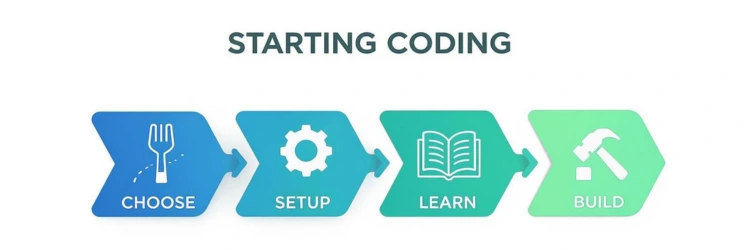
This structured approach turns an intimidating goal into a clear process. The infographic below really nails down the foundational steps every single new developer takes.
This visual shows the cycle you'll repeat over and over: choose a path, get your tools ready, absorb some knowledge, and then immediately put it to use by building something real.
How to Choose Your First Programming Language
Picking your very first programming language feels like a massive, career-defining decision. But here’s the truth from someone who's been there: it’s just a starting line.
The real skills you’re about to learn—things like variables, loops, and conditional logic—are universal. Once you grasp them in one language, learning a second or third is dramatically easier. The goal isn't to get stuck in "analysis paralysis". It’s to pick a language that lets you build something you actually find cool.
Motivation is your fuel. For a beginner, the best language is simply the one that keeps you coming back to the keyboard.
Connect Your Language to a Goal
Let's ditch the abstract comparisons for a moment and focus on what you want to create. Think of programming languages as tools in a workshop; you wouldn't use a hammer to saw a board. Your personal interests are the best guide for choosing the right tool.
- Want to build websites and web apps? If you're drawn to creating the interactive things you see and use online, JavaScript is your clear starting point.
- Practical Example: You could build a personal portfolio website or a simple browser game like Tic-Tac-Toe.
- Fascinated by data science, AI, or automation? For analyzing data, building machine learning models, or even just writing scripts to handle tedious tasks, Python is the undisputed champion.
- Practical Example: Write a script that sorts files in a folder by type (e.g., images, documents) or one that scrapes headlines from your favorite news site.
- Dream of making mobile apps? If your sights are set on the App Store, you'll want to learn Swift for iPhones. For Android development, Kotlin is the modern industry standard.
- Practical Example: A simple to-do list app or a flashcard app for studying.
- Passionate about video games? To dive into game development, especially with a powerhouse engine like Unity, C# (pronounced "C-sharp") is a fantastic choice.
- Practical Example: Create a basic 2D platformer game where a character can jump and collect coins.
This approach makes learning tangible. Tying the language to a real-world project like this is what makes the process click.
The Two Most Popular Choices for Beginners
For most people just starting their coding journey, the choice eventually narrows down to Python or JavaScript. Both have massive, incredibly helpful communities and a seemingly endless supply of free tutorials, guides, and forums. This support system is absolutely crucial when you're starting out and inevitably run into problems.
It also helps to have a basic grasp of the technical differences between languages, like how a computer actually processes them. To get a bit more background, you can check out this guide on programming languages, whether compiled, interpreted, or both. Understanding this can shed light on why certain languages are better suited for specific jobs.
The key isn't to find the "perfect" language. It's to find a "good enough for now" language that lets you start building immediately. Progress beats perfection every single time.
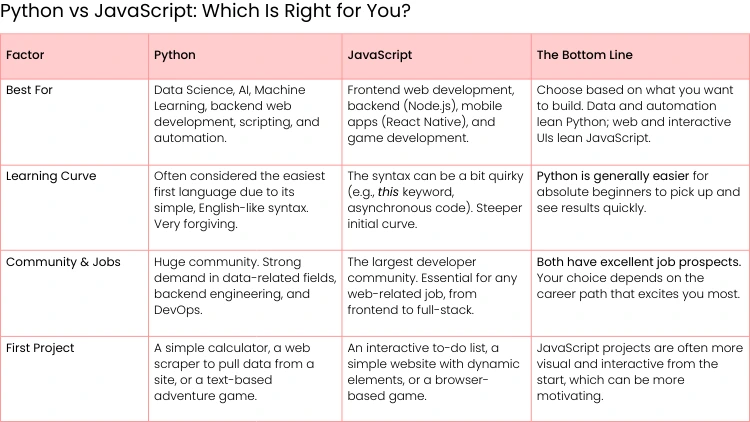
To help you decide between the two most common entry points, let's break them down side-by-side.
Ultimately, industry trends can also offer some perspective. The latest developer ecosystem reports consistently show Python as a top choice for newcomers, highlighting its reputation as a versatile and accessible entry point.
Don't let this decision hold you back. Pick one based on your goals, commit to it for a few solid months, and just start building. The real skill you're learning is how to think like a programmer—and that’s a skill that will follow you no matter which language you learn next.
Building Your Personal Learning Toolkit
Watching tutorials is a great first step, but let's be honest—it's passive. To really learn how to code, you need to get your hands dirty. That means actively building, experimenting, and solving problems. This takes more than just a video player; you need a solid plan and the right set of tools.
Think of it like setting up a workshop before you start a project. You wouldn't just scatter your tools and materials around and hope for the best, right? You’d clear your workbench, lay out what you need, and have a blueprint ready.
Without that prep work, you risk falling into "tutorial hell". It's a place many beginners get stuck—you watch hours of content but freeze up when you have to write a single line of code from scratch. A structured approach is what turns that passive viewing into active learning, and that’s the only way to build real, lasting skills.
Creating a Sustainable Study Routine
Forget vague goals like "learn to code this year". That’s not a plan; it's a wish. Real progress starts when you get specific and create SMART goals—that’s Specific, Measurable, Actionable, Relevant, and Time-bound. This framework is a game-changer because it breaks a huge ambition down into manageable weekly tasks.
Instead of a fuzzy objective, try something like this: "I will complete the first three modules of a beginner JavaScript course and build a functional tip calculator web page within one month."
This goal works because it's:
- Specific: You know exactly what you’re building (a tip calculator).
- Measurable: You can easily track your progress through the course modules.
- Actionable: The steps are clear—watch lessons, practice, build the project.
- Relevant: It directly uses the JavaScript fundamentals you're learning.
- Time-bound: A one-month deadline creates a healthy sense of urgency.
A goal without a plan is just a wish. Your study routine is the engine that drives your progress, turning abstract learning goals into concrete weekly achievements. Schedule your coding time just like you would any other important appointment.
- Actionable Insight: Use a free tool like Google Calendar to block out non-negotiable "deep work" coding sessions. For example, schedule 45 minutes on Tuesday and Thursday mornings and a 2-hour block on Saturday. Defend this time fiercely.
Even 20-30 minutes of focused practice each day builds stronger neural pathways than a single five-hour cram session once a week.
Your Essential Beginner Toolkit
Every craft has its core tools, and programming is no different. The good news is you don’t need a dozen complicated applications to get started. In fact, you really only need three fundamental tools to handle almost any beginner project.
Let's demystify your new digital workbench.
1. A Code Editor (Your Digital Workbench)
This is where you'll write, edit, and organize all your code. While you could technically use a simple text editor, a dedicated code editor gives you superpowers like syntax highlighting (which colors your code to make it readable), auto-completion, and error checking.
- Top Recommendation: Visual Studio Code (VS Code). It’s free, incredibly powerful, and has become the industry standard for millions of developers. It also has a massive library of extensions, so you can customize it for any language or workflow you can imagine.
2. The Terminal (How You Talk to Your Computer)
The command line, or terminal, might look a little intimidating at first, but it's just a text-based way to give your computer direct instructions. You’ll use it for all sorts of things, like running your code, installing software packages, and working with version control. Learning a few basic commands is a fundamental skill that pays off big time.
3. Version Control with Git & GitHub (How You Save and Share Your Work)
Think of Git as a "save" button on steroids. It tracks every single change you make to your code, creating a detailed history. This is a lifesaver when something breaks, because you can easily revert to a previous, working version.
GitHub is a website where you store your Git projects online. It allows you to share your work, collaborate with others, and—most importantly—build a portfolio that future employers can see. Creating a GitHub profile is non-negotiable for any aspiring developer.
Getting these tools installed and configured is your first real step as a programmer. You'll find tons of free guides online that walk you through setting up VS Code, the terminal, and Git for your specific operating system (Windows, macOS, or Linux). This initial setup is an investment that gives you a professional-grade environment from day one.
From Theory to Practice with Your First Projects
Alright, this is where the magic happens. You can watch tutorials all day, but the moment you start building your own project is when everything finally clicks into place. It’s the difference between reading a recipe and actually getting your hands dirty in the kitchen.
Forget about building the next billion-dollar app right now. The real goal is much simpler: prove to yourself that you can create a working program from scratch. This is how you turn abstract concepts into a skill you can actually use.
Moving from passive learning to active building is where you'll grow the most. You'll hit your first real bugs, feel that wave of frustration, and then—the best part—experience the massive win of making it all work.
Your First Project Ideas
The best first project is one you can actually finish. It needs to be small enough not to be overwhelming but just challenging enough to teach you something new. The whole point is to take those core ideas you've learned—like variables, loops, and logic—and apply them to a real (even if tiny) problem.
Your journey starts with the absolute basics, like writing your very first 'Hello World' program, just to get a feel for the syntax. Once you've got that down, it's time to build something with a bit more substance.
Here are a few classic beginner projects and what they secretly teach you:
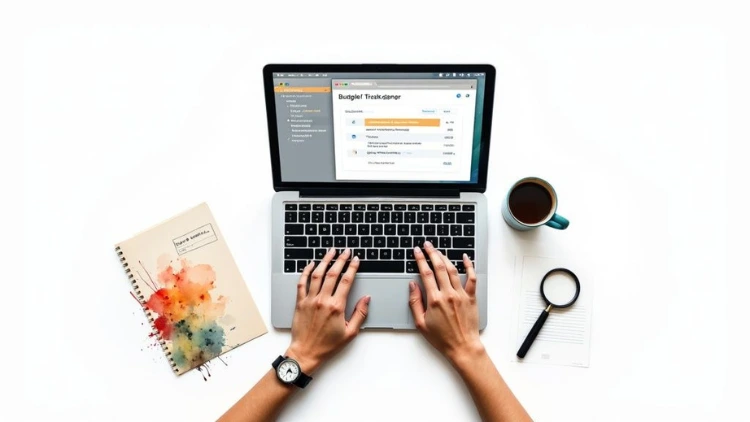
- Simple Budget Tracker: This is a goldmine for learning fundamentals. You’ll use variables for income and expenses, arrays to store transactions, and do some basic math. It’s a crash course in data manipulation.
- Text-Based Adventure Game: Honestly, this is one of the most fun ways to master conditional logic. You’ll build a story using a bunch of if/else statements that react to the player's choices. It forces you to think about program flow and how to handle user input.
- Tip Calculator: If you’re learning JavaScript for the web, this is a must-do. You’ll learn how to grab values from input fields on a webpage, run calculations, and then display the result back to the user. It’s incredibly satisfying to see your code immediately affect what’s on the screen.
These small wins are your fuel. They give you tangible proof that you're making progress and build the confidence you need for bigger challenges. If you need more inspiration, you can always find great lists of Node.js project ideas for beginner, intermediate, and advanced programmers that are easily adaptable to whatever language you're learning.
Embracing the Art of Debugging
Here’s a little secret every seasoned developer knows: a huge chunk of programming is just debugging. You will write broken code. You will get confusing error messages. This isn’t a sign you’re failing—it’s just part of the job.
Learning how to hunt down and fix bugs is arguably more important than learning to write flawless code from the start (which is impossible, by the way). It’s a skill that takes patience, curiosity, and a bit of detective work.
The most valuable skill you can develop as a new programmer is not writing code, but understanding why it breaks. A calm, methodical approach to debugging will save you more time and frustration than anything else.
When an error pops up, your first instinct might be to panic. Don't. Take a deep breath and put on your detective hat. Your only job is to find the clues that lead you to the source of the problem.
Practical Debugging Techniques
Instead of just changing things randomly and hoping it works, you need a system. This is how pros turn a frustrating bug into a productive puzzle. For any beginner, these two techniques are your bread and butter.
- Read the Error Message—Really Read It. That block of red text isn't your enemy; it's your best friend. It almost always tells you two critical things: what went wrong and where it went wrong, often down to the exact line number. Don't just skim it. Copy and paste the entire message into Google. We guarantee thousands of other developers have hit the same wall and someone has posted a solution.
- Use Print Statements (Your Trusty Magnifying Glass). This is the oldest, simplest, and most powerful trick in the book. If you're not sure what a variable's value is at a specific point, just print it to the console.
Practical Example: In Python, if your calculation total_cost = item_price + tax is giving a weird result, add print(f"Item price is: {item_price}, Tax is: {tax}") on the line right before it. You might discover that item_price is accidentally a string like "10.99" instead of the number 10.99, which would cause an error. This simple act of making the invisible visible solves a shocking amount of bugs.
Getting good at debugging early on builds resilience. It trains you to look at problems analytically, which is the skill that separates someone who just writes code from someone who genuinely understands it.

Finding Support in the Developer Community
Learning to code might feel like a solo mission, hunched over your keyboard late at night, but it absolutely shouldn't be. You are not on this journey alone. In fact, the developer community is one of your most powerful tools for pushing through the inevitable roadblocks.
And this isn't some small niche group. The global developer population is exploding. By the start of 2025, there were an estimated 47.2 million developers worldwide—a massive 50% jump from just over 31 million in early 2022. This surge means you're joining a massive, vibrant network of people who are ready to help. You can read more about the dramatic growth in developer populations and see for yourself.
Learning How to Ask for Help
One of the most underrated skills for a new developer is learning how to ask good questions. Just typing "my code is broken" into a forum isn't going to get you very far. The real goal is to give experienced developers all the context they need to help you quickly and effectively.
Funny enough, the process of preparing a good question often leads you to the answer yourself. It forces you to slow down and think through the problem systematically.
To get helpful answers fast, try this simple framework:
- Share your code. Post the specific snippet that’s causing trouble. Use a tool like GitHub Gist or just format it correctly in the forum.
- Explain what you expected to happen. What was the goal? This gives people a clear picture of what you were trying to achieve.
- Example: "I expected the user's name to appear in the welcome message."
- Describe what actually happened. What was the result? If you got an error, paste the exact message. Details matter here.
- Example: "Instead, the message says 'Welcome, undefined' and I get a TypeError in the console."
- Show what you’ve already tried. Mention the solutions you've attempted and why they didn’t work. This shows you’ve put in the effort and respect their time.
- Example: "I've already checked that the input field has the correct ID and tried using a print statement, which shows the variable is empty."
Where to Find Your Coding Community
You don't have to look far to find people who get it. There are tons of places to ask questions, share your wins, and connect with peers who are at the exact same stage as you, plus veterans who are years ahead.
- Online Forums: Websites like Reddit's r/learnprogramming and Stack Overflow are the classic starting points. They are packed with people who genuinely want to see beginners succeed.
- Discord and Slack Channels: Many coding communities have live chat channels where you can get real-time help or just vent about a tough bug.
- Finding a 'Coding Buddy': This is a total game-changer. Partnering up with another learner means you can tackle problems together—a practice known as pair programming—and keep each other on track.
Tapping into the community transforms coding from a private struggle into a shared journey. Your peers and mentors are the support system that will help you turn moments of frustration into opportunities for growth.
Here at Uplyrn, we also connect learners with experienced mentors for personalized guidance. Having direct access to an expert can seriously accelerate your progress and help you navigate the specific challenges you'll face on your journey of how to learn programming for beginners.
You’ve cranked out a few small projects, battled your first real bugs, and are finally starting to think like a programmer. This is that great moment when "learning to code" starts to feel less like a hobby and more like a real career path.
Making that jump from enthusiast to a hireable professional isn’t about memorizing more syntax. It’s about proving you can show up and solve actual problems for a company. This part of the journey is all about strategy—building tangible proof of your skills and getting ready for the hiring gauntlet.
Let's map it out.
Build a Portfolio That Tells a Story
Your portfolio is, without a doubt, the most important thing you'll build. It's not just a gallery of your work; it's your professional origin story. Hiring managers aren't looking for someone who can follow a tutorial. They want to see your problem-solving mind in action.
The secret to a killer portfolio is quality over quantity. Seriously. Don't fall into the trap of showing off a dozen nearly-identical to-do lists or calculator apps. It's much better to focus on two or three unique, polished projects that show you can think for yourself.
A project that really stands out usually has:
- A Unique Problem: It doesn't need to be the next billion-dollar startup idea. It just needs to solve a real problem—even if it's just your own. Maybe you built a simple app to track when to water your plants or a script to automatically sort your messy download folder. That's interesting!
- Clean, Readable Code: Your code needs to be organized and commented where necessary. This signals that you can write code that someone else can actually understand and work with, which is a non-negotiable skill on any dev team.
- A Detailed README File: Your project's README.md file on GitHub is your sales pitch. Use it to explain what the project is, why you built it, the tech you used, and—this is the most critical part—the challenges you ran into and how you figured them out.
A portfolio with three thoughtful, unique projects with great documentation is infinitely more impressive than one with 20 generic tutorial clones. It shows you have initiative, grit, and a genuine passion for building things.
Choosing Your Specialization
As you build more, you’ll probably find yourself enjoying certain parts of the process more than others. Do you get a kick out of making slick, interactive user interfaces? Or are you more drawn to the logic, data, and servers humming away in the background? This is where you can start thinking about a specialization.
- Front-End Development: You build everything the user sees and clicks on. This means getting good at HTML, CSS, JavaScript, and modern frameworks like React or Vue.
- Back-End Development: You're the one behind the curtain, working with servers, databases, and the core application logic. Common languages here are Python, Java, C#, or Node.js for server-side JavaScript.
- Full-Stack Development: You’re a jack-of-all-trades who is comfortable on both the front-end and the back-end. It's a broad skill set, but it makes you incredibly valuable.
- Mobile Development: You specialize in building apps for phones, focusing on platforms like iOS (with Swift) or Android (with Kotlin).
Actionable Insight: Look at 10 job descriptions for a role that sounds interesting (e.g., "Junior Front-End Developer"). Make a list of the top 5 technologies that appear in all of them. This tells you exactly what the market demands and where to focus your learning next.
Demystifying the Technical Interview
For most beginners, the technical interview is the scariest part of the whole process. It's usually a mix of questions about your personality and past projects, capped off with a live coding challenge.
Here's the secret: the coding challenge isn't about writing flawless code under pressure. The interviewer wants to see how you think. Can you break down a big problem into small, manageable steps? Do you ask good questions to clarify what's needed? Can you talk through your solution out loud as you type?
Practice is your best friend here. Get comfortable on sites like LeetCode and HackerRank, which have thousands of problems to work through. But don't just solve them silently. Get in the habit of explaining your logic out loud, even if it’s just to your rubber duck. That communication skill is just as important as the code itself.
The entire process, from portfolio to interview, is a skill you have to build. For a much deeper dive into what hiring managers are looking for, check out this guide on how to get a software engineering job, which walks you through every step of the journey.
Frequently Asked Questions About Learning to Code
As you dive into the world of programming, you're going to have a lot of questions. That’s perfectly normal. Let's clear up some of the most common ones right away so you can manage your expectations and focus on what really matters.
How Long Does It Take to Learn Programming?
There's no magic number here, but having a realistic timeline helps. You can get a solid grip on the fundamentals and build some simple projects within 3-6 months, provided you can put in about 5-10 hours of focused work each week.
Getting to a job-ready level is a bigger commitment, usually taking somewhere between 6-12 months of consistent learning and building out a portfolio. The key isn't speed; it's consistency. Coding a little bit every day is far more powerful than cramming everything into a marathon weekend session.
Do I Need a Computer Science Degree?
For most web and mobile development roles? Absolutely not. While a degree certainly has its benefits, a strong portfolio that proves you can build real-world applications often speaks louder than a diploma.
Many of today's most successful developers are self-taught or came from coding bootcamps. Your ability to solve problems and showcase your work on platforms like GitHub is what truly opens doors.
A formal degree becomes more important if you’re aiming for highly specialized fields like operating systems, AI research, or advanced computer graphics. For most developer jobs, however, skill trumps paper every time.
What Is the Hardest Part About Learning to Code?
It's almost never the syntax. The biggest hurdle for most beginners is learning how to think like a programmer. This means breaking down big, messy problems into tiny, logical, and actionable steps your computer can understand.
The other major challenge is debugging. That initial wave of frustration when your code breaks is tough. Learning to stay calm, read error messages carefully, and methodically hunt down the source of a bug is a skill that only comes with practice. Pushing through that feeling is how you build the resilience every developer needs to succeed.
Ready to turn your curiosity into a career? Uplyrn offers expert-led courses, personalized mentorship, and job opportunities to guide you every step of the way. Start your journey with a structured path to success.


Leave your thoughts here...
All Comments
Reply