









How to Learn Python Programming: A Practical Guide
Learning how to learn python programming isn't about memorizing syntax. It’s about building a real-world skillset, piece by piece. The most effective way we've seen people succeed is by following a clear, three-part journey: set up a professional environment, get your hands dirty with core concepts through small projects, and then tackle real applications.
This approach pulls you out of endless tutorial loops and into the practical world of building things. You gain job-ready skills from the very beginning because every step has a purpose.
Jump To Section

Earn As You Learn
Earn 25% commission when your network purchase Uplyrn courses or subscribe to our annual membership. It’s the best thing ever. Next to learning,
of course.
Your Practical Roadmap to Mastering Python
Jumping into Python without a plan is like trying to explore a new city without a map. You'll see a lot of interesting things, but you’ll probably end up going in circles and feeling overwhelmed. A solid roadmap is your best friend here, turning what could be a confusing mess into a clear, structured path.
This guide is all about practical milestones. We're skipping the dense, academic theory and focusing on what you actually need to do to become competent. The goal isn't just to know Python; it's to use it to solve problems, automate tasks, and create cool stuff. That’s how you build momentum and stay motivated.
Why A Structured Plan Matters
We've seen it time and time again: without a plan, aspiring developers bounce between random YouTube tutorials and blog posts. This scattershot approach leads to frustrating knowledge gaps and the feeling that you aren't making any real progress.
A structured roadmap makes sure you cover all the essentials in a logical order. You start with the fundamentals and methodically build up to more complex applications. This is the secret to building confidence and avoiding burnout.
And of course, none of this works without good study habits. Cultivating effective study habits is just as important for learning Python as it is for any other complex subject. It ensures you actually retain what you learn.
In 2025, Python's dominance isn't slowing down. Its simple syntax and incredible versatility make it one of the best first languages for anyone new to coding. A recent Python Developers Survey of over 30,000 developers found something pretty amazing: exactly 50% of them had less than two years of professional coding experience. That tells you everything you need to know about how welcoming this language is to newcomers.
Actionable Insight: Don't just start by trying to write code. Start by defining a small, achievable project. This gives your learning a purpose from day one. For example, instead of just learning about variables, decide to build a simple calculator that takes two numbers and an operation from a user. A project-based mindset immediately turns abstract concepts into tangible tools.
The Four Phases of Your Python Learning Journey
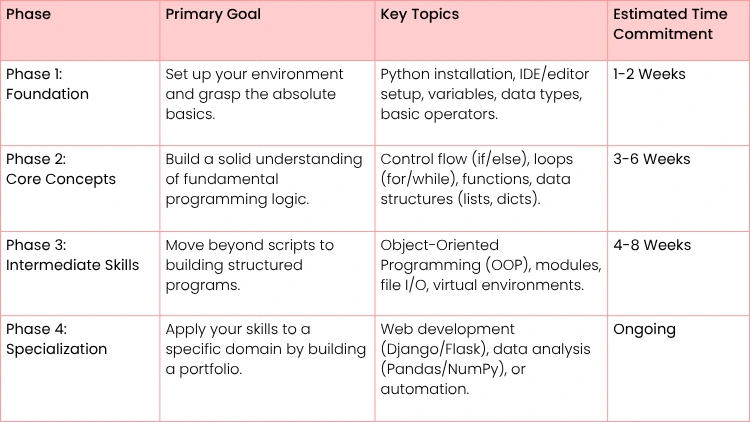
To help you visualize your path from novice to proficient Python programmer, we've broken down the journey into four key phases. This table summarizes the goals, topics, and general time commitment for each stage.
This table isn't a rigid set of rules, but a guide to keep you on track. Your actual timeline will depend on your background and how much time you can dedicate each week.
For more strategies on turning these skills into a career, check out this guide on how to learn coding fast and get hired.
Now, let's dive into the specifics. The next sections will walk you through each phase of this roadmap, giving you the exact tools and knowledge you need to succeed.
Setting Up a Professional Python Environment
Before you write a single line of Python, the most important thing you can do is set up a proper development environment. This isn’t just some boring preliminary step; it’s the foundation for everything that comes next. Getting this right from day one saves you from countless headaches down the road.
Think of it as building your workshop. A clean, organized space with the right tools helps you work efficiently and focus on what matters—actually learning to code—instead of fighting with your setup.
Choosing Your Core Tools: Python and a Code Editor
First things first, you need to install Python itself. Make sure you grab the latest stable version directly from the official Python website. It’s tempting to use the version that might already be on your computer, but those are often outdated and can cause strange issues. Always start fresh.
Once Python is installed, you need a place to write your code. This is your code editor, or Integrated Development Environment (IDE). For someone just starting out, two options stand head and shoulders above the rest.
- Visual Studio Code (VS Code): A fantastic, lightweight, and free editor from Microsoft. Its real power comes from a massive library of extensions that let you customize it for Python, adding features as you need them.
- PyCharm: A specialized IDE built by JetBrains just for Python. It has a free Community edition that's more than enough to get started. PyCharm is famous for working perfectly "out of the box" with powerful code analysis and debugging tools ready to go.
Actionable Insight: To decide, think about your goals. If you see yourself learning multiple languages like JavaScript and Python, VS Code is a versatile choice. If you are 100% focused on becoming a Python specialist, PyCharm's dedicated features might give you a smoother start. Pick one and commit for at least a month.
Essential Configurations for a Smooth Workflow
After picking an editor, a few small tweaks will make a massive difference in your day-to-day coding. These tools help automate the boring stuff and build professional habits from the get-go.
Actionable Setup Steps:
- Install the Python Extension: If you chose VS Code, the first thing you must do is install the official Python extension from Microsoft. It’s non-negotiable. This gives you smart code completion (IntelliSense), error checking, and debugging capabilities.
- Set Up a Linter: A linter is like a grammar checker for your code. It flags potential errors and style problems as you type. In VS Code, search the extensions marketplace for "Flake8" and install it. It will immediately start highlighting issues like unused variables or simple syntax mistakes before you even run your code.
- Configure a Code Formatter: Tools like Black or autopep8 are game-changers. They automatically reformat your code to follow the official PEP 8 style guide with a single command. This means you never have to waste time manually spacing or indenting your code again. In most editors, you can set it to format your code every time you save the file.
Key Takeaway: Automating your code formatting and error checking is a habit of professional developers. It lets you focus purely on the logic and problem-solving, which is where the real learning happens.
Understanding Virtual Environments
Finally, let's cover one of the most crucial concepts for any serious Python developer: virtual environments.
Imagine you’re working on two projects. Project A needs an older version of a specific library, but Project B needs the brand-new version. If you install both on your main system, they'll clash, and one of your projects will break. It’s a mess.
A virtual environment solves this by creating an isolated, self-contained folder for each project. Each environment has its own Python interpreter and its own set of libraries, completely separate from all other projects.
Thankfully, Python’s built-in venv module makes this incredibly simple. For developers who prefer a different OS, it's worth exploring the top reasons why you should use Linux, a popular choice in the development community.
Practical Example: Creating and Activating a Virtual Environment
- Open your terminal or command prompt.
- Navigate to your project folder: cd path/to/my_project
- Create the environment: python -m venv venv (naming it venv is a common convention).
- Activate it:
- On Windows: .\venv\Scripts\activate
- On macOS/Linux: source venv/bin/activate
Once activated, your terminal prompt will change to show the environment's name. Any package you install with pip will now be contained here, keeping your global Python installation clean and your projects conflict-free. This is a non-negotiable best practice.
Mastering Python Fundamentals Through Practice
All right, your environment is set up and you're ready to go. Now for the fun part: actually writing some Python. This is where you’ll build the foundation that every single one of your future projects will stand on. The trick here is to immediately get your hands dirty with small, practical tasks.
This approach is non-negotiable. You don’t just learn what a variable is; you use one to store a user's name in a simple greeting script. You don’t just read about loops; you write one to iterate over a list of files. This is how abstract rules become tangible tools you can use to solve real problems.

Variables and Data Types: The Building Blocks
At its core, all programming is about storing and manipulating information. Variables are the containers you use for that information, and data types tell Python what kind of information you're storing. Think of a variable as a labeled box and the data type as the description on it, like "Photos", "Documents" or "Random Cords".
You'll be working with a few core data types constantly in Python:
- Strings ( str ): This is for text. Anything wrapped in single ( ' ) or double ( " ) quotes is a string.
- Integers ( int ): These are for whole numbers, like 10, -5, or 1024.
- Lists ( list ): An ordered, changeable collection of items. You can add, remove, or modify items after creating the list.
- Dictionaries ( dict ): An unordered collection of key-value pairs. Dictionaries are perfect for storing related bits of information, like a user's profile.
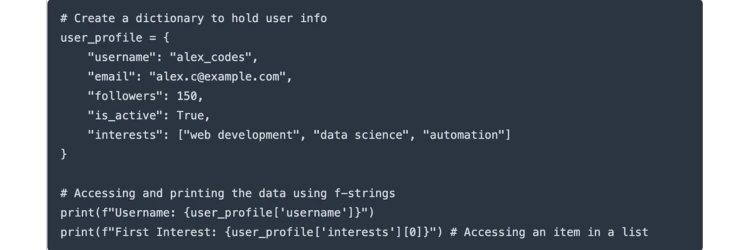
Practical Example: A Simple User Profile
Let's put these to work by creating a tiny user profile with a dictionary. It's a classic beginner exercise that immediately shows why data structures are so powerful.
Let's see how that works. "username" is a key, and "alex_codes" is its value. This is way more intuitive than trying to remember what item in a list corresponds to what piece of information. For anyone brand new to programming, this guide on how to start coding for beginners provides a great overview of these first steps.
Controlling the Flow of Your Program
Once you can store data, you need to make decisions and perform repetitive actions based on it. This is where control flow comes into play. Your two most important tools for this are if statements for making decisions and for or while loops for repetition.
An if statement checks whether a condition is true and runs a block of code only if it is. Loops, on the other hand, let you run the same block of code over and over again.
Actionable Insight: Don't just write loops that count from 1 to 10. Use them to solve a real mini-problem. For example, write a loop that goes through a list of email addresses and prints only the ones from a specific domain (e.g., gmail.com). This immediately connects the concept to a practical data filtering task.
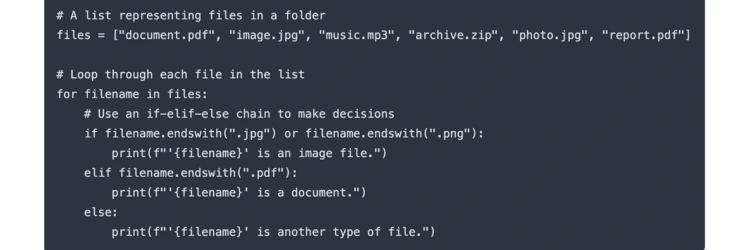
Practical Example: A Basic File Organizer
Let's say your downloads folder is a mess. We can write a quick script to check the extension of each file in a list and tell us what kind of file it is. This is a great way to combine loops and if statements.
This simple script shows a fundamental programming pattern: iterating over a collection and taking action based on a condition. You will use this exact pattern time and time again.
Writing Reusable Code with Functions
As your scripts get bigger, you’ll notice you’re writing the same chunks of code repeatedly. That’s your cue to start using functions. A function is simply a named, reusable block of code that performs a specific task.
By defining a function, you write the logic just once and then "call" it as many times as you need. This makes your code cleaner, more organized, and so much easier to fix when something breaks. It's like creating your own custom tool.
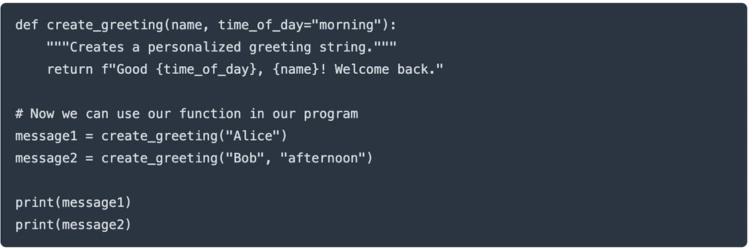
Practical Example: A Reusable Greeting Function
Let’s create a function that generates a personalized greeting. This is a simple but clear example of how functions take input (arguments) and produce output (return values).
By packaging the logic inside the create_greeting function, we can generate custom messages anywhere in our program without rewriting the f-string logic. Building up your skills with small, purposeful code blocks like this is the single most effective way to create a solid foundation for your Python journey.
Building Your First Real-World Python Projects
Alright, this is where the magic happens. Theory is great, but nothing makes the concepts click like actually building something. This is the moment you stop just learning Python and start using it to solve real problems.
The projects you build are your proof. They show you—and future employers—that you can take an idea and turn it into a working application.
We're going to dive into three starter projects. They're designed to be a healthy challenge, pushing you to combine everything you've learned so far. Think of them as the first real entries in your coding portfolio.
Project 1: Command-Line Budget Tracker
First up, a simple budget tracker that runs right in your terminal. This is a classic first project for a reason: it forces you to nail the fundamentals without getting bogged down by a graphical interface.
You'll create a script that lets a user add expenses, see a summary of their spending, and maybe even categorize their purchases. It's all about handling user input, managing data, and performing simple calculations.
Core Skills You'll Practice:
- User Input: Using the input() function to ask the user for things like the cost and category of an expense.
- Data Storage: A list of dictionaries is a perfect way to store the expense data, with each dictionary representing a single transaction.
- Control Flow: You'll use loops to keep the program running and if/else statements to create a simple menu for the user.
- Functions: Breaking the code into clean, reusable chunks for adding, viewing, and summarizing expenses.
Actionable Insight: Start with the smallest possible feature: just adding an expense and printing the list of all expenses. Once that works perfectly, add the next feature, like calculating the total. This incremental approach prevents you from feeling overwhelmed.
As you build this, you’ll quickly see how crucial it is to keep your code readable. Learning how to document Python code to turn complex code into clear documentation is a professional habit that will save you headaches down the road.
Project 2: Simple Web Scraper
Next, let's pull some data from the web. Building a web scraper feels like unlocking a superpower. This project is your introduction to the massive world of external Python libraries—pre-written code that dramatically extends what you can do.
We’ll lean on two industry-standard libraries here: Requests for grabbing the content of a webpage and BeautifulSoup for parsing the HTML and picking out exactly what you want. A great goal is to scrape headlines from your favorite news site or product prices from an online store.
Key Takeaway: For many new developers, building a web scraper is a real milestone. It's often the first time your code reaches out to the live internet, moving beyond self-contained scripts to interact with real-world, dynamic data.
This isn't just a toy project, either. Data gathering is a massive part of the tech world. In fact, a recent developer survey showed that 51% of developers use Python for data workflows and ETL (extract, transform, load) processes, proving just how central this skill is in the data engineering field.
Project 3: Basic API with Flask
For your third project, you’ll build a basic API (Application Programming Interface) with a lean web framework called Flask. An API is simply a way for different software applications to talk to each other, and building one is a fantastic primer on the mechanics of web development.
The goal is simple: create an API that serves up some data when you visit a specific URL. You could even have it return the data from your budget tracker project.
What You'll Learn:
- Web Frameworks: Get a feel for how a framework like Flask handles the tedious parts of web development for you.
- Routing: Learn to define URL endpoints (like /expenses) that trigger specific Python functions when a user visits them.
- Data Serialization: You'll need to convert your Python data (lists and dictionaries) into a universal format like JSON so it can be easily sent and understood over the web.
This project is a gateway to so many advanced topics. For example, complex machine learning applications often use APIs to serve their predictions to other services. If that sounds interesting, this introduction to computer vision with Python could be a great next read.
Knocking out these three projects will give you a powerful, well-rounded foundation. You won't just know Python syntax; you'll know how to build real solutions.

Advancing Your Python Skills Beyond the Basics
Alright, so you’ve built a few projects and the core concepts are starting to click. What’s next? This is where you make the leap from writing simple scripts to building professional-grade applications.
We're moving beyond just learning new syntax. This phase is all about structure—how to organize your code so it can grow without collapsing under its own weight. It’s about writing software that's robust, collaborative, and ready for the real world. Mastering these skills is a huge part of learning how to really program in Python.

Embracing Object-Oriented Programming
The term Object-Oriented Programming (OOP) sounds a lot more intimidating than it is. At its core, it's just a method for organizing code that mimics how we see the world. Instead of one long, procedural script, you create self-contained "objects." Each object bundles its own data (called attributes) with its own behaviors (called methods).
Think of it like building a car. You don't have one giant, single blueprint. Instead, you have separate designs for the engine, the wheels, and the chassis. Each part is an object, with its own distinct properties and functions. This approach makes your code far more modular, reusable, and manageable, especially as projects get bigger.
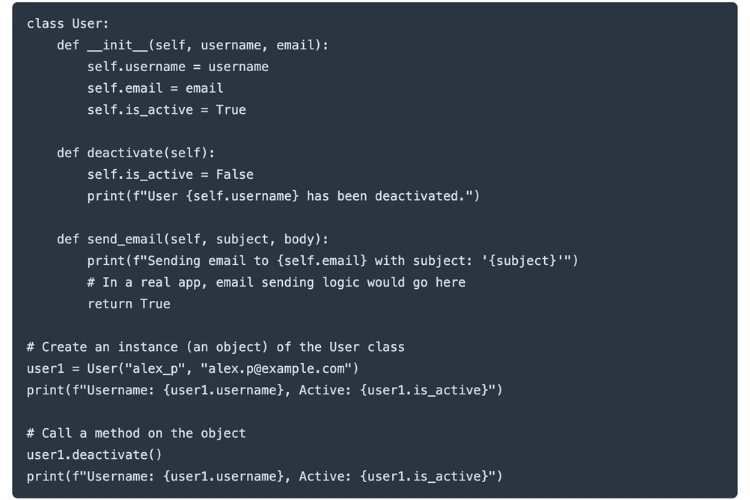
Practical Example: A Simple User Class
Let's say we're building an application with users. Instead of juggling loose dictionaries for each user's info, we can define a User class. This class acts as a blueprint, defining what every user should look like and what they can do.
See how clean that is? All the logic related to a user is neatly packaged together. This is a fundamental skill for building software that lasts.
Handling Errors Gracefully
Let's be real: your code is going to break. It's not a matter of if, but when. A file you need might be missing, a network request could time out, or a user might type in "banana" where a number is expected. Without error handling, these issues will crash your program instantly.
This is where the try...except block becomes your best friend. It lets you anticipate potential failures and give your program a backup plan.
Actionable Insight: Avoid the temptation to catch a generic Exception. Get specific. Catching specific errors like FileNotFoundError or ValueError makes your code much easier to debug because you know exactly what kind of problem you're dealing with.
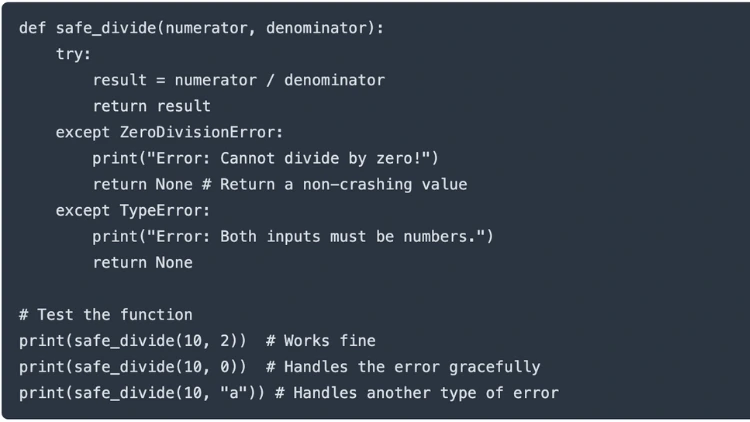
Practical Example: Safe Division
Imagine you're writing a function that divides two numbers, but the second number might be zero, which would cause a crash.
Instead of crashing and burning, your program now prints a helpful message and carries on. That’s robust code.
Writing Professional And Readable Code
Once you're comfortable making code that works, the next challenge is writing code that other people can actually understand. This isn't just a "nice-to-have"; it's a critical professional skill.
- Follow PEP 8: This is the official style guide for Python. It covers everything from how to indent your code to how long your lines should be. Don't worry about memorizing it all—just install an auto-formatter like Black in your editor and let it handle the details.
- Write Docstrings: Get in the habit of documenting your functions, classes, and modules. A good docstring explains what the code does, what arguments it needs, and what it returns. It's a lifesaver for your future self and any collaborators.
These professional habits are more important than ever. According to the TIOBE Index for October 2025, Python is ranked number one with a massive 24.45% rating—a 2.55% jump from the previous year. It has a huge lead over C, which sits at 9.29%. You can check out more stats on programming language trends over at business.daily.dev.
What does this popularity mean for you? It means you'll be working with more people, on more projects. Writing clean, readable, and well-documented code is no longer optional—it's the standard.
Common Questions About Learning Python
Even with a perfect roadmap in front of you, diving into something new like Python is going to bring up some questions. It's totally normal. Knowing what to expect and how to handle the common roadblocks is half the battle in staying motivated.
Let's clear the air and tackle some of the most common questions we hear from aspiring Python developers.
How Long Does It Realistically Take to Learn Python?
This is the big one, isn't it? The honest, no-fluff answer is: it really depends on your goals and how consistently you can show up.
If you just want to get your arms around the absolute basics—things like variables, loops, and functions—most people can get there in 2-3 months. That assumes you're putting in a solid 5-10 hours a week. At that point, you'll be able to write simple scripts and make sense of fundamental code.
But if your goal is to be job-ready? That’s a bigger commitment. You’re likely looking at a timeline of 6-12 months. Getting to that level isn’t just about knowing Python syntax. It means getting comfortable with a framework (like Django or Flask), knowing your way around databases, and building a portfolio that actually shows what you can do.
Actionable Insight: Instead of focusing on the end date, set small, weekly goals. For example: "This week, I will build a function that reads data from a CSV file." Hitting these small, consistent milestones is what builds momentum and leads to long-term success.
What Is the Best Way to Practice Python?
Watching video tutorials is a great start, but it's passive. You'll only get so far. To truly learn how to learn python programming, you have to get your hands dirty and write a lot of code. The most powerful way to practice is by building projects.
- Build Something You Actually Care About: Forget the generic to-do list apps from tutorials for a minute. Pick a problem you genuinely want to solve. Are you a big movie buff? Try building a script to scrape movie ratings. That personal investment is a huge motivator when you get stuck.
- Use Coding Challenge Platforms: Websites like LeetCode and HackerRank are like a gym for your brain. They give you small, focused problems that force you to get better at problem-solving and really understand data structures.
- Contribute to Open Source: We know this sounds intimidating for a beginner, but you don't have to rewrite a whole feature. Even tiny contributions—like fixing a typo in the documentation or helping with a tiny bug—are incredibly valuable. It's one of the best ways to read professional-grade code and see how experienced developers work together.
The magic happens when you're just a little bit outside your comfort zone, wrestling with a problem you don't immediately have the answer for. That's where the real growth is.
Should I Learn Python 2 or Python 3?
Okay, this one's easy. Learn Python 3. Full stop.
Python 2 officially reached its "end-of-life" way back in 2020. That means it gets zero updates—not even for major security holes. All the cool new libraries, all the modern development, and all the good learning resources are being made for Python 3.
Sure, you might run into some ancient Python 2 code on a legacy project somewhere, but every new project you'll ever want to work on will be built with Python 3. Starting with an obsolete version is just putting yourself at a major disadvantage. Focus on Python 3 and you'll be building skills that are relevant today and for the future.
Once you feel you have a good handle on things, you can start looking at career paths. This guide on how to get a software engineering job is a great place to figure out your next steps.
Ready to turn your learning into a career? At Uplyrn, we provide the courses and expert connections you need to master programming and land your dream job. Start your journey with us today!


Leave your thoughts here...
All Comments
Reply