









How to Learn Web Development The Practical Way

Learning web development is a journey that always starts in the same place: mastering the absolute essentials. We're talking about HTML, CSS, and JavaScript—the bedrock technologies that power every single website you've ever visited. This trio isn't just important; it's the non-negotiable foundation for everything else you'll ever build.
Jump To Section

Earn As You Learn
Earn 25% commission when your network purchase Uplyrn courses or subscribe to our annual membership. It’s the best thing ever. Next to learning,
of course.
Laying Your Foundation with Core Web Technologies
Every slick web app, from your favorite streaming service to the social media feed you scroll through, is built on three pillars: HTML for structure, CSS for looks, and JavaScript for behavior. Getting a handle on these isn't just about memorizing tags and syntax. It's about deeply understanding how they work together to create a smooth, intuitive experience for the user.
Think of it like building a house. HTML is the frame and the walls—the raw structure. CSS is the paint, the furniture, and all the interior design choices that give it style. And JavaScript? That's the electricity, the plumbing, and the appliances that actually make the house functional and liveable.
So many aspiring developers get tripped up right here. They rush past the basics to get to the flashy frameworks, but without a solid grasp of what's happening underneath, they eventually hit a wall. Trust us, taking the time to build a strong base now will pay off big time down the road.
The Trio of Web Development
Let's see how these three work in tandem with a simple, real-world example: a "Contact Me" button on your portfolio site.
- HTML (HyperText Markup Language): First, you create the button element itself. You’d use the semantic <button> tag, which tells the browser, "Hey, this is a clickable "button", not just a random box.
- For example: <button class="contact-btn">Contact Me</button>. Using the right tag is a huge deal for accessibility and SEO.
- CSS (Cascading Style Sheets): That default button is pretty boring, right? Next, you’ll grab CSS to style it. Maybe you change its background color when a user hovers over it, give it some nice rounded corners, and pick a font that matches your site's vibe.
- For example: .contact-btn { background-color: blue; border-radius: 5px; } .contact-btn:hover { background-color: darkblue; }. This is all about visual appeal.
- JavaScript: Finally, you bring it to life with JavaScript. You write a script that defines what happens when someone clicks the button. Does it pop up a contact form? Does it display a "Thanks for reaching out!" message?
- For example: document.querySelector('.contact-btn').addEventListener('click', () => { alert('Thanks for your interest!'); });. That's JavaScript's job—making things happen.
This flow—structure, then style, then behavior—is the core loop of pretty much everything you'll do on the front end.
Setting Up Your First Development Environment
Ready to write some code? You only need two things to get started, and they're both completely free: a modern web browser (like Chrome or Firefox) and a good code editor.
Most developers today use Visual Studio Code (VS Code). It's the industry standard for a reason—it’s powerful, easy for beginners to pick up, and has amazing features like syntax highlighting that make your code much easier to read. For a full walkthrough on getting your machine ready, this guide on how to start coding has you covered.
Actionable Insight: Once you have VS Code installed, here's your first task. Create a folder, and inside it, make three files: index.html, style.css, and script.js. In the HTML file, set up the basic document structure. Link the CSS file and use it to change the page's background color. Then, link the JavaScript file and have it log "Hello, World!" to the browser console. This simple exercise confirms your entire setup is working perfectly.
The numbers back this up, too. A staggering 62.3% of all developers use JavaScript, making it the most popular programming language in the world for web tasks. This is largely because front-end development is the entry point for over half of all developers learning new skills.
And as you move from simple pages to more complex sites, performance becomes critical. Learning key website performance optimization techniques early on will ensure your projects are fast, responsive, and provide a great user experience.
Your Foundational Web Development Toolkit
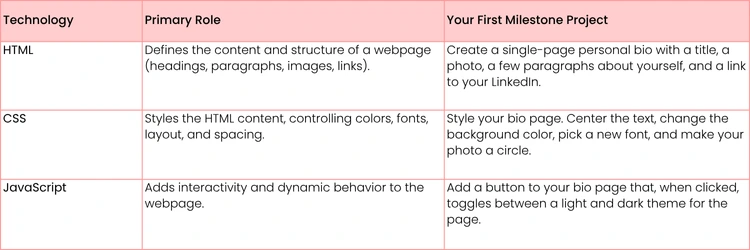
To get you started, here's a quick look at the core technologies, what they do, and a tangible first project you can tackle to lock in your learning.
Completing these small projects proves you have a working grasp of how the three core technologies interact, setting you up for more complex challenges.
Building Modern UIs with Front-End Frameworks
Okay, you've wrestled with the fundamentals. You’ve got a solid grip on HTML for structure, CSS for style, and JavaScript for making things happen. Now it’s time to level up and start building the kind of dynamic, modern web apps you see every day.
This is where front-end frameworks come into play. Think of them not as new languages, but as powerful toolkits built with JavaScript. They give you a structured, efficient way to build complex user interfaces (UIs) without reinventing the wheel every time.
Frameworks like React, Vue, and Angular are the engines behind single-page applications (SPAs). You know, those slick websites that update content on the fly without a full page refresh? That’s what they do best. They champion a component-based architecture, which is a fancy way of saying you build reusable chunks of code—like a button, a search bar, or a user profile—and then assemble them like LEGOs. This is the heart of modern web development.
Choosing Your First Framework
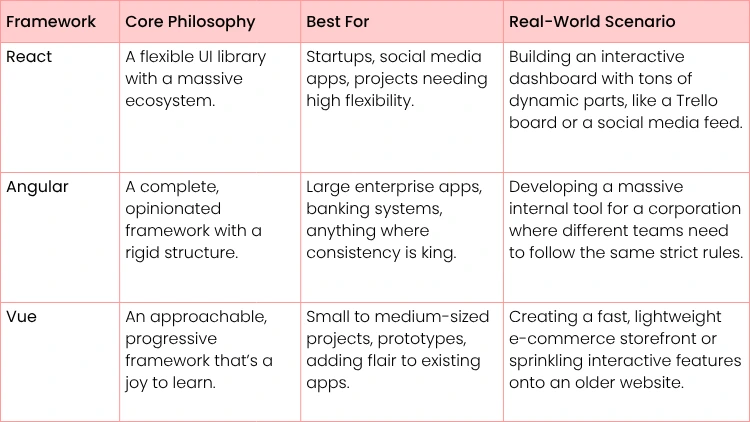
You'll quickly hear about the "big three": React, Angular, and Vue. They all tackle similar challenges but come with different philosophies. The biggest mistake beginners make is trying to learn all three at once. Don't do it. Pick one, and get really good at it.
Here’s a quick, no-nonsense breakdown to help you decide. So, which one should you choose? For most people breaking into web development, React is the way to go. It has the largest community, the most job postings, and an incredible amount of tutorials and support online. Its component model is straightforward and will give you a solid foundation that makes learning other frameworks much easier down the road.
Your First Practical Framework Project
Reading about frameworks is one thing. Building with them is where the knowledge actually sticks. Let’s map out a simple but powerful mini-project: a weather app using React. It's the perfect starter project because it forces you to touch on all the essential concepts.
Your Actionable Steps:
- Get Set Up: Use a tool called create-react-app. It's a simple command that scaffolds a new project, handling all the complicated configuration for you.
- Action: Open your terminal and run npx create-react-app my-weather-app.
- Build the Search Component: Create a basic form. All you need is an input field for the city name and a button to kick off the search.
- Example: <div><input type="text" placeholder="Enter city" /><button>Get Weather</button></div>.
- Manage State: This is a core concept. Use React's useState hook to keep track of what the user is typing, the weather data you get back, and whether the app is loading or has hit an error.
- Example: const [city, setCity] = useState('');.
- Fetch Live Data: When the search button is clicked, use the fetch API to call a free weather API (like OpenWeatherMap). This is how you'll get real-time data for the city.
- Display the Results: Create a new component, maybe call it WeatherDisplay. Pass the data you fetched into this component and show the temperature, conditions, and humidity in a clean, simple layout.
Key Takeaway: Building something that talks to a real-world API is a massive step forward. You're no longer just making static pages. You're creating dynamic applications that can fetch, process, and display data from anywhere on the internet—a non-negotiable skill for any front-end developer.
As you start building more complex interfaces, you'll quickly see that good code is only half the battle. The other half is creating a great user experience. A powerful UI is useless if it's confusing or frustrating to use. If you want to get a head start on making your apps not just functional but genuinely enjoyable, check out this guide on what is user experience design. Understanding these principles will set your work apart.

Understanding the Back-End and Databases
So far, you’ve nailed the part of the website that users actually see and click on. But what happens behind the curtain? How does an app save a user's profile, process an order, or keep track of blog posts?
That’s where the back-end comes in. It's the powerful, hidden engine—the server, the database, and all the server-side logic that makes the front-end functional. If the front-end is the stage, the back-end is the crew making sure the show runs without a hitch.
Building Your First API with Node.js and Express
The bridge connecting your shiny front-end to this powerful back-end is called an API (Application Programming Interface). Think of it like a waiter in a restaurant. Your front-end (the customer) makes a request like, "I'd like to see all the blog posts" and the API (the waiter) delivers that request to the back-end (the kitchen). The kitchen prepares the data, and the waiter brings it back in a perfectly organized format.
For most beginners, the smoothest entry point into back-end development is Node.js. Why? Because it’s a runtime environment that lets you use the JavaScript you already know, but on the server. No need to learn a whole new language right off the bat.
To make life even easier, you'll want to use Express.js, which is a super popular and minimalist framework for Node.js. It takes a lot of the headache out of building APIs, handling requests, and defining the "routes" your front-end will talk to.
Actionable Insight: Your first real back-end project should be a simple API for a personal blog. Forget the front-end for now. Just focus on creating three basic API "endpoints": one to get all posts (GET /posts), one to get a single post by its ID (GET /posts/:id), and one to create a new post (POST /posts). Use a tool like Postman or Insomnia to test your API without needing a front-end. This one exercise will teach you the core concepts of routing, handling requests, and sending back data.
Choosing the Right Database: SQL vs. NoSQL
Okay, so your API can handle requests. But where does the data actually live? That's the job of a database. Without one, any information—like a new user or a fresh blog post—would vanish the second the server restarted.
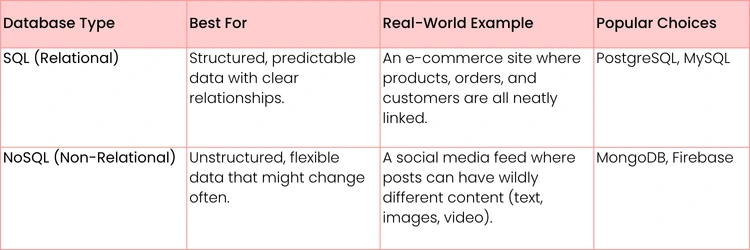
You'll mainly run into two flavors of databases: SQL and NoSQL.
The right choice really boils down to the kind of data you're managing. Neither is universally "better" but they're built for very different jobs.
When you're just starting out, a NoSQL database like MongoDB is often much more approachable. Its flexible, document-based structure feels very natural if you're already thinking in terms of JavaScript objects. This lets you build and make changes much faster without getting bogged down by rigid table structures from the get-go.
Of course, a well-rounded developer needs to understand both. Knowing database design and development is a great next step to solidify your foundation.
Ultimately, the goal here is to connect the dots: understand how your front-end asks for data, how your back-end API processes that request, and how the database stores and serves up that data reliably. Getting these three components to talk to each other is the magic behind every true full-stack application.
Here's a quick, practical breakdown:
Creating a Portfolio That Gets You Hired
Let's be blunt: your skills are just an abstract concept until you show them in action. A portfolio is where your code does the talking, and honestly, it’s the single most important thing you'll build when trying to land your first web development job. Think of it less as a collection of projects and more as your resume brought to life.
Hiring managers aren't just reading bullet points on your resume; they're digging into what you’ve actually built. They want to see your problem-solving process, how you structure code, and your ability to turn an idea into a functional product. This is your chance to prove you can hit the ground running from day one.
A truly great portfolio goes way beyond the simple to-do lists and tutorial clones that everyone else has. It needs to showcase your ability to think like a developer by building applications that are both functional and thoughtfully designed.
Choosing Projects That Showcase Your Skills
The projects you pick say a lot about your capabilities. Your goal should be to build 2-3 substantial projects that demonstrate a real range of technical skills. The idea is to show you can handle complexity and build something more than a basic static page.
Here are a few project ideas that consistently get a nod from recruiters:
- E-commerce Storefront: Try building a product catalog, a shopping cart, and a functional checkout flow. This is a fantastic way to show you can manage state, handle tricky user interactions, and work with complex data.
- Actionable Step: Start by creating a simple product grid page that fetches product data from a fake API like the fakestoreapi.
- Real-Time Chat Application: Use a technology like WebSockets or Firebase to build an app where users can message each other instantly. This is a clear signal that you understand asynchronous operations and can build dynamic, interactive experiences.
- Actionable Step: Use Firebase's Realtime Database for a quick setup; their free tier is perfect for a portfolio project.
- Data Visualization Dashboard: Find a public API (like a stock market tracker or a public health database) and use a library like D3.js or Chart.js to display that data in a meaningful way. This really highlights your ability to work with external data and present it effectively.
- Actionable Step: Use the free CoinGecko API to build a simple cryptocurrency price tracker with charts.
Expert Insight: Don't just build what everyone else is building. The most impressive projects often solve a personal problem. Did you build a tool to track your workout progress or an app to organize your favorite recipes? These projects show passion and an innate drive to solve real-world challenges, which is exactly what employers are looking for.
Presenting Your Work Professionally
How you present your projects is just as important as the code itself. Your GitHub profile essentially becomes your professional showroom, so it needs to be clean, organized, and dead simple for a recruiter to navigate.
A well-presented project is so much more than a folder of code. It absolutely must include a detailed README.md file for each project. This is your moment to explain what the project is, why you built it, the tech stack you used, and any tough challenges you overcame. Don't forget to clearly outline how to run the project locally.
Clean, well-documented code is completely non-negotiable. Use meaningful variable names, break your logic into modular components, and add comments where things get complicated. This shows you write code that others can actually understand and maintain—a critical skill for working on any team. For more tips on this, check out this detailed guide on crafting a powerful web developer resume to go along with your killer portfolio.
Making a Lasting Impression
To really tie everything together, you need a polished portfolio website. Looking at various personal portfolio web templates can give you some great inspiration and a solid foundation for your site's design. Hosting it on a custom domain is the final piece of the puzzle. This site should be your central hub, linking out to your live project demos, your GitHub, and your professional social media profiles.
The demand for skilled developers isn't slowing down. The Bureau of Labor Statistics projects a 7% growth in employment for web developers over the next decade. That translates to around 14,500 new job openings expected each year. With the average U.S. salary topping $95,000 annually, mastering the art of self-presentation through a strong portfolio is your most direct path to securing a role in this growing field.
Boosting Your Workflow with AI and Modern Tools
The best developers we know don’t just work hard; they work smart. This means getting your hands on modern tools that speed up your process, catch errors before they become headaches, and just handle the boring, repetitive tasks.
Today, that toolkit is getting a serious upgrade from artificial intelligence. Learning web dev now is a totally different game than it was a few years ago, mostly because of AI and low-code platforms. We're at a point where around 70% of new applications are built using these technologies, which is great news for newcomers.
The trend is only picking up steam. AI is helping improve user engagement, and 58% of designers are already using it to create assets.
Working with AI Assistants
AI assistants like GitHub Copilot are becoming as essential as a good code editor. Think of them less as a replacement for your brain and more as a super-powered autocomplete that actually understands what you're trying to do. You can use these tools to spit out boilerplate code, generate a gnarly regular expression, or even suggest a few different ways to structure a function.
The trick is to treat AI as a collaborator, not a crutch. You absolutely have to review and understand the code it generates. If you don't know why its suggestion works, you're not learning—you're just copying and pasting. A great way to check yourself is to ask the AI to explain its own code snippet, line by line.
Actionable Insight: Go find a clunky JavaScript function you wrote. Paste it into a tool like ChatGPT or Copilot Chat and ask, "How can I make this more efficient and readable?" Analyze its suggestions, try them out, and see if you really get the "why" behind the improvements. This isn't cheating; it's a powerful way to learn modern coding patterns.
As this collaboration becomes more common, it's smart to think about what's next. We've actually shared some thoughts on how teams with AI agents and humans will perform in the near future.
Essential Collaboration and Design Tools
Beyond writing code, modern development is a team sport. Getting comfortable with the tools that teams use every day will make you a much more attractive hire right out of the gate.
- Figma: This is the absolute standard for UI/UX design. As a developer, you won't be expected to be a designer, but you will be expected to take a Figma file and turn it into a pixel-perfect, functioning website.
- Actionable Step: Find a free Figma community file for a simple web page. Your task is to replicate it perfectly using only HTML and CSS. This is a common task in real developer jobs.
- Jira: A beast of a project management tool used to track tasks, bugs, and new features. Understanding how to work with tickets and sprints in an Agile workflow is a must-have professional skill.
- Actionable Step: Create a free Trello board (a simpler Jira alternative) for your portfolio projects. Break down one project into small tasks like "Create header component" and "Style footer" and move them from "To Do" to "Done" as you work.
Got Questions About Web Development? We’ve Got Answers.
Jumping into web development feels like staring at a huge, complex map without a compass. It’s a big world, and it's totally normal to have a million questions about where to even begin. Let's clear up some of the most common hurdles and concerns aspiring developers run into.
How Long Does This Actually Take?
There's no magic number, but let's talk about realistic timelines. If you can consistently put in a solid 15-20 hours every week, you can get genuinely good at the front-end fundamentals—HTML, CSS, and JavaScript—in about 6 to 9 months. We're talking about being able to build polished, responsive websites from scratch.
Thinking bigger, like a job-ready, full-stack role where you’re building the back-end, too? You're probably looking at a journey of 12 to 18 months. Sure, intensive bootcamps can cram that down into 3-6 months, but that's an all-in, full-time commitment.
Here's what really matters: Consistency beats cramming every time. An hour of focused work every single day is way more powerful than binge-coding for eight hours on a Saturday. That daily practice is what builds momentum and cements concepts for the long haul.
Do I Really Need a Computer Science Degree to Get Hired?
Nope. Absolutely not. While a degree certainly doesn't hurt, the tech world is largely a meritocracy. What you can do matters infinitely more than what's on your diploma. Your portfolio is your resume.
Hiring managers want to see that you can solve problems and, well, build things. A strong GitHub profile filled with a few well-made projects will always carry more weight than a piece of paper. The real test is whether you can get through a technical interview and contribute to their team. Plenty of the most talented developers out there are self-taught or came from bootcamps; they let their work speak for itself.
What’s the First Programming Language I Should Learn?
Start with JavaScript. Seriously. This isn't just a suggestion—it's the most direct and practical path you can take. JavaScript is the only language that runs in every single web browser, which makes it non-negotiable for anyone serious about front-end development.
And the best part? Once you get comfortable with it, you can use that exact same language on the back-end with Node.js. This "learn once, use everywhere" approach is just incredibly efficient. It means you can build complete, full-stack applications with just one language, which simplifies your learning curve and makes you a versatile developer right out of the gate.
How Do I Deal With Imposter Syndrome?
That nagging feeling that you're a fraud and don't belong is practically a rite of passage in tech. The best way to fight it is to stop chasing perfection and start focusing on tangible progress.
Here are a few things that actually work:
- Keep a "Wins" Log: At the end of every week, jot down three things you learned or built, no matter how tiny. Did you finally figure out a CSS property? Write it down. This creates a concrete record of your growth to look back on when doubt creeps in.
- Find Your People: Join a community. Whether it's a Discord server, a local meetup, or just connecting with other learners on X (formerly Twitter), sharing your struggles with people on the same path makes a world of difference.
- Break It Down: A goal like "Learn React" is massive and terrifying. Break it into ridiculously small pieces. Try "Build a single button component" or "Fetch one piece of data from an API". This turns an intimidating mountain into a series of small, manageable hills.
Remember, even the most senior developers are googling basic syntax all day long. It’s just part of the job. The feeling of being an imposter doesn't disappear when you know everything—it fades when you accept that learning is a permanent part of the process.
Ready to turn these answers into action? Uplyrn offers a complete ecosystem with expert-led courses, one-on-one mentorship, and job opportunities to guide you at every stage of your web development journey. Start building your future today by exploring our programs.


Leave your thoughts here...
All Comments
Reply