









How to Manage Multiple Projects Simultaneously
Trying to juggle multiple deadlines, teams, and goals at once? It feels less like a choice and more like a standard job requirement these days. The secret to managing it all isn't just working longer hours—it’s about building a unified system that brings together smart priorities, solid scheduling, and clear communication. This is how you turn chaos into a predictable, manageable workflow.
Jump To Section

Earn As You Learn
Earn 25% commission when your network purchase Uplyrn courses or subscribe to our annual membership. It’s the best thing ever. Next to learning,
of course.
Stop Juggling, Start Systematizing Your Workflow
Welcome to the new normal, where handling just one project at a time is a rare luxury. Instead of frantically switching between tasks and losing your momentum, real success comes from creating a structured system. This guide is about moving past the "work harder" myth and showing you how to work smarter.
The struggle is real, and it has a measurable cost. In our project-driven world, the average project performance rate is a mere 73.8%. That means over a quarter of projects don't hit their targets, usually because of poor coordination. On a global scale, companies waste an average of 11.4% of their investment on projects that just don't perform.
The Pillars of a Unified System
Moving from juggling to a real system means building your workflow on a few core principles. Think of them as the legs of a table—if one is shaky, the whole thing wobbles. To get your workload balanced, you need to master each of these areas. For a deeper dive into balancing these demands, you can learn more about how to manage multiple projects without burning out.
This guide will give you a practical roadmap for developing these skills, which are absolutely essential for anyone looking to increase their productivity at work.
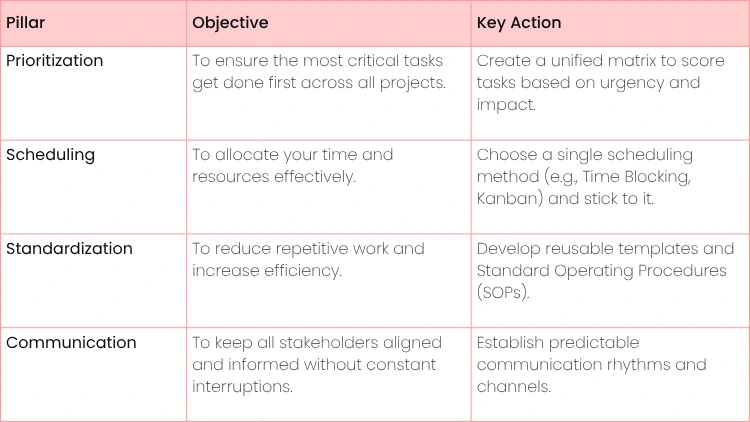
To get started, we'll focus on four key areas that form the backbone of any effective multi-project management strategy. The table below breaks down these core pillars, their main goals, and the single most important action you can take for each.
Core Pillars of Multi-Project Management
Think of this as your foundational checklist. By addressing each pillar, you’re not just managing tasks; you’re building a resilient system that can handle whatever comes your way.
- Actionable Insight: The goal isn't just to complete projects. It's to create a sustainable workflow that prevents burnout and consistently delivers high-quality results. By adopting a systematic approach, you trade frantic energy for focused execution.
Defining Your Axes: Impact and Urgency
When every project is screaming for your attention, how do you actually decide what to tackle next? The trick is to stop reacting to whatever's loudest and start using a single, central system to weigh every single task.
Think of it as your command center. It’s what brings order to the chaos when you're trying to manage multiple projects at the same time.
This system is what we call a Unified Priority Matrix. It’s where you’ll pull all your to-dos from every project into one spot. Here, you’ll judge each item not by its looming deadline, but by how much it actually contributes to your goals.
Your matrix is built on two simple axes:
- Impact/Value: This measures how much a task actually moves the needle on a project’s success or your broader business objectives. A high-impact task could be launching a key feature for a new product. A low-impact one? Maybe a minor copy edit on an internal document.
- Urgency/Deadline: This is all about the timeline. An urgent task might be fixing a critical bug on your company's website that’s costing you sales. Something non-urgent could be planning for a quarterly review that’s still two months away.
Practical Example: Let's say you're a marketing manager juggling a full website redesign (super high impact, but the deadline has some flex) and an urgent fix for a live ad campaign (high urgency, but maybe medium impact on the grand scheme of things). The matrix forces you to logically choose to tackle the urgent ad fix first to stop potential losses, while scheduling dedicated, uninterrupted time for the high-impact redesign later.
This visual approach to decision-making is a lifesaver when you're drowning in competing demands.
The main takeaway here is that building a system is the absolute first step toward getting control. It stops you from living in a constant state of putting out fires.
How to Score and Prioritize Your Tasks
Once your axes are set, it’s time to start plotting your tasks. Just assign a number (say, 1-5) to both the impact and the urgency of every task, no matter which project it's from.
- Actionable Insight: Start your day by reviewing your unified list and scoring the top 5-10 tasks. This 15-minute habit forces you to be strategic before diving into execution and prevents reactive work. This scoring system gets rid of the guesswork. It helps you drop tasks into clear action quadrants, so you know exactly what to do with them. We dive deeper into this method in this guide on the time management matrix for planning and prioritizing.
And if you want to get going right away, you can grab a ready-to-use project priority matrix template.
By bringing every task into a single matrix, you stop managing projects in silos and start managing your workload as a unified portfolio. This shift is critical for making strategic decisions, not just reactive ones.
This structured thinking has a real impact. Research shows that poor resource allocation is a factor in why 70% of projects miss their original goals.
On the flip side, high-performing organizations that use formal methods like this succeed 27% more often. And with nearly 45% of successful projects having been considered at-risk at some point, it’s clear that prioritization is what gets them across the finish line. You can see more data on how project management methodologies impact success rates.
Using a matrix like this every day gives you instant clarity on your true top priorities. It also becomes an incredible communication tool, letting you show stakeholders exactly why you’re focused on what you are, all backed by a logical, data-driven plan.
A solid priority list is a great start, but it's only half the battle. Once you know what to do, you have to figure out when you’ll actually do it. This is where a good scheduling method comes in, turning your abstract priorities into a concrete, day-to-day plan. Without one, you’re just bouncing from one fire to the next.
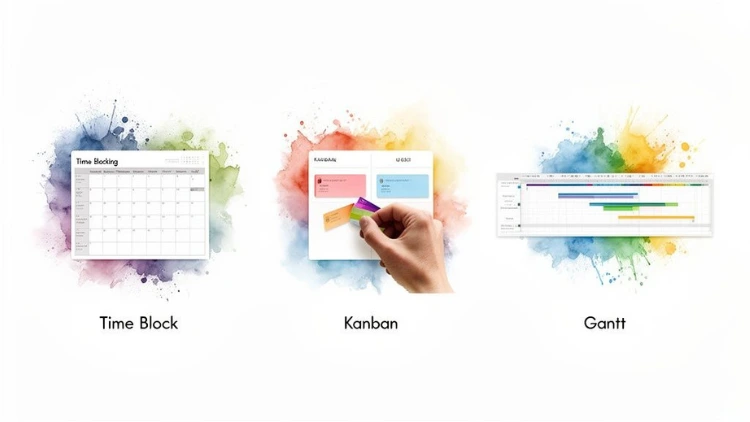
Choosing the right system isn't about finding the one "perfect" method—it’s about finding the one that genuinely clicks with how you work. Let's walk through three solid approaches that work wonders in multi-project environments.
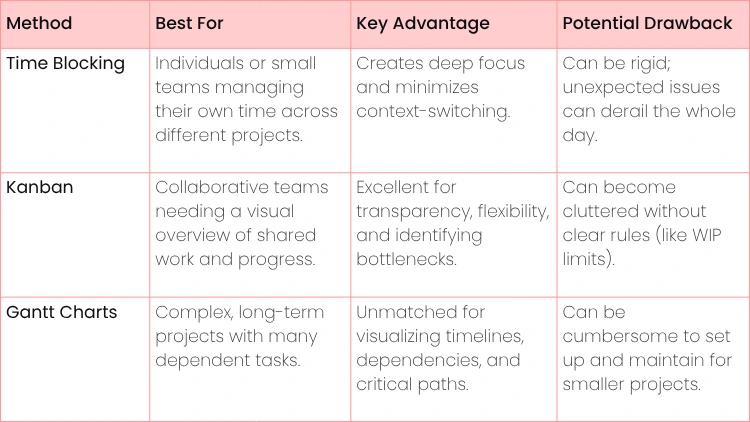
Before we dive deep, here’s a quick-glance table to help you compare Time Blocking, Kanban, and Gantt Charts. Each has its place, and seeing them side-by-side can help you zero in on the best fit for your specific needs.
Comparing Project Scheduling Methods
The table above gives you the 30,000-foot view. Now, let’s get into the nitty-gritty of how to actually use these methods to get things done.
Time Blocking: For the Solo Juggler
If you’ve ever felt your day get eaten alive by a never-ending to-do list, time blocking might be your answer. Instead of a list of tasks you hope to get to, you schedule everything directly onto your calendar. Each block of time is dedicated to a specific project or task. It's a game-changer for avoiding the mental tax of constantly switching gears.
Practical Example: Imagine you're a freelance developer juggling three clients. Your time-blocked week could be a model of clarity:
- Mondays & Wednesdays (9 AM - 1 PM): Deep work on "Client A - App Development".
- Tuesdays & Thursdays (9 AM - 1 PM): All focus on "Client B - Website Redesign".
- Friday AM (9 AM - 12 PM): Knocking out "Client C - Bug Fixes".
- Friday PM (2 PM - 4 PM): Catching up on admin, like invoicing and client outreach.
Actionable Insight: The real trick here is to color-code your calendar. Assign a unique color to each project. A quick glance gives you an instant, visual read on your entire week, making it obvious where your time is going.
Kanban: For the Visual, Collaborative Team
For teams, nothing beats the clarity of a Kanban board. It's a visual way to manage workflow, using columns like "To Do", "In Progress" and "Done" to show the status of every single task at a glance. It's all about transparency and spotting hold-ups before they become major problems.
This visual approach is a cornerstone of Agile, which is why a staggering 71% of organizations have brought practices like Kanban into their workflow. In fact, 58% of organizations are using hybrid approaches, blending different methods to suit their unique needs. You can find more project management statistics here to see how these methods are shaping modern teams.
- Practical Example: Just picture a marketing team running several product launches. Their Trello or Jira board would be their command center, with columns like 'Backlog', 'Ready for Design', 'In Review' and 'Launched'. A card for "Launch A: Finalize Ad Copy" can move through the workflow, visible to everyone.
A board like this makes it immediately clear who's doing what and what’s coming up next. A pro tip for Kanban is to enforce Work in Progress (WIP) limits. By capping the number of tasks in the "In Progress" column, you force the team to finish what they started before pulling in new work, which keeps everyone focused and prevents overload.
Gantt Charts: For the Complex, Long-Haul Project
When you're dealing with projects where the timing is everything and tasks are all interconnected, Gantt charts are indispensable. These are essentially bar charts on a timeline, showing start and end dates for every task and, crucially, how they all depend on one another. They're built for mapping out big, complex initiatives from start to finish.
- Practical Example: Think of a construction manager juggling two different building sites. A Gantt chart is the only way to keep it all straight. At Site A, the foundation has to be poured before the framing can even begin. Over at Site B, the electrical crew can't start their work until the drywall is up. The Gantt chart visualizes these dependencies across both projects, making it clear how a delay in one small task can ripple through the entire schedule.
Create Your Project Management Toolkit
Stop reinventing the wheel every single time a new project lands on your desk. The real secret to juggling multiple projects isn’t about finding more hours in the day—it’s about building ruthless efficiency through standardization. By creating your own personal 'Project Management Toolkit', you’ll have a set of reusable assets that slash setup time and reduce mental friction.
Think of it like a professional chef's mise en place. They aren't scrambling to find ingredients and chop vegetables for every individual order. Everything is prepped, portioned, and ready to go. You can bring that exact same principle to your project workflow.
Standardize Your Core Processes
Your main goal here is to stop making the same repeatable decisions from scratch. Start by looking across your projects to spot the common, recurring tasks. For those, you'll create either a simple template or a full-blown standard operating procedure (SOP).
Here are a few practical examples of what to build first:
- Project Kickoff Checklist: A go-to checklist guarantees you cover all your bases when launching something new. This should include items like: Define goals & KPIs, identify stakeholders, set initial budget, and agree on communication channels. You'll never have that "oops, I forgot to..." moment again.
- Standardized Status Report Template: Create a simple email or document template with three sections: “Accomplishments This Week”, “Priorities for Next Week” and “Current Blockers”. This gives stakeholders the consistent, predictable information they crave and cuts your reporting time in half.
- Client Onboarding SOP: If you’re in a client-facing role, a documented onboarding process is an absolute lifesaver. Map out every single step, from the first welcome email and contract signing to the kickoff meeting agenda. This ensures every client gets the same professional, consistent experience.
Actionable Insight: By creating templates, you're not just saving time; you're creating a consistent standard of quality across all your work. It's a simple way to scale your capacity without sacrificing attention to detail.
Build a Central Source of Truth
One of the biggest drains on your focus is just trying to remember where everything is. A central source of truth eliminates this chaos by giving you a single, master dashboard with a high-level view of your entire workload.
This doesn't need to be some complex, custom-coded system. You can build an incredibly powerful dashboard using a tool you probably already know, like Notion, Asana, or even a well-structured Google Sheet.
Your dashboard should give you an at-a-glance summary and link out to all your active projects. Make sure it displays the critical info:
- Project Name: A clear, simple identifier for each initiative.
- Key Contacts: Who is the main point of contact or project lead?
- Next Major Deadline: What's the most immediate milestone you need to hit?
- Current Status: A simple tag is perfect here, like "On Track", "At Risk" or "On Hold".
Practical Example: A freelance consultant’s Notion dashboard could be a simple table showing their five active clients. Each client name links to a detailed project page. With a single glance, they can see which projects need their immediate attention (e.g., status is "At Risk") and which are cruising along smoothly. This master view is essential for anyone wanting to understand project management methodology in a practical way, as it consolidates various efforts into a single, manageable system. This approach clears out the mental clutter and gives you the confidence to take on more work.
Establish Clear Communication Rhythms
When you're juggling multiple projects, your communication strategy can either be your best friend or your worst enemy. Without a plan, you're just inviting chaos—a constant stream of interruptions, confused stakeholders, and critical details lost in the noise.
The fix is to create predictable communication rhythms. This is just a simple, structured cadence for how, when, and where information actually flows.
It means ditching the free-for-all where anyone can ask for anything, anytime. Instead, you get ahead of the curve by setting clear expectations and assigning a specific job to each communication channel. This doesn't just make your life easier; it builds a massive amount of trust with your stakeholders because they know exactly when and how they'll hear from you.
Designate Channels for Different Purposes
One of the most common mistakes is people using the same tool for everything. That's a fast track to feeling completely overwhelmed. A much smarter approach is to give each tool a specific job. This gives everyone, from your team to your clients, total clarity on the best way to get the information they need.
Here’s a practical example of how to assign roles:
- Slack/Microsoft Teams: For quick, informal questions and real-time team collaboration.
- Example: "Does anyone have the latest logo file?" that needs a fast, short answer.
- Email: For formal, official communication, especially with external stakeholders.
- Example: Sending a signed contract to a new vendor or a final project summary to a client.
- Project Management Tool (Asana, Jira, etc.): The single source of truth for all task-specific work. All comments, questions, and files related to a task live with that task.
- Example: A question about a design mockup is left as a comment directly on the "Review Mockup" task in Asana.
Actionable Insight: Creating these boundaries trains your team and stakeholders to use the right tool for the job. This one habit alone can dramatically cut down on the "Where did we talk about that?" chaos that tanks so many multi-project environments.
Set a Predictable Update Cadence
Honestly, one of the most powerful things you can do is to put your progress updates on a regular, predictable schedule. This single, proactive step almost completely eliminates those random "Just checking in" emails and calls that absolutely destroy your focus.
- Practical Example: Decide that a standard progress report for every active project goes out at 4 PM every Friday. No exceptions. This report, pulled from a simple template you created, gives everyone a consistent look at what got done, what's next, and any roadblocks you've hit.
After a few weeks, stakeholders learn to expect this update and will start holding their non-urgent questions for it. Putting these processes in place is also just good business, especially when studies show that roughly half of organizations can't even see their real-time project KPIs.
To make these updates even stronger, check out these tips for facilitating highly productive project meetings, as the same rules of clarity and focus apply. A predictable rhythm doesn't just keep everyone in the loop—it carves out and protects the deep work time you need to actually push all your projects forward.
Let Technology Do the Heavy Lifting
The right tech stack can be the difference between juggling projects and dropping them. Think of it less as adding more apps to your life and more like assembling a custom toolkit. Each tool has a specific job, and when they work together, they dramatically cut down on the administrative busywork that eats up your day.
Your project management software—think Asana or Monday.com—acts as your command center. It's where you get that crucial 30,000-foot view of everything on your plate. Pair that with a communication tool like Slack for real-time updates and a document hub like Google Drive to create a single source of truth for all your plans and files.
Choose Your Core Tools with a Purpose
The goal here isn't just to have tools; it's to have an integrated system that talks to each other.
- Practical Example: Imagine a marketing manager running three separate product launches. They could use Asana to track the major campaign milestones for each launch, have a dedicated Slack channel for each team's daily huddles, and keep all the approved creative assets neatly organized in a shared Google Drive folder. This setup stops vital information from getting buried in a swamp of emails or forgotten in DMs.
There's a reason the market for these tools is exploding. It's projected to climb from $6.59 billion in 2022 to a staggering $20.47 billion by 2030. That growth is built on real results and smarter features.
AI Is Already Here (and It's Actually Useful)
Artificial intelligence isn't some far-off concept anymore; it's a practical feature already baked into many of the tools you use. Right now, about 21% of project managers are regularly using AI to help with everything from automating schedules to predicting risks before they become problems.
- Practical Example: Some platforms can analyze your team's workload and flag potential burnout risks, even suggesting who to reassign a task to. That kind of insight can boost resource utilization by 25% and slash risk incidents by as much as 35%.
This is what a smart tech stack does for you. Instead of spending your morning manually shuffling tasks around, the software gives you data-backed suggestions, freeing you up to focus on the big picture.
Got Questions?
Even with a solid system, you're going to hit some snags. That’s just the reality of juggling multiple projects. Here are some of the most common questions we hear.
What Do I Do When an Urgent, Unexpected Task Lands on My Desk?
First, don't panic. Fire drills are part of the job; they don't mean your system has failed. The key is to not let someone else’s manufactured urgency derail your strategy.
- Actionable Insight: Before you drop everything, run that new task through your Unified Priority Matrix. This isn't about stalling—it's a 2-minute exercise to get an objective look at its real impact versus how "urgent" it feels. If it truly can't wait, the next step is to make a conscious trade. What lower-priority task gets pushed back to make room? This is a strategic swap, not a failure. Then, immediately let any affected stakeholders know about the change. A quick "Heads up, I'm shifting focus to X, so Y will be delayed by a day" manages expectations and keeps you in control.
What's the Single Biggest Mistake People Make?
Hands down, the biggest mistake is treating every project like its own separate island. When you manage in silos, you’re constantly fighting for your own attention, creating conflicting priorities, and probably even duplicating work without realizing it. It's an exhausting and inefficient way to work.
- Actionable Insight: The real shift happens when you stop seeing a collection of competing projects and start managing a single, cohesive portfolio of work. This is why a unified system—with one master task list, a single priority matrix, and a central calendar—is so critical. It’s what lets you make smart decisions for your entire workload, not just one piece of it.
How Can I Keep from Burning Out?
Burnout is almost always a symptom of feeling a total loss of control. You're stretched thin, overwhelmed, and it feels like you're always one step behind. The most powerful defense against this is to set—and ruthlessly protect—your boundaries.
- Actionable Insight: This is where time blocking becomes your best friend. Schedule your "deep work" sessions and treat them like unbreakable appointments. More importantly, schedule your breaks, your lunch, and your end-of-day cutoff time in your calendar. You also have to get comfortable saying 'no' to things that don't align with your priorities. It’s easier when you can confidently point to your workload and say, "I'd love to help, but my focus is committed to these priorities right now." Finally, make it a point to celebrate small wins. Acknowledging progress, no matter how minor, is vital for keeping your motivation and momentum high.
Ready to stop juggling and start managing like a pro? Uplyrn offers expert-led courses that give you the practical skills and frameworks you need to master project management and advance your career. Join our satisfied learners and build a system that works for you.


Leave your thoughts here...
All Comments
Reply