









A Complete Guide to ActiveCampaign Email Marketing
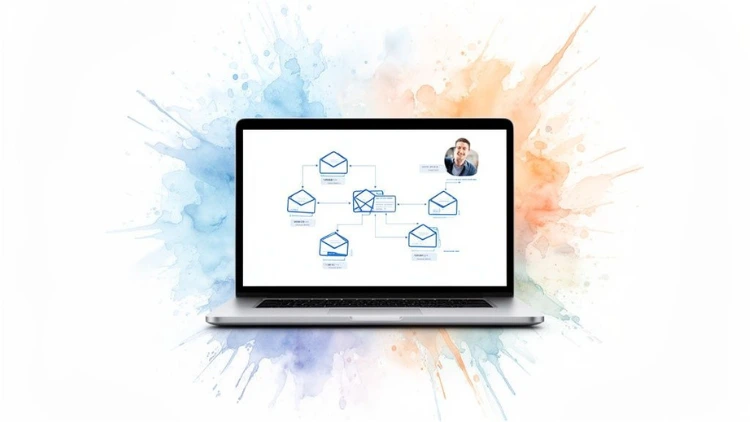
ActiveCampaign is so much more than a tool for sending out your weekly newsletter. Think of it as a complete Customer Experience Automation (CXA) platform. For anyone running an online course or business, this means you get a powerful email system that’s fused with smart automation, clever segmentation, and even a built-in CRM. It's designed to create truly personalized journeys for every single one of of your users.
Jump To Section

Earn As You Learn
Earn 25% commission when your network purchase Uplyrn courses or subscribe to our annual membership. It’s the best thing ever. Next to learning,
of course.
Why ActiveCampaign is More Than Just an Email Tool
Look, plenty of platforms can send a basic email blast. But ActiveCampaign is built from the ground up to send the right email to the right person at the right time.
What does that mean for a course creator? It’s the difference between blasting a generic "new course is live!" announcement to everyone and automatically sending a personalized follow-up to a student who just aced a tough module. It stops acting like a megaphone and starts behaving like a dedicated digital campus coordinator for each learner.
This entire approach is built on four core pillars that work together beautifully:
- Email Marketing: This is your foundation. It's where you'll design and send everything from one-off course announcements to beautifully crafted newsletters.
- Marketing Automation: This is the real powerhouse. It’s the engine that saves you countless hours by triggering messages based on what your students do, like enrolling in a course, visiting a specific page, or even letting a subscription lapse.
- Smart Segmentation: This is how you stop talking to everyone the same way. It lets you group your audience based on their interests and actions, making sure your messages always hit the mark.
- Built-in CRM: This is your relationship hub. It helps you keep track of every interaction with learners, leads, and even potential corporate clients for B2B training programs.
Turning Clicks into Enrollments
The proof is in the numbers. ActiveCampaign customers sent a staggering 109 billion emails in a recent year, all powered by 2.5 million active automations.
But here's the kicker: across that massive volume, they saw an average click rate of 6.7%—more than double the industry average. A campaign to 100,000 potential users could mean 6,700 landing page visits instead of a measly 2,620. That's a lot of potential enrollments.
The platform is designed to bring all these pieces together, giving you a clear view of the entire user journey.
This unified dashboard is the key. It connects every touchpoint, from the first marketing email to the final sales interaction. Once you grasp the importance of email in business communication, you can really see how this connected approach builds stronger, more engaged relationships with your users.
To help you see how these pieces fit together, let's break down the core features.
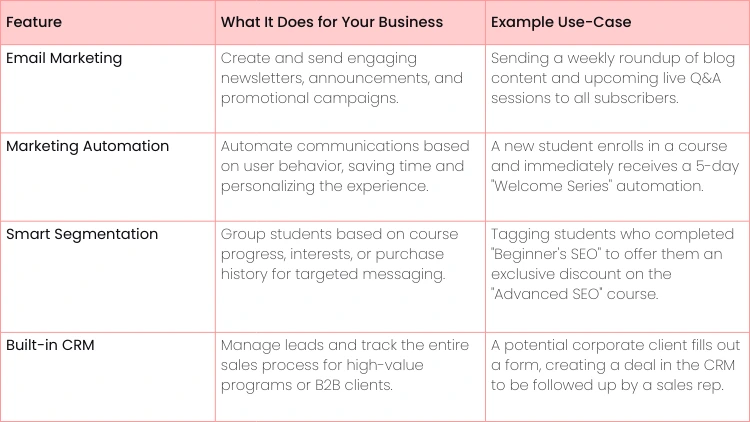
ActiveCampaign Core Features at a Glance
This table sums up how ActiveCampaign's key functions move beyond basic email to create a fully automated marketing system for any business.
By seeing how these tools work in concert, you can start to map out a truly effective communication strategy.
- Actionable Insight: Don't think of ActiveCampaign as just a place to send emails. Instead, map out your ideal user journey first. Where do they start? What actions should trigger a communication? For example, map the path from "Downloaded free e-book" to "Attended webinar" to "Purchased introductory course". This mindset shift transforms the tool from a simple mailer into a strategic asset for growth.
Understanding the Core Pillars of ActiveCampaign
To really get what makes ActiveCampaign tick, you need to know its four foundational pillars. Don't think of them as separate features, but as interconnected parts of one smart system, all working to create personalized experiences for your users. When they’re in sync, they turn your mass emails into genuine one-on-one conversations.
Each pillar has its own job, but the real power is unleashed when they start sharing data and triggering actions across the platform. Let's break down what each one does and how you can actually use it.
Pillar 1: Email Campaigns
This is the bread and butter of any email platform. Email campaigns are your one-off broadcasts—the newsletters, announcements, and special promotions you send out to a big chunk of your audience. It's your primary channel for communication.
While it sounds basic, ActiveCampaign adds a layer of intelligence here. You still get a great drag-and-drop editor to create beautiful emails, but the magic is in how you can send them. It’s all about precision.
Actionable Example: A Course Launch Newsletter
Imagine you're about to launch a new "Advanced SEO" course. Instead of blasting the announcement to your entire list, you could use ActiveCampaign to send it only to students who have already finished your "Beginner's SEO" course.
- How to do it: Create a segment of contacts where Tag EXISTS "Completed-Beginner-SEO". This simple bit of targeting makes the campaign wildly more relevant and can seriously boost your enrollment numbers.
Pillar 2: Marketing Automation
This is where ActiveCampaign truly pulls away from the pack. Marketing automation is the engine that works for you 24/7, firing off perfectly timed, personal messages based on what your contacts actually do. Think of it as having a dedicated assistant for every single user.
You build these automations visually by creating "workflows" that kick off when someone takes a specific action. This could be anything from signing up for your newsletter to visiting a specific page three times in one week.
Actionable Example: An Automated Welcome Series
A new student signs up on your platform. That single action can trigger a five-day welcome automation without you lifting a finger:
- Day 1: An immediate welcome email shoots out with their login details and a direct link to their student dashboard.
- Day 2: Another email introduces them to your community features, like forums or student groups.
- Day 3: A message pops into their inbox showcasing a popular introductory course to help them get started.
- Day 5: A final check-in asks if they have questions, signed by a real person from your team.
This entire sequence runs on autopilot, giving every new user a warm, guided onboarding experience.
Pillar 3: Smart Segmentation
Segmentation is simply the art of slicing your audience into smaller, more focused groups. Effective email marketing hinges on sending the right message to the right person, and segmentation is how you pull it off.
But ActiveCampaign uses dynamic segments, not static lists. This means a contact can be automatically added or removed from a segment as their data changes, so your targeting is always spot-on.
- Actionable Insight: Segmentation is your ticket to moving beyond one-size-fits-all messaging. When you speak directly to a smaller group's specific needs, your engagement rates—and your sales—will climb. Start with a simple segment: Tag EXISTS "Purchased-Course". Now you can send exclusive content to paying students, making them feel like VIPs.
Actionable Example: Creating an Inactive Student Segment
You can build a dynamic segment for "Inactive Students" with a simple rule: "Has not logged in within the last 45 days". The moment a student hits that 45-day mark, they're automatically dropped into this segment. This lets you trigger a re-engagement campaign just for them, maybe offering a special discount or highlighting new course content to bring them back into the fold.
Pillar 4: The Sales CRM
The final pillar is the built-in Customer Relationship Management (CRM) system. A lot of people think CRMs are just for sales teams, but it’s an incredibly powerful tool for course creators, especially if you offer high-ticket programs or corporate training packages.
The CRM gives you a visual pipeline to track potential sales, which ActiveCampaign calls "Deals". Each deal represents a person or company you're talking to, and you can drag them through stages like "New Lead", "Contact Made" and "Proposal Sent".
Actionable Example: Managing Corporate Training Leads
A manager from a big company fills out a "Request a Demo" form on your website. This one action can automatically do three things:
- Create a new contact in ActiveCampaign.
- Open a new "Deal" in your Sales Pipeline under the "New Inquiry" stage.
- Assign a task to someone on your team to follow up within 24 hours.
This creates a foolproof process that ensures no high-value lead ever slips through the cracks.
Building Your First Automated Email Workflows
Alright, you've got the theory down—the four pillars of ActiveCampaign email marketing make sense. But theory is one thing; putting it into practice is where the magic really happens. This is the fun part, where we connect those pillars and build tangible, automated workflows that do the heavy lifting for you.
Think of automations as the heart of your communication strategy. They're what let you deliver a personal touch at scale, sending the right message to the right person at the right time—all on autopilot.
Instead of just talking about what’s possible, let’s roll up our sleeves and build three core automations every online business platform needs. These aren't just random examples; they're battle-tested sequences designed to tackle common moments in a user's journey, saving you time while making them feel supported.
Let's get building.
Workflow 1: The Welcome and Onboarding Series
You only get one chance to make a first impression. The first few days after a user signs up are absolutely critical for setting the tone, driving engagement, and stopping them from drifting away. The goal here is simple: make them feel welcome, confident, and guided.
The trigger for this one is straightforward: "Contact subscribes to a list". The moment someone signs up, this workflow springs into action.
Here’s a simple but effective 5-day sequence to get you started:
- Email 1 (Immediately): Welcome & Next Steps. Don't make them wait. As soon as they sign up, hit their inbox with a confirmation. Include their username, a big, obvious button to log in, and maybe a link to a "Getting Started" video.
- Wait 1 Day.
- Email 2 (Day 2): Introduce a Key Feature. Pick one cool thing that will improve their experience. Show them how to join the community forum. Focus on a single, valuable action.
- Wait 2 Days.
- Email 3 (Day 4): Recommend Their First Course. Analysis paralysis is real. Gently point them toward a popular introductory course or one based on info they gave you at signup. This helps them get a quick win.
Actionable Insight: The best welcome emails have one clear call to action. Don't bombard new users with a dozen links. The only job of that first email is to get them to log in successfully. Your subject line should be direct, like "Welcome to [Your Brand]! Here are your login details."
Workflow 2: The Interest Nurture Sequence
What about the window shoppers? This automation is for people who check out an item but don't pull the trigger. It’s designed to gently nudge them toward purchasing by sending valuable, persuasive content without being pushy.
This time, the trigger is a bit more advanced: "Contact visits a specific webpage". You’ll simply pop in the URL of your product sales page.
Here’s how a nurture sequence could look:
- Wait 24 hours after they visit the page. Give them some space to think it over.
- Send Email 1: The Social Proof Follow-Up. Hit them with a powerful testimonial from a user who took that exact course. Something like, "See how Jane landed a new job after completing our Advanced SEO course" is far more compelling than a generic sales pitch.
- Wait 3 Days.
- Send Email 2: Overcome Common Objections. Think about the questions people always ask. Does the course require prior experience? How long will it take? Answering these proactively builds trust and shows you understand their concerns.
- Wait 3 Days.
- Send Email 3: The Scarcity Offer. If they're still on the fence, a little urgency can work wonders. A small discount or a bonus resource that expires in 48 hours can be the final push they need.
This kind of targeted follow-up is exactly what makes ActiveCampaign email marketing so powerful.
Workflow 3: The User Re-engagement Campaign
It's just a fact of life: some users will go quiet. A re-engagement campaign is your automated safety net, designed to win them back before they disappear for good. This workflow targets users who haven't logged in for a while.
The trigger here relies on a custom event or tag from your business platform: "Date of Last Login is older than 30 days".
Here's a simple flow to bring them back:
Trigger: A student hits the 30-day inactive mark.
- Email 1: The "We Miss You" Check-in. Send a friendly, personal-sounding email. "Hey, just checking in. Need any help?" You can also highlight a cool new product or feature that's been added since they last logged in.
- Wait 15 Days.
- Email 2: The Content Nudge. Forget the sale for a minute. Send them something genuinely useful, like a link to a new expert webinar recording or a killer blog post. Remind them of the value you provide. This ties back to having great content, which also helps you understand the 3 ways to rapidly grow your email list in the first place.
- Wait 30 Days.
- Email 3: The Last-Chance Offer. For those who are still MIA, it's time for a final, compelling offer. A significant discount on their next purchase might just be what it takes. If they don't bite, you can automatically tag them as "dormant" and clean them from your active list later.
Once you've got your automated workflows humming along, it's time to dig into the really powerful stuff inside ActiveCampaign. This is where you graduate from a good email strategy to a great one. By layering in some of the platform's smarter features, you can seriously crank up engagement, pinpoint your most eager leads, and keep your emails out of the dreaded spam folder.
These tools are all about moving beyond simple "if this happens, do that" rules. Instead, they start making intelligent, data-backed decisions for you.
Let's break down three features that can completely change the game for your business.
Boost Open Rates with Predictive Sending
Ever agonize over the absolute perfect time to hit "send" on a campaign? We've all been there. Predictive Sending is ActiveCampaign's brilliant answer to that question. It throws out the guesswork of picking a generic time like "Tuesday at 10 AM".
Instead, this AI-powered feature looks at the unique engagement history of every single person on your list. It learns when they are most likely to open and click your emails, then sends your campaign to them at that ideal moment within a 24-hour window. For an online business with users scattered across the globe, this is a massive win.
- Actionable Example: Let's say you're launching a flash sale for a course bundle. With Predictive Sending turned on, a student in London might get the announcement at 9 AM their time. Meanwhile, a student in Los Angeles gets it at 8 AM Pacific time. To activate it: When you are scheduling a campaign, simply select the "Send with Predictive Sending" option instead of a specific time. It's a single click.
Identify Your Best Leads with Lead Scoring
Let's be honest: not all users are created equal in terms of engagement. Some are just window shopping, while others are one nudge away from enrolling in your top-tier program. Lead scoring is how you tell them apart.
It’s simple, really. You assign points to your contacts based on the actions they take.
- Someone opens an email? +5 points.
- They click a link to a specific product page? +10 points.
- They visit your pricey course program page three times in one week? +50 points.
Suddenly, engagement isn't a vague concept—it's a number you can track.
- Actionable Insight: Lead scoring turns your contact list from a static directory into a dynamic, prioritized queue. It automatically shows you who's hot and who's not, so you can focus your energy where it will make the biggest difference. Create an automation that triggers when a contact's score reaches 100 points. This automation can notify a sales rep or send a personalized offer directly to the highly engaged lead.
When a contact hits a certain score—say, 100 points—you can automatically trigger an action. Maybe it’s a personal email, a special discount code, or a task for your sales team to follow up.
Protect Your Sender Reputation
All these cool strategies mean nothing if your emails land in spam. Your sender reputation is basically a credit score for your email address. Services like Gmail and Outlook are always watching it to decide if you're trustworthy.
ActiveCampaign shines here, partly because it's so focused on deliverability. Independent tests show an impressive 86.38% deliverability rate, with only 10.68% of emails hitting the spam folder. And the AI-driven personalization that powers this isn't just for show; it can boost revenue by 41%, which explains why it's the platform's fastest-growing feature. You can check out more of these email marketing statistics here.
To keep your sender score high, stick to these best practices:
- Keep your list clean: Automatically tag and remove subscribers who haven't opened anything in over 90 days.
- Use a double opt-in: This proves people really want your emails and cuts down on spam complaints.
- Watch your metrics: If a campaign gets a ton of bounces or unsubscribes, figure out why—fast.
If you’re curious about how these AI concepts extend beyond just email, this guide on leveraging AI for sales and marketing is a great next step.
Weaving ActiveCampaign Into Your Business Ecosystem
An email platform is powerful on its own, but it's a game-changer when it syncs up with the other tools you use every day. When everything is connected, your email system becomes the central nervous system for your entire business. This is where ActiveCampaign really shines—it connects the dots between different platforms to create one smooth, unified user experience.
Think of integrations as bridges. They let data flow freely between your Learning Management System (LMS), payment processor, and webinar software. ActiveCampaign sits in the middle, acting as the hub that makes sense of it all.
Connecting Your Tech Stack
Most modern learning platforms and LMS options offer native, built-in integrations with ActiveCampaign. These are usually the easiest to set up, often just a few clicks to connect your accounts and get them talking.
But what about tools that don't have a direct connection? That's where a service like Zapier comes in, acting as a universal translator. Zapier lets you create simple "if this, then that" rules (called Zaps) to link just about any two applications together. It's incredibly flexible.
- Actionable Insight: Before you build anything, map out your most critical user actions. What are the key moments—like enrolling in a course, finishing a module, or attending a webinar—that should trigger an email?
- For example: Action: Student completes 'Module 1'. Triggered Email: 'Congrats on finishing Module 1! Here's a sneak peek at Module 2.' This map becomes your blueprint for building smart, effective integrations.
Practical Integration Workflows in Action
Let's move past the theory and look at how these connections actually work. The goal is to make sure that when a user does something in one system, it triggers an immediate, relevant follow-up in another. It's all about creating a seamless journey.
Trigger Automations from Your LMS
Your LMS is a goldmine of behavioral data. By connecting it to ActiveCampaign, you can automate your communication based on what users are actually doing.
- When a student enrolls: A new student signs up for your course via your LMS. A Zap can instantly add them to a specific list in ActiveCampaign and kick off their welcome series. No manual exporting or importing required.
- After a module is completed: A student finishes a tough module. Your LMS can send a signal to ActiveCampaign to apply a tag like "Completed-Module-3". This tag can then trigger a congratulatory email, maybe even one that unlocks a bonus resource.
- For inactivity alerts: What if a student hasn't logged into your LMS for 30 days? This can trigger an automation in ActiveCampaign to send a friendly re-engagement email, checking in and highlighting something new to draw them back in.
Syncing with Payment and Webinar Tools
Integrating other key business tools opens up even more possibilities for perfectly timed, personal communication. These connections help tie your marketing directly to your revenue and live events.
- Payment Processors (like Stripe or PayPal): When a payment for a course goes through successfully, the integration can automatically add a "customer" tag in ActiveCampaign. This is a simple but crucial step for separating your paying students from your general leads. For a deeper dive into making money from your courses, check out this complete guide on selling online courses.
- Webinar Platforms (like Zoom or GoToWebinar): When someone registers for your webinar, they're automatically added to a "Webinar Registrants" list. Better yet, after the event, you can automatically segment those who attended from the no-shows. This allows you to send completely different follow-up sequences to each group—a replay for attendees, and a "sorry we missed you" offer for those who couldn't make it.
By building out this 360-degree view of your student, ActiveCampaign becomes way more than just an email tool. It transforms into the command center for your entire user communication strategy.
How to Measure Success in ActiveCampaign
It's one thing to build out a slick ActiveCampaign email marketing strategy, but that's really only half the job. To know if any of it is actually working, you have to look past the easy vanity metrics, like open rates, and dig into the numbers that prove your efforts are actually moving the needle.
Success isn't about how many emails you send. It's about what happens after someone clicks.
This means you need to start thinking in terms of business outcomes. Stop asking, "How many people opened the newsletter?" and start asking, "How many of those openers ended up buying a product?" ActiveCampaign's reporting is built to help you answer these much bigger, more important questions.
Key Metrics Beyond Opens and Clicks
If you want to measure your real return on investment (ROI), you have to track the metrics that connect directly to your business goals. Get a clear picture of what's really working by focusing on these key performance indicators (KPIs).
- Conversion Rate: This is the big one—the ultimate measure of success. Inside ActiveCampaign, you can set up "Goals" within any automation. For example, a goal could be triggered when a contact buys a product. The conversion rate report will then show you exactly which emails in your sequence are the most powerful at driving that purchase.
- Automation Goal Completions: This tracks how many people are actually doing the thing you built the workflow for. For a re-engagement campaign, the goal might be as simple as a user logging back in. For a nurture sequence, it could be enrolling in the course you're promoting.
- List Health & Growth: Keep a close eye on your unsubscribe rate and overall list growth. A healthy list isn't just a big list; it's one that grows steadily with engaged subscribers who stick around, not one that constantly churns through people who lose interest fast.
Actionable Insight: When you start tracking these outcomes, your reporting stops being a simple activity log and becomes a powerful tool for making decisions. For instance, if your Welcome Series has a high open rate but a low goal completion rate (e.g., users don't log in), it's a clear signal to rework the content of your emails, not just the subject lines.
Proving the ROI of Your Efforts
The financial impact of a well-oiled automation machine can be huge. Businesses using ActiveCampaign often see some pretty significant returns, with many reporting revenue bumps of 15–30% in the first year alone. We know one client who managed to slash their churn by 13% just by using engagement scoring and automated campaigns.
For a deeper look into figuring out the financial returns from your automation work, it's worth reading up on understanding marketing automation ROI.
At the end of the day, measuring success in ActiveCampaign is all about connecting your email activities to real, tangible business results. When you can confidently walk into a meeting and report that a specific automation generated a 451% increase in qualified leads, or that your triggered emails get 8x more engagement than your bulk newsletters, you’re doing more than just managing a mailing list—you’re actively driving the growth of your entire business. Discover more stats on ActiveCampaign’s impact.
Got Questions About ActiveCampaign?
We all do when we're getting started. Here are the straight answers to a couple of the most common ones that pop up.
Can ActiveCampaign Replace My CRM?
For a lot of businesses, the answer is a resounding yes. Once you’re on the Plus plan or higher, ActiveCampaign rolls out its own built-in Sales CRM. It’s got everything you need to build visual sales pipelines, keep track of deals, and see every single touchpoint a lead has had with your brand.
If your sales flow is all about moving leads through distinct stages, this feature is a game-changer. It means you can ditch a separate CRM tool and keep all your marketing and sales data under one roof, talking to each other seamlessly.
- Actionable Insight: Here's a quick way to check: Sketch out your current sales process. If it looks something like "New Lead", "First Contact", "Proposal Sent" and "Deal Won/Lost", then the ActiveCampaign CRM will probably fit like a glove. You can then create automations that automatically move deals between these stages based on a lead's email engagement.
What Is the Difference Between a List and a Tag?
Getting this right is absolutely fundamental to using ActiveCampaign effectively. It’s the key to smart segmentation.
Let's break it down with an analogy:
- Think of a List as the main filing cabinet for a contact. You'll only have a few of these, for big, broad categories like "Newsletter Subscribers" or "Enrolled Students". It's their primary status.
- A Tag is like a colorful sticky note you slap on their file. A single contact can have tons of these. They mark specific behaviors and interests, like "Completed-SEO-Course", "Attended-May-Webinar" or "Clicked-Pricing-Page".
Basically, use lists for your macro-level organizing and tags to get granular with who people are and what they’ve done. Nail this, and your ability to send the right message to the right person at the right time goes through the roof.
Ready to build smarter, more personal relationships with your users? Uplyrn provides the skills and expert guidance you need to master tools like ActiveCampaign and grow your business. Explore this course today!


Leave your thoughts here...
All Comments
Reply