









Your Guide to the CompTIA Network+ Course and Certification

A CompTIA Network+ course is the training that builds your foundation for a career in IT networking. It’s all about teaching you the hands-on skills to design, set up, manage, and fix both wired and wireless networks.
Think of it as learning the universal language that lets all our digital devices talk to each other, both effectively and securely.
Jump To Section

Earn As You Learn
Earn 25% commission when your network purchase Uplyrn courses or subscribe to our annual membership. It’s the best thing ever. Next to learning,
of course.
Why a CompTIA Network+ Course is Your Starting Point
Imagine the road system in a busy city. For traffic to move without gridlock, you need stoplights, road signs, and clear routes. A CompTIA Network+ course basically teaches you how to be a traffic engineer for the digital world, making sure data gets where it needs to go, fast.
What's great is that this certification is recognized everywhere and is completely vendor-neutral. That means the skills you learn aren't locked into one company's products, like Cisco or Microsoft. Instead, you walk away with a versatile toolkit that applies to any networking environment.
Who Benefits from This Certification
This course isn't just for people with "Network Administrator" in their job title. It delivers critical knowledge for a whole range of IT pros who need a real grasp of how networks actually work.
- IT Support Specialists: A help desk tech with Network+ training can go way beyond just restarting a computer.
- Practical Example: They can figure out why a user can’t get to a shared drive, perhaps by using the ipconfig /all command to spot a misconfigured IP address or a missing default gateway. It’s the difference between guessing and knowing.
- Junior System Administrators: An admin setting up a new office network can use Network+ principles to properly segment it using VLANs (Virtual Local Area Networks).
- Actionable Insight: This means keeping the sales team's devices on VLAN 10 separate from the finance department's devices on VLAN 20, a huge and practical step for security.
- Career Changers: If you're looking to break into IT, this certification is a solid, verifiable credential. It's proof for employers that you have the core skills for an entry-level networking job, even if you don’t have years of experience.
The CompTIA Network+ certification is the industry standard for establishing a career in IT and is the preferred qualifying credential for technical support and IT operational roles.
This foundational knowledge is so important because almost every piece of modern tech depends on a stable network. Before you jump into the deep end, it's always a good idea to make sure you're comfortable with the basics.
If you're just getting started, you might want to check out this guide on basic computer skills you need to know to build some confidence. Ultimately, this article gives you the practical, real-world abilities to build and maintain the digital backbone that every business relies on.
Decoding The Network+ N10-009 Exam Objectives
To really get the most out of any CompTIA Network+ course, you first have to get inside the mind of the exam itself. The N10-009 exam isn't about memorizing a dictionary of terms; it's a blueprint for the hands-on skills you'll need to manage and troubleshoot real-world networks. Think of the exam objectives as your personal study roadmap.
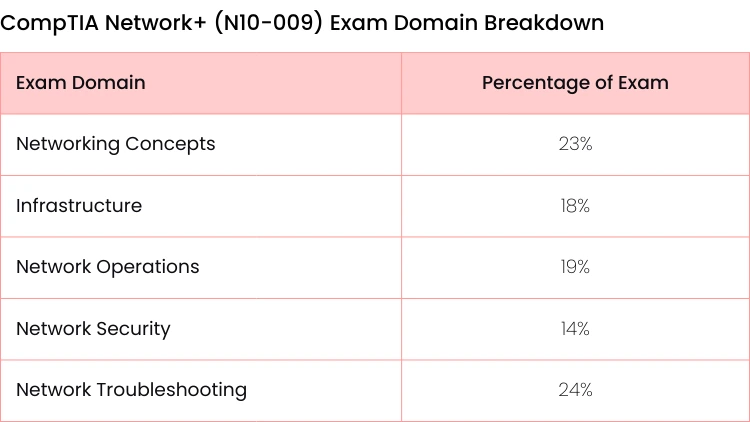
The latest N10-009 version has been refreshed to zero in on the skills that matter most today. The exam domains are now weighted to reflect modern IT priorities, with networking concepts at 23%, network operations bumped up to 19% (to include cool stuff like AI monitoring), and troubleshooting expanded to a massive 24% to cover complex hybrid environments. Network security sits at 14%, but it’s packed with current ideas like zero-trust principles.
The certification has a surprisingly broad appeal, which is why it's such a great starting point for so many different IT paths.
As you can see, whether you're in IT support, administration, or making a complete career change, Network+ is a solid credential to have in your toolkit.
Breaking Down The Core Domains
Let's use a few analogies to make these concepts click.
- Networking Concepts (23%): This is the "grammar" of networking. It covers the absolute fundamentals, like the OSI model.
- Practical Example: Picture the OSI model like a 7-story office building where each floor has a specific job. On Floor 3 (Network Layer), your data packet gets an IP address, just like an address on an envelope. On Floor 4 (Transport Layer), it chooses between TCP (certified mail, requiring a signature) or UDP (a regular postcard). This domain is all about understanding the how and why behind device communication.
- Infrastructure (18%): Think of this as the physical road system for your data. It’s all about the hardware—the routers and switches that act like traffic cops, the cabling that forms the highways, and the wireless access points that create on-ramps.
- Actionable Insight: You'll learn the difference between Cat 5e and Cat 6 cabling and when to use each one. Choosing Cat 6 for a new office installation, for example, future-proofs the network for higher speeds, even if it costs a bit more upfront.
Once you get a handle on these objectives, the abstract world of networking starts to feel like a clear, manageable study plan. You can focus your energy on the areas that carry the most weight on the exam and are most relevant in the workplace.
Operations and Security In Practice
- Network Operations (19%): If infrastructure is the road, then operations is traffic management. This is the day-to-day work of keeping the network healthy.
- Practical Example: This involves using monitoring tools like Wireshark to capture and analyze network traffic, spotting potential bottlenecks before users start complaining about slow-downs.
- Network Security (14%): This is your network’s digital security system. A key part of the N10-009 exam dives into the fundamental principles of network security, teaching you how to build defenses.
- Actionable Insight: You’ll learn how to configure a firewall to block suspicious incoming traffic on specific ports, set up a guest Wi-Fi network that's isolated from your main company network, and implement strong WPA3 encryption on wireless access points.
- Network Troubleshooting (24%): And here's the big one: the detective work. When a user says "the internet is down", this domain gives you the methodical process to find out why.
- Practical Example: You’ll learn to use commands like ping to test connectivity to a server, tracert (or traceroute) to map the path your data takes and identify where it's failing, and nslookup to diagnose DNS issues. For a deeper dive into that last one, this DNS lookup command guide has some handy, real-world troubleshooting tips.
What The Exam Actually Covers
The official exam objectives tell you exactly what CompTIA expects you to know. To recap, this table breaks down the five core domains and how much of the exam each one represents. Knowing this helps you focus your study time where it counts the most.
Seeing troubleshooting as the biggest slice of the pie tells you a lot, doesn't it? CompTIA wants you to be a problem-solver.
Where Can a Network+ Certification Take You?
Getting your CompTIA Network+ certification isn’t just about adding another line to your resume. It's about opening the door to a whole world of stable, in-demand IT careers. Think of it as a universal key that proves to employers you’ve got the hands-on skills to keep their digital operations humming along.
This isn’t just theory. The certification is designed to prepare you for roles where you become the backbone of an organization's IT infrastructure, the go-to person for keeping everyone and everything connected.
A Day in the Life of a Network+ Pro
So, what does a typical day actually look like for someone with these skills? Let’s peek into a few common career paths that a CompTIA Network+ course gets you ready for:
- Network Administrator: Imagine the entire sales team grinds to a halt because their cloud app is unbearably slow.
- Actionable Insight: You’d jump in, use your skills to log into the managed switch, check the port statistics, and quickly pinpoint the bottleneck—a single faulty network cable causing massive packet loss. Replacing that cable restores full speed and saves the day.
- IT Support Specialist: A remote employee is completely cut off, unable to connect to the company network.
- Practical Example: You’d be the calm voice on the other end, walking them through running ipconfig /release and ipconfig /renew to refresh their IP settings. In minutes, you'd find a simple IP conflict was the culprit and get them securely back online.
- NOC Technician: Picture yourself in a Network Operations Center (NOC), monitoring the health of a massive network.
- Actionable Insight: Your training helps you spot an unusual spike in outbound traffic from a specific server. You'd use your knowledge to investigate, identify it as a potential data exfiltration attempt, and immediately apply a firewall rule to block the connection, preventing a security breach before it impacts thousands of users.
The real power of Network+ is its laser focus on practical problem-solving. It gives you the diagnostic mindset to tackle the real-world glitches businesses face every day, making you a valuable asset from the moment you start.
The Financial Side of Certification
Beyond cool job titles, certification delivers a clear financial boost. Earning your CompTIA Network+ unlocks serious earning potential, with certified pros pulling in an average total compensation of around $81,643 a year. Base salaries typically fall between $78,000 and $84,000, with room to grow based on your experience and location.
Of course, getting certified is just the first step. Next, you have to land the job. Learning how to stand out in job applications is a crucial skill to develop.
And if you find yourself drawn more to the server side of things, this guide on mastering Microsoft Windows Server 2019 with hands-on training might be the perfect next step for you.
How to Choose the Right CompTIA Network+ Course for You
Picking the right CompTIA Network+ course is a lot like choosing the right tool for a big project. The best one isn't just about the brand name; it's the one that fits how you learn, what your schedule looks like, and where you want your career to go. Not all training programs are created equal, so knowing what to look for is half the battle.
To really understand networking, you've got to roll up your sleeves and get your hands dirty. That means you should be laser-focused on finding a course that offers practical, hands-on experience. The goal is to find a program that closes the gap between knowing the theory and actually doing the work.
Key Features of a High-Quality Course
When you’re weighing your options, keep an eye out for features that are designed to prepare you for the job, not just the test. Think of it as an investment—it should pay you back with real skills, not just a piece of paper that says you finished.
Here are the non-negotiables:
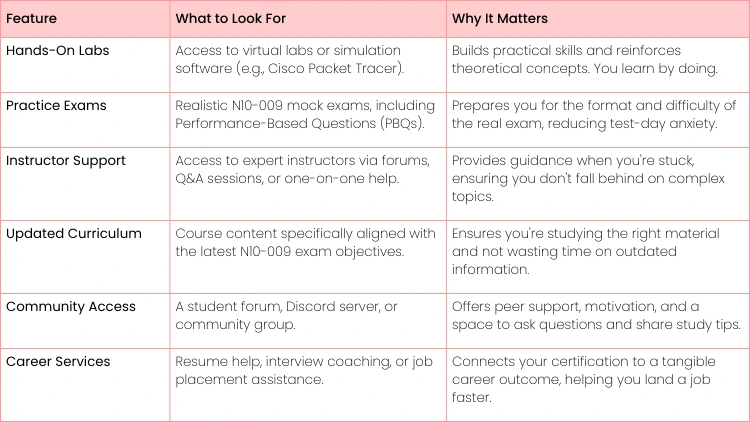
- Hands-On Labs: Does the course give you access to virtual labs or network simulators?
- Actionable Insight: This is an absolute must. There's a world of difference between reading about a router and actually typing configure terminal in a command-line interface to set it up, even if it's virtual. Troubleshooting a simulated network outage is where the concepts really start to stick.
- Realistic Practice Exams: You need practice tests that feel like the real N10-009 exam.
- Practical Example: Look for a platform that includes performance-based questions (PBQs) that ask you to drag-and-drop network components into a diagram or configure a firewall rule in a simulated interface. These are a huge part of the actual test, not just an endless stream of multiple-choice questions.
- Instructor Support: What happens when you're completely stumped by a tough topic like subnetting?
- Actionable Insight: The best courses give you a lifeline—access to instructors or mentors through forums, live Q&A sessions, or even direct messages. Having an expert to turn to can save you from hours of banging your head against the wall.
Choosing a course isn't just about passing an exam; it's about building job-ready confidence. A program rich with hands-on labs and expert support equips you to solve real problems from day one in your new role.
Comparing Network+ Course Features
Use this checklist to evaluate and compare different CompTIA Network+ course providers to find the best fit for your learning needs.
At the end of the day, the best CompTIA Network+ course is the one that respects your unique learning journey. Look for a provider that empowers you with the practical tools and expert support you need to not only ace the exam but to walk into your first networking job feeling prepared and confident.
Crafting Your Own Network+ Study Plan
The amount of material in a CompTIA Network+ course can look overwhelming at first glance. But with a solid plan, you can break it down into much smaller, more manageable pieces. The trick is to stop just reading about networking and start actively doing it.
A good study plan is more than just a calendar—it's your roadmap for active learning. Instead of just passively watching videos, you should be dedicating real time each week to getting your hands dirty. This is how you turn abstract theory into practical skills that will actually stick with you.
Your Week-by-Week Action Framework
Most people find that a 6-8 week timeline works well, but you can adjust this based on how much you already know. Here’s a simple structure to get you started:
- Weeks 1-2 - Get the Fundamentals Down: This is where you dive headfirst into networking concepts and infrastructure. The goal here isn't to become an expert overnight, but to build a strong foundation you can rely on later.
- Actionable Insight: Download a free network simulator like Cisco Packet Tracer and build a simple virtual lab. Set up a basic network with a router, a switch, and a couple of PCs. Actually configuring IP addresses makes the concept feel so much more real.
- Weeks 3-4 - Master Operations and Security: Now you can shift your focus to how networks are managed and, just as importantly, protected. You'll learn how to keep that network you just built running smoothly and safely.
- Practical Example: Create flashcards (digital or physical) for common port numbers and their associated protocols. Come up with silly mnemonics to remember them (like FTP on port 21 is for "File Transfer Protocol, ready for fun at 21" or DNS on port 53 because "DNS fixes your mess"). It sounds simple, but you'll be amazed at how well these little tricks work under the pressure of an exam.
The most effective study plans always mix theory with consistent, hands-on practice. Even just 30 minutes a day in a virtual lab can do wonders for your troubleshooting skills and your confidence.
Final Prep and Key Resources
The last couple of weeks are all about refining what you know and filling in any gaps.
- Weeks 5-6 - Hit Troubleshooting and Review Hard: Spend a lot of time on the troubleshooting domain, since it makes up a whopping 24% of the exam.
- Actionable Insight: Use practice exams to find your weak spots. If you consistently miss questions about DHCP, for example, go back and build a lab where you configure a DHCP server from scratch and watch how it assigns IPs to client machines.
- Weeks 7-8 - Final Review and Full Practice Exams: In the home stretch, focus on taking full-length, timed practice exams. When you get an answer wrong, don't just move on—dig into why it was wrong and understand the logic behind the right answer.
Of course, having the right technical knowledge is only half the battle; you also need the right mindset. For more tips on that, check out this guide on how to improve study habits. A focused, well-planned approach will have you walking into that exam feeling ready to nail it.
How Uplyrn Kicks Your Networking Career Into High Gear
Picking the right CompTIA Network+ course is the last hurdle between you and a new career. Let's be honest, you're not just doing this for a piece of paper. You're doing it to land a job. At Uplyrn, we get that. Our program is built from the ground up to get you past the N10-009 exam and make you shine in your first networking role.
We close the gap between knowing the material and actually doing the job. Our expert-led training makes even the toughest concepts click, and the hands-on virtual labs are where the real magic happens. You'll get your hands dirty configuring routers, segmenting networks, and hunting down common problems in a totally safe environment. This is how you build the kind of confidence that only comes from real experience.
With Uplyrn, you're not just cramming networking theory. You're building a direct pipeline to a new career. Our mission is to arm you with everything you need to land a great job and be awesome at it from day one.
You also get access to our network of seasoned industry pros. Find out how our expert mentors can give you the kind of real-world advice and career guidance you can't get from a textbook.
Ready to build a stable, rewarding career in a field that's always growing? Uplyrn has the training and career mentoring to make it happen. Enroll in our CompTIA Network+ course today!


Leave your thoughts here...
All Comments
Reply