









How to Improve Presentation Skills for Career Success

Giving a good presentation isn't just about what you say. It’s a blend of compelling content, smart design, and confident delivery. If you want to get better fast, focus on those three pillars: structure your ideas like a story, make your slides clean and simple, and practice your delivery until it feels like second nature.
Jump To Section

Earn As You Learn
Earn 25% commission when your network purchase Uplyrn courses or subscribe to our annual membership. It’s the best thing ever. Next to learning,
of course.
From Competent Speaker to Unforgettable Presenter
Being able to present your ideas clearly isn't just a "nice-to-have" skill—it's a genuine career accelerator. Strong presentation skills can be the deciding factor in promotions, getting project sign-offs, and building your professional reputation.
Think back to the last truly great presentation you saw. It probably wasn't just the data that stuck with you. It was the clarity and conviction of the person delivering it.
This guide is designed to get you past the usual advice like "just be yourself" or "picture the audience in their underwear". We’re going to dig into a real-world framework you can use to completely transform how you prepare and deliver. For an even deeper dive, this article on how to improve presentation skills to captivate your audience is a great starting point.
Moving Beyond the Basics
So many people know they need to get better at public speaking but have no idea where to start. They tinker with surface-level fixes but never address the core issues holding them back. The result? They might feel a little less nervous, but the presentation itself is still flat.
My approach is different. It’s all about building tangible skills you can see and measure.
Here’s my game plan:
- Structuring Your Content: We'll look at how to organize your ideas into a compelling narrative that takes your audience on a journey from a clear beginning to a powerful conclusion.
- Actionable insight: You'll learn the "Problem-Solution-Benefit" framework to structure any presentation in under 10 minutes.
- Designing for Clarity: This is all about using slides as a visual backdrop to support your message, not as a teleprompter crammed with text.
- Actionable insight: I'll introduce the "One Idea Per Slide" rule and show you how to transform a text-heavy slide into three powerful visuals.
- Mastering Your Delivery: You’ll learn to control your voice, body language, and pacing to command the room and keep your audience locked in.
- Actionable insight: You'll get a simple vocal exercise you can do in your car on the way to work to improve your vocal range.
- Handling Tough Scenarios: I'll cover everything from managing pre-talk jitters to handling tricky questions during the Q&A with total poise.
- Actionable insight: I'll give you a word-for-word script for deflecting a hostile question without sounding defensive.
A great presentation has two components: a well-structured message and a confident delivery. You cannot have one without the other. Focusing only on reducing anxiety without improving your actual content is like polishing a car that has no engine—it might look better, but it won’t go anywhere.
Whether you're presenting to your team in a weekly sync or speaking at a major conference, these strategies are designed for you to use right away. The goal is to give you the practical tools you need to make every single presentation impactful and memorable.

Crafting a Narrative That Connects and Persuades
Let's be honest, the presentations that stick with us aren't the ones packed with endless data points. They're the ones that tell a great story. It's just how we're wired as humans. A compelling narrative gives context, sparks emotion, and makes even the most complex ideas easy to grasp and remember long after you’ve left the room.
Think about it: when you just throw facts at your audience, you’re making them do all the heavy lifting to figure out what it all means. But when you weave those facts into a story, you become their guide, leading them through the information in a way that feels completely natural and makes perfect sense.
This is the most critical shift you can make. Stop thinking of yourself as someone "presenting data" and start seeing yourself as a storyteller. It's the difference between being a lecturer and being a true guide.
Adopt an Audience-First Framework
Before you even think about opening PowerPoint or writing a single bullet point, you need to get inside the heads of the people you'll be speaking to. The single biggest mistake I see people make is building a presentation around what they want to say, completely ignoring what their audience actually needs to hear.
An audience-first approach flips that script. You have to start by stepping into their shoes and asking some really important questions.
Key Questions to Ask About Your Audience:
- Who are they, really? Think about their jobs, their level of experience, and what they already know (or think they know) about your topic. Are you talking to seasoned executives, junior engineers, or a mixed bag?
- Practical Example: If you're presenting a technical update to executives, skip the code snippets and focus on the business impact, timeline, and budget. For engineers, you'd do the opposite.
- What keeps them up at night? Get to the heart of their goals, challenges, and frustrations. Your message has to connect to something they genuinely care about, like solving a problem they’re facing.
- Practical Example: A sales team doesn't just want to hear about a new product feature; they want to know how that feature will help them close more deals and hit their quota. Frame it that way.
- What are they expecting from you? Are they here for a 30,000-foot strategic view, or do they want to get into the nitty-gritty technical details? A mismatch in expectations is the fastest way to lose them.
- What do you want them to do? Every single part of your presentation should be laser-focused on leading them to one specific, crystal-clear action.
- Actionable Insight: Write down your call to action on a sticky note and put it on your monitor before you start building your slides. If a slide doesn't help get you to that action, cut it.
Once you have the answers to these, you've got the foundation for your entire narrative. It helps you find the perfect angle to make sure your message doesn't just get heard, but actually lands with real impact.
Use Classic Storytelling Structures
You don't have to be the next great novelist to use storytelling effectively. There are simple, time-tested structures that can give your content a powerful backbone. The easiest and most effective is the classic three-act structure.
Act 1: The Setup
This is your opener, and you have one job: grab their attention. You need to establish the "problem" or the current reality right away. Kick things off with a surprising stat, a personal story they can relate to, or a sharp question that introduces the core conflict your presentation is about to solve.
- Practical Example: Don't start with, "Today, I'll be reviewing the Q4 sales figures." Instead, try something like: "Last quarter, we noticed something strange. Despite our best efforts, customer churn jumped by 15%. Today, we're going to dig into why that happened and, more importantly, what we're going to do about it."
See the difference? That opening immediately presents a problem your audience cares about, giving them a compelling reason to lean in and listen.
Act 2: The Confrontation
This is the heart of your presentation. Here's where you build your case, present your data, and take the audience on a journey of discovery. You’ll introduce the challenges you faced, the obstacles you had to overcome, and the steps you took to get here.
This is where your evidence comes in, but you frame every piece of it as part of the unfolding story. Each data point should build on the last, logically guiding the audience toward the big reveal. For a deeper dive, check out this guide on how to craft your core message so it really sticks.
Act 3: The Resolution
This is your grand finale. You resolve the conflict you introduced back in Act 1 by revealing your solution, your key findings, or the big takeaway. It needs to be sharp, concise, and directly answer the "So what?" question that’s been on their minds.
Your conclusion is the most important part of your presentation. It's the final thought you leave with your audience. Make it powerful, actionable, and directly tied to the problem you introduced at the beginning.
Always end with a clear call to action. Don't just rehash what you said. Tell your audience exactly what you want them to do with this information.
- Practical Example: Instead of ending with "So, that's our plan", end with "To hit our Q1 goal, I need your approval on this budget by Friday. Are there any final questions before we move forward?" This is a clear, time-bound request that drives action.
Designing Slides That Amplify Your Message
Think of your slides as your backup singer, not the lead vocalist. Their job is to support what you’re saying—to add visual punch and clarify your points. They are absolutely not a teleprompter for you or a research paper for your audience.
We’ve all sat through presentations where the speaker crams every last detail onto a slide. This creates a wall of text that pits you against your own visuals. The audience is forced to choose: read the slide or listen to you? They can’t do both, and they’ll probably tune out completely.
The real goal is to create visuals that make your message stick. A great slide deck is a secret weapon; it guides attention, makes complicated ideas feel simple, and keeps everyone locked into the story you’re telling.
Embrace the One Idea Per Slide Rule
Want the fastest way to instantly improve your slides? Adopt one simple but incredibly powerful principle: one core idea per slide. That’s it. This single change is a game-changer because it prevents the dreaded cognitive overload that happens when you throw too much at your audience at once.
When a slide is cluttered with multiple bullet points, a chart, and a long headline, your audience’s attention scatters. They waste mental energy just trying to figure out what’s important instead of actually absorbing what you’re saying.
The purpose of a slide is to create a visual and emotional connection to your words, not to document them. If you find yourself reading directly from a slide, it’s a clear sign that it contains too much information. Cut it down or split it into multiple slides.
This one-idea approach forces you to be disciplined. You have to boil every part of your message down to its absolute essence and then find the single best way to show it.
Core Design Principles for Non-Designers
You don't need a degree in graphic design to make beautiful, effective slides. Just focusing on a few key fundamentals can elevate your presentation from amateur to pro. To really amplify your message, it helps to incorporate a range of powerful visual aids for presentations.
Here are the three areas where you’ll get the most bang for your buck:
- Visual Hierarchy: This is just a fancy way of saying you need to show what’s most important. Use size, color, and placement to guide the eye. Your headline or that killer statistic should be the biggest, boldest thing on the slide. Everything else is secondary.
- Actionable Insight: Try the "squint test". Squint your eyes at your slide. The most important element should still be clearly visible. If everything blurs together, your hierarchy is weak.
- Simple Color Palette: Stick to two or three complementary colors, max. A chaotic color scheme looks unprofessional and is incredibly distracting. Use one main color for backgrounds or big elements and a pop of a contrasting color to highlight key info.
- Actionable Insight: Use a free online tool like Coolors to generate a professional palette in seconds. Just pick a primary brand color, and it will suggest complementary shades.
- Clean Typography: Choose one or two fonts that are dead simple to read, and use them consistently. A clean sans-serif font like Helvetica or Arial is perfect for on-screen text. Create contrast with font weight (bold) and size, not by using a dozen different typefaces.
These elements work together to create a clean, professional vibe that makes your information easy to swallow. If you're curious about the theory behind this, you can learn more about the 8 essential elements of graphic design.
From Cluttered Text to Powerful Visuals
Let’s make this real. Imagine a slide titled "Q3 Performance" that’s followed by five bullet points detailing sales growth, market share, and customer acquisition numbers. Sure, the information is there, but it’s completely forgettable.
Now, let's break that one cluttered slide into a sequence of powerful moments. This is a practical application of the 'one idea per slide' rule.
- Slide 1: A full-screen, high-quality image of an upward-trending graph. The only text is a massive number: "+25%". Below it, in a smaller, clean font: "Record Sales Growth in Q3."
- Slide 2: A simple pie chart. Only one slice is highlighted in your bright accent color. The text right next to it reads: "Captured 5% New Market Share."
- Slide 3: A bold, simple icon of a person with a plus sign. Next to it: "10,000+ New Customers Acquired."
See the difference? Each slide now delivers a single, clear, powerful idea. The visuals make the numbers feel real and memorable. This stuff works. When presentations use strong visuals, audience retention skyrockets. In fact, adding good visuals can boost retention from 70% to 85% within three hours of delivery.
Ultimately, great slide design is about subtraction, not addition. It's about having the confidence to remove everything that doesn't directly support the one point you’re making right now.

Mastering Your Delivery and Onstage Presence
Let's be honest: how you say something is often more important than what you say. You can have a perfectly crafted story and jaw-dropping slides, but if your delivery is flat, the whole thing falls apart. This is where we pivot from the what to the how—your voice, your body language, and the way you own the space.
Your delivery is what transforms a one-way information dump into a real human connection. It's that mix of vocal energy, purposeful movement, and authentic confidence that keeps people leaning in, not zoning out. Without it, you’re just reading slides. With it, you become a guide people want to follow.
The great news? A powerful stage presence isn't some magic gift. It’s a set of skills, and like any skill, it can be learned, practiced, and mastered. By breaking it down, you can build an authentic presence that feels both natural and authoritative.
Harnessing the Power of Your Voice
Think of your voice as your most powerful tool for conveying emotion and keeping your audience hooked. A monotone delivery is an instant sedative. The key is to consciously practice vocal modulation—that’s just a fancy way of saying you need to vary your pitch, pace, and volume to add color and emphasis to your message.
One of the most underused techniques is the strategic use of silence. Seriously. Pausing right before you reveal a key statistic or after you ask a thought-provoking question builds anticipation. It gives the audience a beat to process what you’ve said and signals that it was important.
Actionable Vocal Exercises:
- Pacing Practice: Grab a book and record yourself reading a paragraph aloud. First, read it at your normal speed. Now, read it again but 50% slower, really focusing on hitting every single word. Finally, read it a third time, but this time, intentionally speed up on the less critical phrases and slow right down for the key points. This exercise breaks you out of that single-speed rut.
- Volume Variation: Take one sentence from your presentation. Practice saying it in a near-whisper, then in a normal conversational tone, and finally, project it as if you’re trying to reach the back of a large room. This builds your ability to punch up your volume for emphasis.
Projecting Confidence Through Body Language
Your nonverbal cues are screaming messages to your audience, whether you realize it or not. How you stand, move, and gesture sends constant signals about your confidence and conviction. Start with an open, confident posture—shoulders back, feet planted firmly. This simple shift immediately projects authority.
Genuine eye contact is your bridge to the audience. Don't just sweep your gaze across the room like a security camera. Try to connect with individual people for a few seconds at a time. And if you're presenting virtually? This means looking directly into the camera lens, not at your own face on the screen. For a deeper dive, check out this guide on body language tips to make a strong impression.
Your physical presence sets the energy in the room. If you appear closed off, nervous, or distracted, your audience will mirror that energy right back at you. When you stand with confidence and move with purpose, you give your audience permission to relax and trust your message.
Purposeful gestures are great for punctuating your message, but random, nervous fidgeting is just a distraction. Use your hands to emphasize a point, illustrate a concept, or count off items.
- Actionable Insight: Identify one nervous habit you have (like touching your hair or shifting weight). Before you practice, put a rubber band on your wrist. Every time you catch yourself doing the habit, give the band a light snap. This uses gentle negative reinforcement to build awareness and break the cycle. The best way to catch and kill these habits? Record yourself practicing.
Mastering these skills isn't just a "nice to have" anymore. Demand for presentation coaching has surged, with a 40% increase recorded in 2025 as professionals hunt for a competitive edge. The stakes are real—poor public speaking skills have been shown to reduce wages by around 10%. You can find more insights on the career impact of communication here.
From Practice to Polish: Nailing Your Delivery
You can have the most brilliant story and the slickest slides, but if your delivery falls flat, so does your message. The real magic happens in the hours you spend practicing between presentations. This isn’t about just reading your notes; it’s a structured process of rehearsal and refinement that builds the confidence you need to truly connect with your audience.
The goal isn't rote memorization. It's about knowing your material so well that you stop thinking about the words and start focusing on the people in front of you. That’s how you turn a good presentation into an unforgettable one.
Adopt the Chunking Technique for Rehearsal
Staring down a 45-minute presentation and trying to practice it all at once is a recipe for frustration. It's overwhelming and, honestly, not very effective. A much smarter approach is the chunking technique.
Break your presentation down into smaller, logical pieces—maybe the intro, that one critical data point, or the closing story. Master each one individually.
Practical Example: For a project proposal presentation, your chunks might be:
- The opening story about the customer problem (2 minutes).
- The demonstration of your proposed solution (5 minutes).
- The budget and timeline slide (1 minute).
- The closing call to action (1 minute).
Start with your opening. Just the first two minutes. Run through it until it feels completely natural. Then, move on to the next segment. Once you’ve got a few chunks down cold, you can start stringing them together. This method builds momentum and makes the full run-through feel way less intimidating.
For a deeper dive into smart rehearsal strategies, check out this guide on how to practice like a master speaker. It’s packed with frameworks to make every practice session count.
Record Yourself to See What Your Audience Sees
We’re often our own worst critics, but we’re also blind to our most distracting habits. You might feel like you’re standing perfectly still, but a video could reveal you’ve been swaying the whole time. You might think your pacing is spot-on, but the recording shows you’re blazing through your most important points.
Recording yourself, even just on your phone, is the single most powerful tool for getting an honest look at your performance.
When you watch it back, look for specifics:
- Filler Words: How many times did you say "um", "ah", "like" or "you know"? Just becoming aware of the habit is the first step to kicking it.
- Nervous Gestures: Are you fidgeting with a pen? Constantly touching your face? Identify these habits so you can replace them with more purposeful movements.
- Pacing and Pauses: Do you use pauses for dramatic effect, or do you just rush from one idea to the next? Give your audience a moment to absorb what you’re saying.
Watching yourself on video can be cringe-worthy, but it's absolutely essential. It’s the unfiltered truth about your delivery. Lean into the discomfort—that’s where real growth happens.
How to Ask for Feedback That’s Actually Useful
While recording yourself is critical, getting an outside perspective from a trusted colleague or mentor is invaluable. But simply asking, "So, what did you think?" is a surefire way to get a polite, "It was great!"
To get feedback you can actually use, you need to ask better questions. Be specific.
Guide your reviewer on what to look for. This helps them move beyond vague compliments and give you actionable insights. This structured approach to feedback is becoming a big deal in professional development. It's no surprise that 72% of businesses in North America reported a higher demand for presentation training as of 2025. Strong communication is no longer a soft skill; it’s a core competency.
Instead of asking "How was it?", try these questions:
- "What was the single most memorable thing I said, and why did it stick with you?"
- "Was there a moment where you felt lost or confused?"
- "On a scale of 1-10, how was my energy? What could I do to kick it up a notch?"
- "Did my slides support my points, or were they more of a distraction?"
When you get the feedback, your only job is to listen. Don't get defensive. Just absorb what they're saying, thank them for their time, and start looking for patterns. If one person says you spoke too fast, it's an opinion. If three people say it, you've got a problem to fix. This is how you turn every practice session into a measurable step forward.
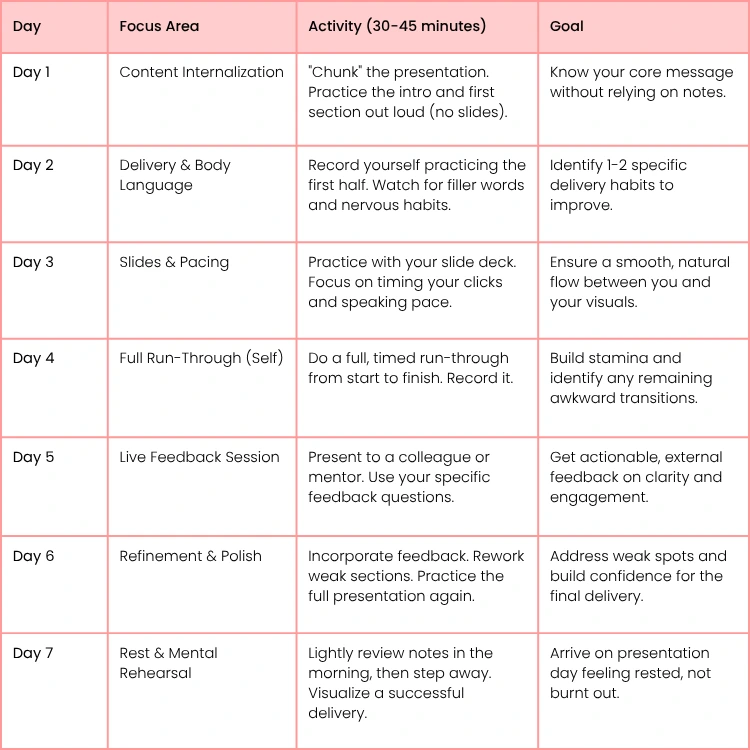
Effective Presentation Practice Schedule
To put this all into action, here’s a sample schedule you can adapt. Spreading out your practice sessions is far more effective than cramming the night before. This structure helps you build skills systematically.
This schedule provides a framework for turning raw content into a polished performance. By focusing on one area at a time, you build skills layer by layer, ensuring you're fully prepared and confident when it’s time to step on stage.
Answering Your Toughest Presentation Questions
No matter how much you prepare, some challenges always seem to creep in. Let's tackle some of the most common hurdles presenters face, using practical advice I've picked up over the years to help you handle these tricky moments like a pro.
Think of this as your go-to guide for those situations that can really throw you off your game. The goal isn't just to survive them, but to have a clear, repeatable process for turning them into a win.
How Can I Effectively Manage Anxiety Before a Big Presentation?
Those pre-show jitters are completely normal. The trick is to channel that nervous energy into focus instead of letting it take over. This comes down to a mix of mental shifts and simple physical exercises.
First, reframe how you see the event. You're not putting on a "performance" for a panel of judges. You're having a "conversation" to help your audience. This tiny mental switch takes the pressure off you and puts the focus where it belongs: on your message.
Then, build a pre-presentation ritual with a few physical tricks:
- Deep Breathing: Just before you go on, try box breathing. Inhale for four seconds, hold for four, exhale for four, and hold for four. It's a simple way to slow your heart rate and tell your nervous system to calm down.
- Burn Off Adrenaline: A quick, brisk walk about 15-20 minutes before you're on can work wonders. It helps burn off that excess adrenaline, leaving you feeling more centered.
- Get Familiar with the Space: If you can, show up early. Walk the stage, click through your slides, and test the mic. Making the environment familiar removes a lot of small unknowns that can fuel anxiety.
What Is the Best Way to Handle Difficult Questions During a Q&A?
A tough question doesn't have to be a scary moment. In fact, if you have a strategy ready, you can maintain your cool and actually strengthen your credibility. A hostile question can feel personal, but your job is to address the issue, not the person.
The absolute first step is to listen—really listen—to the entire question without cutting them off. It shows respect and, more importantly, ensures you actually understand what they're asking.
When you're challenged, your first instinct is to get defensive. Fight it. The poise and professionalism you show in that moment will earn you far more respect than a technically perfect answer ever could.
Once they've finished, paraphrase their question back to them in neutral terms. Something like, "So, if I'm hearing you right, you're asking about the budget impact of this plan?" This does two critical things: it confirms you understood, and it buys your brain a few extra seconds to organize your thoughts.
If you have the answer, state it directly and with confidence. If you don't, it is 100% okay to say, "That’s a great question, and I don't have the specific data on that right now. I'd be happy to find out and follow up with you." That's infinitely better than guessing and being wrong. For a deeper dive, check out these golden tips for answering questions smartly.
How Do I Keep a Virtual Audience Engaged?
Keeping a remote audience from checking their email requires a much more deliberate approach than an in-person talk. You're not just competing for their attention; you're competing with everything else on their screen.
The golden rule here is to build in some form of interaction every 5-7 minutes. This simple rhythm breaks up the monologue and constantly pulls your audience back into the conversation.
Here are a few practical ways to make that happen:
- Use the Tools: Don't just talk. Launch a quick poll, ask a question and tell people to pop their answer in the chat, or use the "raise hand" feature to get a quick feel for the room.
- Practical Example: "I'm curious, how many of you have faced this problem before? Click the 'raise hand' button if you have." This is a low-effort way to re-engage everyone instantly.
- Vary Your Voice: Your voice is your most powerful tool online. Be more dynamic with your pitch, pace, and volume than you would in person to keep things from sounding flat.
- Call People Out (in a good way!): When someone asks a great question or makes a point in the chat, use their name. "That's a great point, Sarah," makes the experience personal and shows you're actually listening.
- Optimize Your Visuals: Make sure your camera is at eye level and you have good lighting on your face. A clean, distraction-free background also sends a signal that you're a professional who takes this seriously.
- Actionable Insight: Put a small desk lamp or ring light behind your laptop, facing you. This simple change dramatically improves your video quality and makes you look more present and professional.
Ready to turn these insights into second nature? At Uplyrn, we provide the courses and mentoring you need to become a truly unforgettable presenter. Connect with industry experts and build the skills that will accelerate your career. Start learning with Uplyrn today.


Leave your thoughts here...
All Comments
Reply