









What is IPv4 and Know How It Powers the Internet

Think of IPv4 as the internet's original postal service. Just like your house has a specific street address so the mail carrier knows where to drop your letters, every single device connected to the internet—your phone, your laptop, even your smart fridge—needs a unique address. This is its Internet Protocol Version 4 (IPv4) address, and it's the fundamental system that ensures data gets exactly where it needs to go across the vast, global network.
Jump To Section

Earn As You Learn
Earn 25% commission when your network purchase Uplyrn courses or subscribe to our annual membership. It’s the best thing ever. Next to learning,
of course.
The Digital Address System Explained
At its heart, an IPv4 address is simply a 32-bit numerical label. This number is the invisible workhorse behind almost everything you do online, from browsing a website to sending an email or streaming a movie.
- Here’s a practical example: when you type a website's name like uplyrn.com into your browser, a process called DNS lookup kicks in. It acts like a digital phonebook, translating that human-friendly domain name into its corresponding IPv4 address (e.g., 104.21.92.148). Your computer then shoots a request to that specific numerical address. The website's server sees your device's IPv4 address as the "return address" and sends the webpage data right back to you. It's a perfect two-way street.
Why This Matters for You
Getting a handle on IPv4 isn't just for network engineers; it helps demystify how the internet actually functions. It’s the core logic that prevents online traffic from descending into chaos.
- Pinpoint Delivery: It guarantees that the cat video you requested lands on your screen, not your neighbor's.
- Unique Identification: Every device on the network gets its own distinct address, preventing any data mix-ups.
- Global Connection: This standardized addressing system is what allows a computer in Tokyo to seamlessly talk to a server in Toronto.
Actionable Insight: If you're ever having trouble connecting to a website, you can use a command like ping uplyrn.com in your command prompt or terminal. This will not only show you the website's IPv4 address but also test if your computer can reach it. This is a first-step troubleshooting technique for any IT professional.
Curious about how domain names and IP addresses connect? You can see this process in action by checking out this DNS lookup command guide.
IPv4 at a Glance
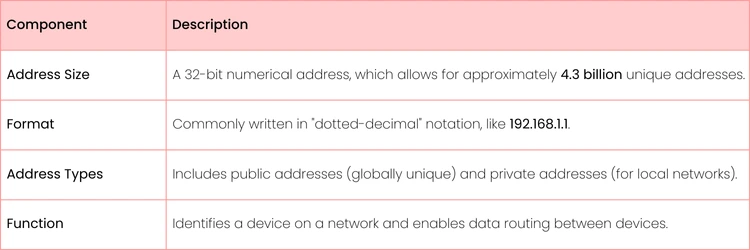
To quickly break it down, here are the core components that make up IPv4.
This table gives you a snapshot of the protocol that has powered the internet for decades, acting as the bedrock for all our digital communications.
Breaking Down an IPv4 Address
When you see an IPv4 address like 192.168.1.1, it’s easy to think of it as just a string of numbers. But it’s actually a highly structured address with two distinct parts that work together to route data exactly where it needs to go. Getting your head around this structure is the first real step to understanding how networks tick.
Think of it like a physical mailing address. Every address has two key pieces of information: the street name and the house number. In the world of IPv4, this translates perfectly to the network portion and the host portion. The network part identifies the specific "street" (the network) your device is on, while the host part points to the individual "house" (your device).
The Network and Host Analogy
Let's stick with that analogy for a second. Imagine your home Wi-Fi network is "Maple Street".
- Practical Example: Let's say your network is 192.168.1.0. The 192.168.1 part is "Maple Street". It tells your router that any device starting with these numbers belongs to the same local family.
- Host Portion: The final number is the unique "house number". Your router might grab .1, your laptop could be .5, and your phone might be assigned .12. Your laptop's full address would be 192.168.1.5.
This simple division is incredibly powerful. It allows a router to know instantly whether to send a packet of data to another device right there on your local network or if it needs to send it out to the wider internet. This foundational concept was standardized way back in September 1981, giving us the 32-bit addressing system that powered early networks like ARPANET and, eventually, the internet as we know it. You can read more about the history of IPv4 address allocation.
From Decimals to Binary
While we humans see IPv4 addresses in a friendly dotted-decimal format, computers speak a different language. They see these addresses in binary—a sequence of just 1s and 0s. Each number between the dots is called an octet, and it represents 8 bits of the total 32-bit address.
So, when you see 192.168.1.1, your router sees this: 11000000.10101000.00000001.00000001
Actionable Insight: Understanding this binary structure is key for anyone aspiring to be a network administrator. It’s the foundation for calculating subnets to efficiently organize a network. A practical skill is to practice converting common decimal numbers like 192, 168, 255, and 0 into their 8-bit binary equivalents to build speed and accuracy for networking exams and real-world tasks. You can learn more by exploring the top reasons why you should use Linux for server and network management.

Understanding Subnetting and Address Classes
Back in the early days of the internet, IPv4 addresses were handed out in big, inflexible chunks called address classes.
Think of it like buying land. You had three main options:
- Class A: A massive ranch, perfect for a huge corporation needing millions of addresses.
- Class B: A decent-sized farm, good for a university or large organization.
- Class C: A small suburban lot, just right for a small business.
The problem? It was incredibly wasteful. A company needing just 500 addresses might get stuck with a Class B block, which came with over 65,000 of them. Most of those addresses would just sit there, completely unused, while others were desperate for space. This rigid system just wasn't sustainable.
The Smarter Solution: Subnetting
This glaring inefficiency led network engineers to develop a much more flexible approach: subnetting.
Subnetting is simply the practice of taking one large network and carving it up into smaller, more manageable pieces called "subnets". It’s like a property developer taking that big farm (a Class B network) and dividing it into custom-sized lots for individual homes. No space is wasted, and everything is much more organized.
This wasn't just about saving addresses. By creating smaller, isolated subnets, administrators could improve security, reduce network chatter (broadcast traffic), and seriously boost performance. It put the control right back where it belonged: with the network managers.
At its core, every IP address has two parts: one piece identifies the network, and the other identifies the specific device (the host) on that network. Subnetting is the art of manipulating the boundary between those two parts.
Today, we rarely talk about the old Class A, B, and C system. Instead, we use Classless Inter-Domain Routing (CIDR) notation. You've definitely seen it before—it’s the slash and number at the end of an IP address, like /24 or /16.
That number simply tells us how many of the 32 bits in the address are locked in for the network portion.
- Practical Example: A /24 network uses the first 24 bits for the network ID. This leaves the final 8 bits for host devices, giving you 254 usable IP addresses (2^8 - 2). It’s a super common setup for small and medium-sized local networks. An office of 50 people would be a perfect fit for a /24 network.
Getting a handle on subnetting and CIDR is non-negotiable for anyone working in networking, especially in server environments. It's this level of control that truly defines modern network management.
Public vs Private IPv4 Addresses Explained
Not all IPv4 addresses are created equal. In fact, they fall into two very distinct categories that serve completely different purposes. The big difference boils down to where they can be used: on the wide-open public internet or tucked away inside a private, local network.
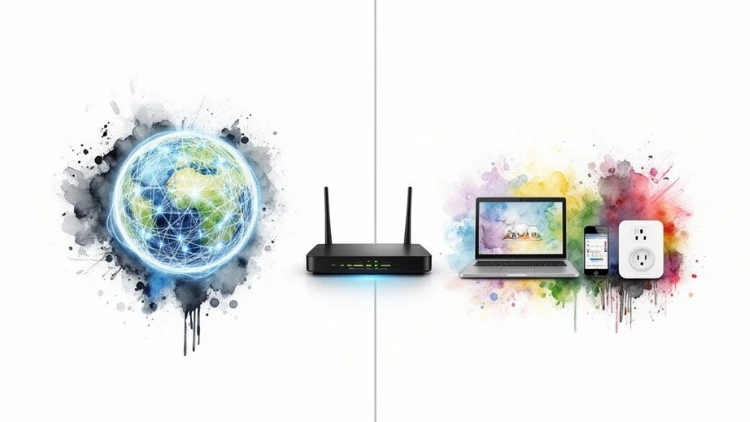
A public IPv4 address is your unique, globally reachable identifier on the internet. Your Internet Service Provider (ISP) assigns this to your router, and it’s the single address the rest of the world sees when you go online.
On the flip side, a private IPv4 address is only used within your own network—think of your home or office Wi-Fi. It’s what lets your laptop, phone, and smart TV talk to each other and your router, but it’s completely invisible to the outside world.
The Office Phone Analogy
Imagine a large company’s phone system. The business has one main, public phone number that anyone can dial from the outside. That’s your public IP address.
Inside the office, though, every employee has their own unique 3- or 4-digit extension. These extensions only work for making calls within the company; they’re useless for anyone trying to call in from the outside. These are your private IP addresses.
This whole setup works because of a critical piece of networking magic called Network Address Translation (NAT).
Actionable Insight: You can easily find your public and private IP addresses. To find your public IP, simply search "what is my IP address" in Google. To find your private IP, open your command prompt (on Windows) and type ipconfig or your terminal (on Mac/Linux) and type ifconfig or ip a. Knowing the difference is crucial for tasks like port forwarding for gaming or setting up a home media server.
When a response comes back from a website, the router remembers which internal device made the original request and forwards the data to the correct private IP. This clever translation is what allows dozens of devices to share just one public address, a crucial trick that helped us stretch the limited supply of IPv4 addresses.
Managing both public and private address spaces is a core part of keeping things running smoothly and securely. A solid grasp of network security fundamentals is a must here. If you want to get into the weeds of how this process works for specific applications like video calls, it's worth learning more about STUN Servers and NAT Traversal.
The Reality of IPv4 Address Exhaustion
Back in the day, the pool of roughly 4.3 billion IPv4 addresses felt bottomless. Who could ever use that many? Well, it turns out we could. The explosion of personal computers, followed by smartphones and a tidal wave of Internet of Things (IoT) devices, devoured that supply much faster than anyone anticipated.
Suddenly, the internet had outgrown its original address book. This scarcity turned IPv4 addresses from a free, technical resource into a hot commodity. Like any finite resource, as the well started to run dry, demand shot through the roof. This kicked off a surprisingly active marketplace where large companies, cloud providers, and ISPs began buying and selling blocks of unused addresses.
The core takeaway is that IPv4 exhaustion wasn't a distant theoretical problem; it became a real-world economic and technical challenge that directly impacted the internet's ability to expand.
The Rise of the IP Address Market
As the central registries ran out of addresses to give away, a full-blown global market was born. We're not talking about small-time trades, either. The transfer volumes were massive, with huge spikes happening right after the main registries officially hit empty.
Take 2015, for example. It was an absolutely wild year that saw a combined 44.8 million addresses change hands. That was a staggering 667% jump from the year before. If you're curious about these trends, you can discover insights from 10 years of IPv4 address transfer statistics.
This intense economic pressure, coupled with the clear technical ceiling, proved that workarounds like NAT were just putting a bandage on the problem. The internet needed a bigger, more permanent solution to keep growing. This urgency was the real catalyst behind the push for a next-generation protocol, setting the stage for the transition to IPv6.
Why IPv6 Is the Future of the Internet
With IPv4 addresses all but gone, the internet was facing a serious growth problem. The solution? A next-generation protocol called Internet Protocol Version 6 (IPv6), designed from the ground up to solve the address shortage for good. Its headline feature is a mind-boggling 128-bit address space.
To put that number into perspective, IPv6 offers more unique addresses than there are grains of sand on Earth. It's a practically infinite supply built for a future where trillions of devices—from your smart thermostat to industrial sensors on a factory floor—can all have their own direct line to the internet.
Navigating a Gradual Transition
Even with its obvious benefits, flipping the switch to IPv6 isn't something that happens overnight. The protocol was actually introduced way back in 1999, but adoption has been slow. The reality is that upgrading every piece of legacy hardware and software takes time and money, which is why IPv4 still carries most of the internet traffic you see today.
Actionable Insight: For any IT pro working today, the key takeaway is that both protocols are going to be around for the foreseeable future. A practical action is to check if your own network is IPv6-ready by visiting a site like test-ipv6.com. This can help you understand your current capabilities and prepare for troubleshooting in a dual-stack world.
This dual reality makes a solid grasp of network protocols more critical than ever. If you're looking to build a career in this space, this comprehensive IPv4 vs IPv6 course dives deep into these foundational networking principles.
Common Questions About IPv4
Once you start digging into IPv4, a few questions always seem to surface. Let's tackle some of the most common ones to clear things up and give you some real-world context.
Can I Choose My Own Public IPv4 Address?
In a word, no. Your public IPv4 address isn't something you can pick and choose. It's handed to you by your Internet Service Provider (ISP), who manages huge blocks of these addresses and assigns them to customers as needed.
Where you do have control, though, is with your private IPv4 addresses on your local network. This is where you can get hands-on. For instance, you could assign a static IP like 192.168.1.100 to your office printer. Why? So your computers always know exactly where to find it, preventing those annoying "printer offline" messages. This is a practical step you can take by logging into your router's admin panel and setting up a DHCP reservation for the printer.
Will IPv4 Be Replaced Completely?
While IPv6 is definitely the way forward, don't expect IPv4 to vanish overnight. It's just too deeply embedded in the internet's DNA. This is important to know, especially when you run into connection problems; a good starting point is often troubleshooting common IP configuration failures.
The internet is built on mountains of hardware and software that speak IPv4. Because of this, both protocols are set to coexist for a long, long time. Modern networks run in a "dual-stack" mode, supporting both IPv4 and IPv6 side-by-side to make sure everything just works.
At Uplyrn, we believe that understanding foundational tech concepts is key to career growth. Our expert-led courses provide the practical skills you need to succeed in the IT industry. Explore our tech courses today!


Leave your thoughts here...
All Comments
Reply