









Your Guide to Data Center Certifications in 2026
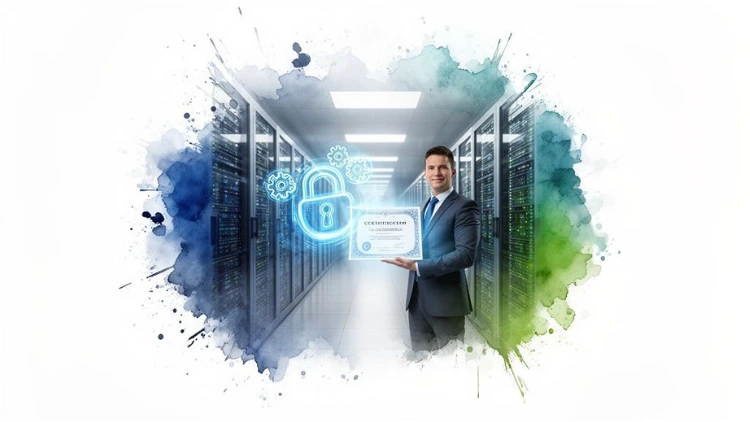
Trying to make sense of data center certifications can feel a little overwhelming at first. The easiest way to think about it is like running a professional kitchen. The restaurant itself needs health and safety certificates for its equipment and cleanliness, but you also need certified chefs who actually know how to cook. It’s the same idea here—one set of standards for the facility, and another for the people running it.
Jump To Section

Earn As You Learn
Earn 25% commission when your network purchase Uplyrn courses or subscribe to our annual membership. It’s the best thing ever. Next to learning,
of course.
Why Data Center Certifications Matter
In the data center industry, these certifications are basically a shared language for trust. They aren’t just fancy badges to hang on a wall; they’re the proof that the digital services we all use every day—from your favorite streaming service to complex AI tools—are secure, dependable, and running efficiently. Without these standards, there would be no reliable way for a business to know if a provider's facility is truly resilient or if its staff has the right skills for the job.
This guide will demystify data center certifications by splitting them into two simple groups. Getting this distinction right is the first step, whether you're a company looking for a data center partner or a tech pro mapping out your next career move.
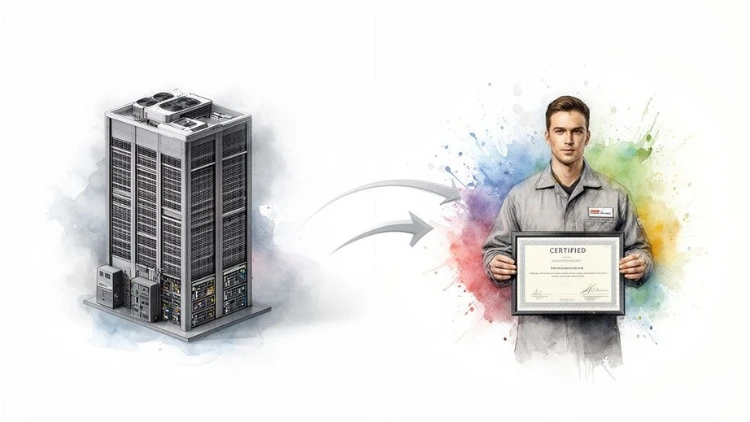
The Two Pillars of Certification
The whole world of data center credentials stands on two main pillars. They serve very different functions, but they absolutely need each other to build a digital infrastructure you can count on.
- Facility Certifications: These are all about the physical building and its systems. They check things like power redundancy, cooling efficiency, and physical security to prove the facility can stay online, no matter what.
- Professional Certifications: These are for the people. They confirm that the individuals designing, operating, and maintaining the data center have the expert knowledge to do their jobs correctly.
Here’s another way to look at it: A hospital might have a top-notch building certification because of its advanced operating rooms and backup generators (that’s the facility cert). But you wouldn't let them operate on you unless the surgeons and nurses had their medical licenses and credentials (the professional certs). You need both for a good outcome.
- Actionable Insight: When evaluating a potential data center provider, don't just take their word for it. Ask for their specific certification documents. For a facility, request their Uptime Institute Tier certificate. For their staff, ask what percentage of their operations team holds professional credentials like CDCP. This tangible proof separates marketing claims from operational reality.
A Practical Look at Each Category
Let's dig a little deeper into what these certifications actually mean in the real world. This will give you a solid foundation before we jump into the specific certs later in this guide.
For a business, some of these certifications are non-negotiable. For example, understanding what is SOC 2 certification is crucial if you handle customer data. It’s a facility-level audit that essentially proves a provider has the right controls in place to keep that data secure.
For you as a professional, getting certified is the most direct way to prove your worth. It shows you're serious about your craft and immediately makes you a stronger candidate for better jobs. Many of the people who earn these credentials go on to become the go-to experts in their field.
Decoding Essential Facility Certifications
When you hand over your data to a third-party data center, you're placing an immense amount of trust in them. You're counting on their building to protect your most critical digital assets from everything—power outages, physical break-ins, you name it.
Facility certifications are the proof in the pudding. They act as a report card, showing that a facility has been rigorously audited against tough industry standards for reliability, security, and efficiency. Think of them as the building codes for the digital age. A skyscraper has to prove it can survive an earthquake; a data center has to prove it can survive a business-critical failure.
Let's get into the main certifications you'll see and what they actually mean.
Uptime Institute Tiers for Reliability
The Uptime Institute Tier Standard is probably the most famous benchmark in the data center world. It’s all about reliability and uptime, grading facilities on their infrastructure design, redundancy, and ability to handle faults.
Let’s use a simple car analogy to make sense of it.
- Tier I (Basic Capacity): This is like driving a car with no spare tire. If one thing goes wrong—a flat tire, a dead battery—your entire trip comes to a grinding halt. A Tier I facility has a single path for power and cooling, offering 99.671% availability.
- Tier II (Redundant Capacity): Okay, now you have a spare tire and a jack in the trunk. You can handle a flat, but the car is completely out of commission while you're on the side of the road making the swap. Tier II adds some redundant components but still relies on a single distribution path.
- Tier III (Concurrently Maintainable): This is like having a premium roadside assistance service on speed dial. They can come and change your tire while you wait comfortably in the driver's seat, never having to interrupt your journey. A Tier III facility lets engineers perform planned maintenance without ever having to take your servers offline.
- Tier IV (Fault Tolerant): This is the ultimate level of protection, like having a second, identical car shadowing you, ready to take over the instant the first one has any trouble. A Tier IV facility is built to withstand any single unplanned equipment failure without any impact on operations.
Actionable Insight: For the vast majority of businesses, a Tier III certified facility is the sweet spot. It delivers fantastic reliability and protects you from downtime during maintenance—a common culprit for outages—without the massive price tag of Tier IV. Only truly mission-critical systems, like financial trading platforms where even a second of downtime means millions in losses, really need that level of investment.
Security and Compliance Frameworks
While the Uptime Tiers are all about keeping the lights on, a whole other set of certifications focus on keeping your data secure. In an age of constant cyber threats and strict regulations, these are non-negotiable for building trust.
With regulations like GDPR and HIPAA breathing down everyone's necks, certifications like ISO/IEC 27001 and SOC 2 Type II are now table stakes. The world's data center capacity is on track to nearly double by 2030 to keep up with AI demand, making this kind of certified security more critical than ever.
ISO 27001: The Security Rulebook
Think of ISO/IEC 27001 as the official rulebook a data center writes for itself to manage information security. It covers everything from who can physically enter the building to how they conduct employee background checks and manage digital risks.
Getting certified isn't a one-and-done deal. It forces the facility to establish, implement, maintain, and—most importantly—continually improve its security posture.
- A practical example: A healthcare provider storing sensitive patient records must choose a data center partner with ISO 27001 certification. This ensures the facility has a documented process for everything from visitor access logs to incident response plans, which are auditable and essential for meeting HIPAA requirements.
SOC 2 and PCI DSS
Two other heavy hitters in the security space are SOC 2 and PCI DSS.
- SOC 2 (Service Organization Control 2): This report is all about how a service provider handles your data, focusing on five trust principles: security, availability, processing integrity, confidentiality, and privacy. A SOC 2 Type II report is the gold standard because it's audited over several months, proving the provider consistently enforces its security policies day in and day out.
- PCI DSS (Payment Card Industry Data Security Standard): If you handle credit card information, this one is not optional. A data center with PCI DSS compliance has demonstrated it has the extremely strict controls required to protect financial data, like end-to-end encryption and tightly firewalled networks.
A big part of meeting these standards comes down to how a facility is physically organized. If you want to go deeper on that topic, this guide on data center space planning is a great next step.
Sustainability Certifications: LEED
Let's face it: data centers are power-hungry beasts. Sustainability certifications are how you know a facility is designed and operated to be as efficient as possible, which is good for the planet and your wallet.
LEED (Leadership in Energy and Environmental Design) is the best-known green building certification on the planet. When a data center is LEED-certified, it means it was constructed using strategies to save energy, conserve water, and provide a healthier indoor environment.
- A practical example of this is using a "free cooling" system that draws in cool outside air during colder months instead of running energy-intensive chillers, a design feature often highlighted in LEED-certified facilities.
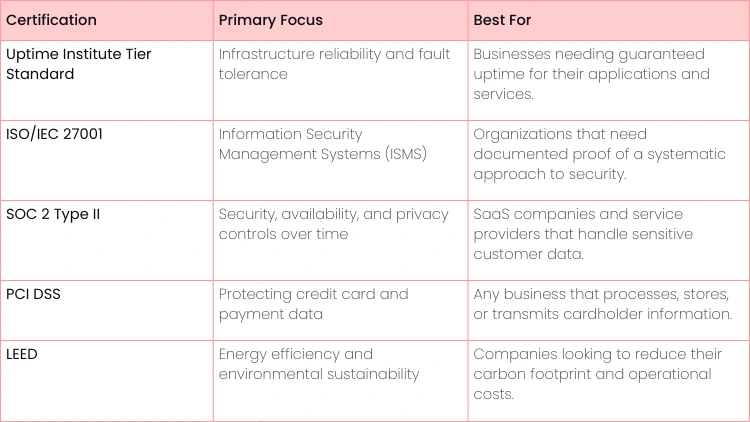
Here's a quick look at how the top facility-level certifications stack up.
Key Facility Certifications at a Glance
Each of these certifications serves as an independent seal of approval, giving you confidence that a facility is not just talking the talk, but walking the walk.
Building Your Career with Professional Certifications
While facility certifications are all about the building's reliability, professional data center certifications are all about you. These are the credentials that prove you—the person designing, building, and keeping these complex places running—really know your stuff.
Think of them as your personal badge of expertise. They're the clearest way to demonstrate your skills, unlock doors to better jobs, and give your salary a serious boost. For anyone trying to break into or move up in the data center world, certifications create a clear roadmap for mastering the skills that matter. They tell a potential boss you have a verified handle on everything from power and cooling to networking and security. Often, that's the one thing that tips the hiring scale in your favor.
Foundational vs Specialized Certifications
Professional certifications pretty much fall into two buckets: vendor-neutral and vendor-specific. Knowing the difference is crucial for mapping out your career.
- Vendor-Neutral Certifications: These give you the big-picture knowledge that works in any data center, no matter what brand of hardware is inside. They're all about universal principles and best practices.
- Vendor-Specific Certifications: These zoom in on one company's products, like Cisco, VMware, or Dell. They prove you're an expert at setting up, managing, and fixing that specific company's gear.
It's like being a chef. A vendor-neutral cert is like your culinary degree—it teaches you the fundamentals of cooking that apply everywhere, like knife skills and food safety. A vendor-specific cert is like becoming a certified pro on a particular brand of high-tech combi oven. Both are valuable, but they get you different kinds of jobs.
- Actionable Insight: If you're new to the industry or aiming for a broad role like a Data Center Manager, start with a vendor-neutral certification like the CDCP. It provides a solid, all-around foundation that makes you versatile. If your goal is to be a specialist, like a Network Engineer in a shop that runs on Cisco gear, then a vendor-specific credential like the CCNP Data Center is your golden ticket.
Key Vendor-Neutral Certifications
For anyone looking to build a strong, flexible skill set, vendor-neutral certifications are the perfect place to start. They give you a common language and a base of knowledge that everyone in the industry respects.
Certified Data Centre Professional (CDCP)
The CDCP is one of the most recognized foundational certs on the planet. It walks you through all the key components of a data center—power, cooling, security, cabling, and the day-to-day best practices for running the place.
- Best For: Newcomers, IT pros transitioning into data center roles, and managers who need to understand what their teams are dealing with.
- Practical Example: A systems admin with a CDCP can talk intelligently with the facilities team about the power needs for a new server rack. They won't just ask for more power; they'll understand the impact on the electrical load and cooling capacity, potentially suggesting a more efficient rack layout.
- Cost & Time: The training and exam usually run between $2,000 and $3,000. You can knock it out in an intensive 2-day course.
CompTIA Server+
This certification proves you have the hands-on skills to install, manage, and troubleshoot servers, which are the heart of any data center. It covers everything from server hardware and software to storage, security, and disaster recovery.
- Best For: Future server admins, systems administrators, and data center technicians.
- Practical Example: A technician with a Server+ certification can confidently tackle a server that won’t boot. They know how to methodically check the BIOS settings, RAID controller configuration, and network boot options using a structured troubleshooting process instead of just guessing.
- Cost & Time: The exam voucher itself is about $370. Depending on your experience, you could be ready for the test in a few weeks or a couple of months.
Exploring Vendor-Specific Credentials
Once you've got a solid foundation—or if you already know you want to master a specific technology—vendor-specific certifications are your direct path to deep expertise. Companies that have invested heavily in one vendor's tech actively hunt for people with these certs.
If your career path points toward networking, this guide on the CompTIA Network+ course is a great way to build up your foundational knowledge before diving into a specialized vendor track.
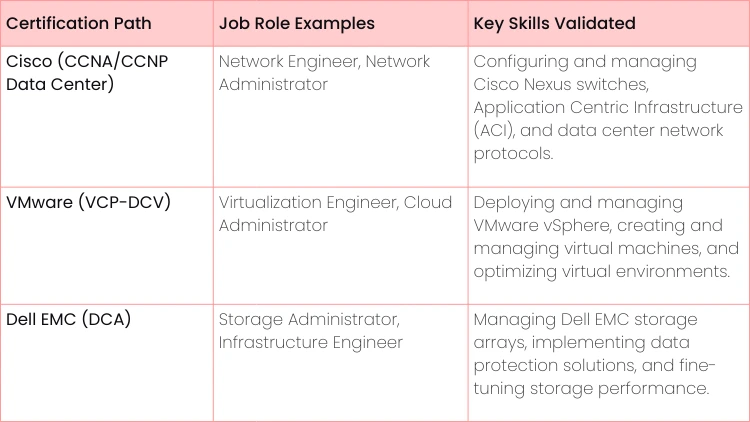
Earning a vendor-specific certification almost always translates to a higher salary. For instance, a network engineer holding a CCNP Data Center cert can expect to earn significantly more than one without it. Why? Because they've proven they can manage the complex, high-stakes networks that modern businesses depend on, making them a priceless asset.
Here’s a quick look at how these certs map to real-world jobs:
Choosing the Right Certification Path for Your Goals
Staring at the long list of data center certifications can feel a bit like standing at a crossroads with a dozen different signs pointing in every direction. So, which path is the right one for you? The honest answer is: it depends entirely on your goals.
The trick is to stop thinking, "I need a certification" and start asking, "Which certification will help me achieve this specific outcome?" It all comes down to matching the credential to your objective, whether you’re a professional building your career or a business building market trust.
A Decision Framework for Professionals
For individuals, the right certification path is a direct reflection of where you are now and where you want to be. A common misstep is chasing an advanced, specialized cert without having the fundamentals down first. A few simple "if-then" scenarios can really clear things up.
- If you're brand new to IT or just moving into a data center role, then you should start with foundational certifications like the CompTIA Server+ or CDCP. These build the vendor-neutral knowledge you absolutely need to hit the ground running.
- If you're gunning for a specialist role, like becoming a network or storage guru, then target vendor-specific certifications. Think Cisco's CCNA/CCNP Data Center or a Dell EMC credential. This proves you have deep expertise in a specific tech stack that companies are hiring for right now.
- If you're aiming for a management or leadership position, then it's time to pursue broader credentials like the Certified Data Centre Specialist (CDCS). This demonstrates you understand not just the "how" but also the "why" behind data center strategy, design, and operations.
A Strategic Checklist for Organizations
For any business, deciding which facility and staff certifications to pursue is a major strategic decision. These aren't just line items in the budget; they're investments in mitigating risk, standing out from the competition, and earning customer confidence.
- Actionable Insight: Don't collect certifications just for the sake of it. Map every potential certification to a specific business need. For instance, if you want to land government contracts, ISO 27001 is often non-negotiable. If your primary clients are in e-commerce, PCI DSS is a must-have to prove you can secure their payment transactions.
Here’s a quick checklist to guide your organization's decision:
- Who are your clients? A business targeting healthcare customers absolutely must show HIPAA compliance, which makes a SOC 2 Type II report essential.
- What are your biggest business risks? If even a single minute of downtime would be a catastrophe for your clients, investing in an Uptime Institute Tier III certified facility is a no-brainer.
- What is your competition doing? If all your rivals are boasting about their LEED-certified facilities, getting one yourself is table stakes to compete on sustainability.
The Financial and Strategic Return on Investment
Let’s be clear: investing in data center certifications pays off. For individuals, a credential like the CDCS can open the door to a significant salary bump because it validates high-demand, advanced skills. It's a direct investment in your earning power.
For businesses, the ROI is measured in trust and opportunity. Getting planning approval for new data centers can now take years. In this environment, certified operators become the safe, reliable choice for investors. According to market analysis from sources like DC Byte, the global committed supply often doubles what's actually under construction simply due to these regulatory hurdles.
Certified professionals who know how to navigate this complex process are incredibly valuable. Ultimately, that trust translates directly into winning more business and commanding better rates.
Creating Your Roadmap to Certification Success
Earning a data center certification isn't like cramming for a final exam; it’s more like training for a marathon. You need a solid plan, consistent effort, and the right mix of book smarts and hands-on skills. Just reading a textbook and hoping for the best is a recipe for failure. You need a real roadmap to turn all that study time into a career-changing qualification.
A good plan starts with a realistic timeline. Don't just vaguely say, "I'll study for the CDCP exam." Get specific. Break the exam topics down into small, bite-sized pieces and schedule them on your calendar, week by week. This simple step keeps you from feeling overwhelmed and makes sure you cover every base before exam day.
Build Your Study Strategy
Your study plan needs to be flexible, mixing different learning styles to make sure the tough concepts really stick. One of the most common mistakes is relying on a single resource, like one book or one course. A much better approach is to attack the material from multiple angles.
A great place to start is with a self-assessment. Be brutally honest about what you already know and where your knowledge gaps are. This helps you focus your energy where it's needed most, right from the beginning. You can learn more about how to do this well by checking out this guide on how to identify skill gaps and applying those ideas to your certification prep.
Once you know where you stand, you can build a smarter plan:
- Treat Practice Exams Like a GPS: Don't save practice tests for the very end. Use them early and often to figure out where you’re going wrong. If you keep missing questions about power redundancy, that’s a clear sign telling you exactly what to study next.
- Get Your Hands Dirty with Labs: Theory is one thing, but data center skills are built by doing. You can set up a home lab with some old server gear or use virtual labs online. Actually configuring networks, managing storage arrays, and troubleshooting problems is what makes the knowledge sink in for good.
- Teach to Learn: One of the most powerful study hacks is the Feynman Method. Try explaining a complex idea, like the difference between 2N and N+1 redundancy, to a friend in simple terms. If you get stuck or can't make it clear, you’ve just found a weak spot in your own understanding.
A Day in the Life of a Successful Student
Think about someone prepping for their CompTIA Server+ exam. Their day is a mix of activities. They might spend an hour in the morning reviewing RAID configurations. Then, on their lunch break, they’ll pull out their phone for a quick 20-question practice quiz.
Later that evening, they fire up their home lab to install a new server OS and play with the network settings. This blend of reading, testing, and hands-on practice creates a powerful learning cycle that builds both knowledge and real confidence.
- Actionable Insight: Block out your study time on your calendar just like you would a critical meeting at work—and then protect that time. Consistency beats cramming every single time. A focused 60-90 minutes each day builds momentum and helps you remember things long-term, which is far more effective than a frantic, multi-hour study session once a week.
Staying Motivated on Your Journey
The road to certification can feel long, and it's natural to lose a bit of steam along the way. Keeping your motivation high is a huge part of your roadmap. Set small, achievable goals for yourself. Maybe this week's goal is to completely master the Uptime Institute Tier standards. When you nail it, take a moment to acknowledge that win.
Another game-changer is connecting with other people on the same path. Find online forums or study groups where you can ask questions, share what you've learned, and hold each other accountable. Knowing you aren't in this alone can give you the final push you need to get across the finish line and walk into that exam feeling like the certified pro you're about to become.
The Future of Data Center Expertise
The world of data center certifications is changing, and fast. The explosive growth of Artificial Intelligence is rewriting the rulebook. If you want a career that lasts, you can't just focus on the skills that are valuable today. You need to anticipate what's coming next.
This means looking beyond the traditional IT roles we're all familiar with. The next big frontier is all about power and sustainability. As AI workloads get bigger and hungrier, skills in energy management are no longer just a "nice-to-have". For facilities and the people who run them, they're becoming essential for survival and keeping costs under control.
The Rise of Energy and Sustainability Skills
Let's talk about the sheer power modern data centers are guzzling. It's staggering. Data centers are projected to consume 219 GW by 2030—that’s enough juice to power 180 million US homes. This incredible demand, driven mostly by AI, is forcing a massive industry-wide focus on efficiency.
Suddenly, a whole new set of skills is in the spotlight.
- ISO 50001 (Energy Management): This isn't just about being green. This certification shows you know how to systematically improve energy performance and cut consumption. Someone with this knowledge can directly help a company slash its energy bills and shrink its carbon footprint.
- Liquid Cooling Expertise: Old-school air cooling just can't keep up with the heat coming off high-density AI hardware. Professionals who truly understand advanced liquid cooling systems are about to become incredibly sought-after.
- High-Density Power Management: Designing and managing electrical systems that can handle enormous power loads safely and efficiently is quickly becoming a core skill for any senior data center role.
Actionable Insight: Start looking into sustainability-focused micro-credentials or training modules now. Even if your current job doesn't demand it, getting a solid foundation in energy management principles will make you a much stronger candidate for the leadership roles of tomorrow. For example, seek out webinars on liquid cooling technologies or take an online course on Power Usage Effectiveness (PUE) calculations.
As data centers evolve, you need to understand the whole operational picture. Diving into resources like the Top 10 Data Center Migration Best Practices for Enterprises: A Definitive Guide can give you a major leg up. These shifts are also happening alongside huge leaps in networking, which you can read more about in this article on 5G and the New Data Centers to Support.
The bottom line? The future of data center expertise is where IT, power engineering, and environmental science all meet.

Frequently Asked Questions
Jumping into the world of data center certifications? You're not alone. A few questions pop up all the time, and getting straight answers is the fastest way to map out your career path or plan your company's next move.
Which Certification Is Best for a Beginner?
When you're just getting your foot in the door, the goal is to build a solid foundation. You don't want to get pigeonholed into a specific technology right away. Think broad, not deep.
Start with a vendor-neutral certification that proves you know the fundamentals. Your best bets are the CompTIA Server+ or the Certified Data Centre Professional (CDCP). The Server+ shows you have real, hands-on server skills, while the CDCP gives you that crucial big-picture view of how a data center runs. Either one is a fantastic first step.
How Much Do Data Center Certifications Cost?
The price tag on these certifications can swing wildly, so it’s smart to know what you're getting into. The cost usually lines up with how deep the training goes.
For instance, an exam voucher for something like CompTIA Server+ might set you back a few hundred dollars. On the other end of the spectrum, an intensive, multi-day course like the Certified Data Centre Specialist (CDCS) can easily run into several thousand. Always remember to budget for study guides and a potential retake, just in case.
Do I Need a Degree for a Data Center Job?
Honestly? Not always. For many of the most in-demand technical roles, what you can do matters a lot more than a four-year degree. Practical skills and the certs to prove them are what hiring managers are looking for.
- Practical Example: A hiring manager is choosing between two candidates for a data center technician role. One has a general IT degree but no certifications. The other has no degree but holds a CompTIA Server+ and can describe their experience building a home lab. The hiring manager will almost always favor the second candidate because their certification and hands-on experience are direct proof they can do the job from day one.
Ready to build the skills that will define your career in data center operations? Uplyrn offers expert-led courses and clear learning paths to guide you from beginner to certified professional. Start your journey and unlock job opportunities at Uplyrn.


Leave your thoughts here...
All Comments
Reply