









How to Build a Portfolio Website That Gets You Hired
Your portfolio is more than just a website; it’s your most powerful career tool, working 24/7 to land you opportunities. Think of it as a dynamic, living resume that shows what you can do instead of just listing it.
We’ll walk through the whole process, from planning and picking a platform to creating content that grabs attention and finally, launching your site.
Jump To Section

Earn As You Learn
Earn 25% commission when your network purchase Uplyrn courses or subscribe to our annual membership. It’s the best thing ever. Next to learning,
of course.
Your Portfolio Is Your Best Career Investment
Tired of sending resumes into the black hole of online applications? A personal portfolio website lets you bypass the usual gatekeepers and put your work directly in front of hiring managers, recruiters, and potential clients.
This isn't just for designers and artists anymore. Developers, marketers, writers, and consultants are all using personal sites to prove their real-world skills. It’s your dedicated space to control the narrative and prove your value.
Your portfolio is the ultimate proof of your skills. It shifts the conversation from what you say you can do to what you can show you have done.
This isn't just a hunch; the numbers back it up. The portfolio website market is on track to hit 9.7 billion USD globally by 2033, with a projected annual growth rate of 11.10%. For anyone serious about their career, having a portfolio site is no longer a nice-to-have. It’s a necessity.
A Career Tool That Proves Your Worth
A great portfolio doesn't just show off your finished work—it tells the story of your professional journey and what makes you unique. It's a cornerstone of building your personal brand and establishing yourself as an expert.
- For a web developer: It’s a live demo of your clean code, responsive design chops, and problem-solving abilities.
- Practical Example: You could build a small, interactive web app as a project to demonstrate your JavaScript skills, rather than just listing "JavaScript" on a resume.
- For a marketer: It's a living case study of your branding skills, content strategy, and ability to drive real results.
- Practical Example: Your portfolio itself can be a case study. Use analytics to track its traffic and mention how your content strategy for the site increased views by 50% in three months.
- For a designer: It’s a carefully curated gallery showcasing your aesthetic, creative process, and the impact you’ve had on user experience.
- Practical Example: Instead of just showing the final logo, create a case study that shows early sketches, color palette explorations, and how the final design solved the client's branding problem.
Choosing the right platform is the first major step. It can feel overwhelming with so many options out there, but it really comes down to your technical comfort level and career goals.
Choosing Your Portfolio Platform
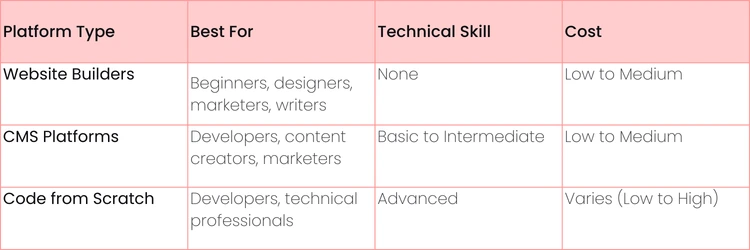
Here's a quick comparison to help you understand the best starting point for your portfolio, based on your technical comfort and career goals. We'll dive deeper into each option later.
Each path has its own pros and cons, which we'll explore in the next sections. The key is to pick the one that lets you focus on what matters most: showcasing your incredible work.
Ultimately, your portfolio is a strategic investment in yourself. Now, let’s get started on building a site that opens doors.
Crafting a Content Strategy That Actually Converts
Before you even think about picking a template or writing a single line of code, we need to talk strategy. A portfolio without a clear purpose is nothing more than a digital scrapbook. A strategic portfolio, on the other hand, is a powerful machine built to land you jobs and clients. The very first thing you must do is decide on the single, specific action you want every visitor to take.
This one core goal will shape every other decision you make, from the layout you choose to the projects you decide to feature. Are you hunting for a full-time role? Chasing freelance gigs? Something else? Your main call-to-action (CTA) has to reflect that ambition.
A portfolio designed for 'everyone' usually ends up impressing no one. But a portfolio built for a specific person—like a tech recruiter, a startup founder, or a creative director—speaks their language and gets real results.
Your objective sets the stage for the entire user experience. It's the critical difference between a passive gallery of your work and an active career-building tool that pushes you forward.
Nail Down Your Primary Goal
What's the number one outcome you're looking for? You have to be specific here. Vague goals like "get a job" are useless because they aren't actionable.
Instead, zero in on a concrete, measurable action:
- Book a discovery call: This is the go-to for freelancers and consultants. Your entire site should funnel visitors straight to your calendar.
- Download your resume: Perfect if you're a job seeker in a more traditional hiring pipeline. Make that PDF impossible to miss.
- Fill out a contact form: A fantastic all-rounder for project quotes, general inquiries, or networking feelers.
- View your work on GitHub: Absolutely essential for developers who need to let their code do the talking.
Actionable Insight: If your goal is to get freelance work, embed a Calendly or SavvyCal link directly on your contact page. This removes the friction of back-and-forth emails and lets a hot lead book a call with you instantly.
Curate Projects for Your Ideal Audience
Once you know your goal, you have to figure out who you need to impress. A corporate hiring manager at a massive tech company cares about different things than the founder of a 10-person startup. You have to tailor your project selection to match their needs.
This isn't the place to show off every single thing you've ever worked on. Instead, hand-pick 3-5 of your absolute best projects that directly align with the kind of roles or clients you're targeting. Quality crushes quantity, every single time.
- Practical Example: Imagine you're a UX designer trying to break into the fintech industry. You’d want to showcase projects involving complex data visualization, secure user flows, and anything that screams financial responsibility. You would leave out that beautiful branding project you did for a local coffee shop. As great as it was, it doesn't solve your target audience's problems. This kind of ruthless curation is a vital part of building a portfolio website that actually works.
Turn Your Projects into Gripping Case Studies
The project pages are the real heart of your portfolio. Please don't just throw up a final screenshot with a one-sentence caption. You need to tell a story that proves your value. The best way to do this is by framing each project as a mini-case study.
Here’s a simple but powerful framework that works:
- The Problem: Start by clearly explaining the challenge. What issue was the client or company facing?
- Practical Example: "The e-commerce site was hemorrhaging money, with a 35% cart abandonment rate caused by a clunky and confusing checkout process."
- Your Process & Contribution: Walk them through the steps you took. What was your specific role on the team? More importantly, explain your thinking—why did you make certain design choices, select a particular tech stack, or run a specific marketing campaign?
- Actionable Insight: Use subheadings like "My Role", "The Research" and "Design Iterations" to make this section skimmable for busy recruiters.
- The Solution & Results: Show off the final product and, most critically, the outcome. Back it up with hard numbers whenever you can.
- Practical Example: "The redesigned checkout flow slashed cart abandonment by 20% within the first quarter and boosted the average order value by 12%."
Following this structure shows you’re not just an order-taker; you're a strategic thinker who solves problems and delivers measurable business value. After all, a killer website is only half the battle; you'll also want to look into proven methods for bringing traffic to your website to make sure your amazing work actually gets seen.

Choosing the Right Platform for Your Goals
Picking the right platform for your portfolio is probably the biggest technical choice you'll make in this whole process. Get it right, and showcasing your work feels almost effortless. Get it wrong, and you'll hit one frustrating roadblock after another.
Your decision needs to be a practical one, based on your technical skills, how much time you have, and most importantly, what you’re trying to achieve with your portfolio.
Don't get caught up thinking one path is automatically "better". A custom-coded site isn't superior to one made with a template if the template site is live, looks great, and is already bringing in leads, while the custom one is still just a bunch of code on your local machine.
The goal isn't to build the most technically complex website; it's to build the most effective one. Your platform is just the vehicle—your work is the destination.
Let’s walk through some real-world scenarios to help you figure out which road to take. The main takeaway here is pretty simple: your goal determines the features you need, and those features will make one platform a much more logical choice than the others.
When to Use Website Builders like Wix or Squarespace
Website builders are, without a doubt, your fastest path from zero to a live, professional portfolio. They’re the go-to for visual pros like designers, photographers, writers, and marketers who need to prioritize looks and speed over deep technical customization.
- Actionable Insight: Imagine you're a graphic designer, and you just landed an interview for next week. You need a slick, mobile-friendly site online yesterday. A platform like Squarespace lets you grab a beautiful template, drag and drop your projects into it, and hit "publish"—all in a single afternoon.
These tools have completely changed the game for building a professional web presence. By 2025, Wix alone is expected to power over 8 million sites, owning a massive 45% of the website builder market. For creatives and students, this is proof that you can launch an industry-standard portfolio fast, with zero coding required. Many excellent free resume website builder tools offer this same level of ease for getting a sharp-looking profile online.
When to Use a CMS like WordPress
A Content Management System (CMS) like WordPress is the perfect middle ground. It mixes a user-friendly interface with some seriously powerful customization options.
This is the ideal choice if you want more control than a simple builder can offer but aren't quite ready to code a site from the ground up. Think of developers who want to show they can customize a theme, content creators planning to blog, or marketers who need access to advanced SEO plugins.
- Actionable Insight: You’re a content marketer. You need to display your writing portfolio, but you also want to run a blog to pull in organic search traffic. WordPress is the clear winner. You get access to thousands of themes and plugins (like Yoast SEO) to nail your design and optimize your content, all while tapping into its legendary blogging power. Of course, this route means you'll be managing your own hosting. If that's new territory, this guide on how to choose hosting for your first blog can help you get started.
When to Code Your Portfolio from Scratch
Alright, let's talk about the ultimate flex: coding your portfolio from scratch. This path is pretty much reserved for web developers, software engineers, and anyone in a deeply technical role.
Why? Because for them, the website is the portfolio piece.
- Practical Example: You're a backend developer who specializes in Python and Django. Building your own site from the ground up isn't just about showing off projects—it's about demonstrating your actual skills. You can showcase your clean code, API integrations, and database know-how. By hosting the code publicly on GitHub, you give recruiters a testament to your abilities that speaks way louder than any bullet point on a resume.
Designing a User Experience That Gets Results
Think of your portfolio not as a static gallery, but as a guided tour where you're the expert guide. The goal is to lead visitors—recruiters, hiring managers, potential clients—straight to the conclusion that they need to hire you. Bad design creates roadblocks, and when people get confused or frustrated, they leave. It’s that simple.
Great user experience (UX) is all about paving a smooth path. Every choice, from your navigation layout to the color of a button, should be intentional. You want to eliminate any guesswork and make it incredibly easy for someone to see your value and get in touch.
Your portfolio should feel like a helpful conversation. The second a visitor has to stop and think, "Wait, where do I click next?" you've already lost their attention.
If you're new to this concept, this guide on what user experience design is, is a perfect starting point. It breaks down the core idea of making things easy and enjoyable for your users.
Create a Simple and Clear Navigation
Your navigation is the roadmap. If it's a mess, people will hit the back button before they ever see your projects. Simplicity is key. Stick to the essentials that everyone expects to see.
Don't overload your main menu. Too many choices cause "decision fatigue", and a confused mind says no. For most portfolios, these are the only links you need:
- Work/Projects: The star of the show. This should be front and center.
- About: Where they connect with the person behind the work—your story, skills, and personality.
- Contact: The all-important page that makes it easy to start a conversation.
- Resume (Optional): A direct link for those who want to quickly download your credentials.
Actionable Insight: Put a bold, impossible-to-miss "Contact Me" button right in your header. It should follow the user on every single page. When a recruiter is impressed by a project, you want that button right there, ready for them to click without a second thought. This is known as a "sticky" header element.
Design for Conversion with Smart CTAs
Every page needs a job to do. That job is usually guided by a Call-to-Action (CTA)—a button or link that tells the visitor what their next move should be.
Put yourself in their shoes. After they finish reading a fantastic case study, what do you want them to do? Don't leave them at a dead end. Guide them with a clear CTA like "View My Next Project" or "Let's Build Something Together".
Here’s a practical example of this in action.
- Before: A project page just ends. The visitor sees the final image and thinks, "Nice work. Now what?" They'll probably just close the tab.
- After: The same page ends not just with the design, but with a quick summary of the results you achieved. Right below it is a bright, contrasting button that reads, "Have a similar project? Get in touch." This one change transforms a passive viewer into a potential lead.
Actionable Insight: Use an action-oriented phrase (like "View", "Download" or "Contact") and pick a color that pops against the background. For example, if your site is mostly blue and white, use a bright orange or green for your main CTA buttons to draw the eye. This tiny detail can make a massive difference in how many inquiries you get when you build a portfolio website.

Your Launch and Growth Checklist
So you’ve finally hit 'publish'. That’s a huge step, but the work isn't over. In fact, it's just getting started. Having a beautiful portfolio is one thing, but getting people to actually see it is another challenge entirely.
What you do right after going live is what transforms your site from a static page into a powerful career tool. It's all about making sure the portfolio you just poured your heart into gets in front of the recruiters, clients, and hiring managers who can change your career.
Your portfolio's launch is not a single event. It's the beginning of a continuous process of optimization and promotion that keeps your work in front of the right people.
Think of it this way: you just built the product, and now you have to be the marketer. A little effort right now will pay off massively down the road.
Pre-Launch Technical Polish
Before you start shouting from the rooftops, it's a good idea to run through a few final technical checks. These details might seem small, but they make a world of difference for your visitors and how search engines view your site. A few minutes of polish now can save you a lot of headaches later.
- Image Compression: Slow websites are almost always caused by huge image files.
- Mobile-First Testing: This is non-negotiable. Grab your phone, your friend's phone, a tablet—whatever you can find—and test your site.
- Actionable Insight: Use Chrome's built-in Developer Tools (right-click > Inspect > toggle device toolbar) to quickly simulate how your site looks on various phones and tablets.
- Proofread Everything: Seriously, read every word on your site out loud. It feels a bit silly, but it's the best trick for catching sneaky typos, grammatical mistakes, and sentences that just don't flow right.
On-Page SEO Essentials
You don't need to be an SEO wizard, but you do need to get the basics right so people can find you on Google. These simple tweaks tell search engines what your pages are about, which is critical for showing up in relevant searches.
- Actionable Insight: For your homepage title tag, a simple, clear formula works best: "Your Name | Your Professional Title" (for example, "Jane Doe | UX/UI Designer").
Then, for your meta description, write a quick, punchy sentence that explains who you are and what you do. This is your 160-character elevator pitch to get people to click.
- Practical Example: A great meta description might be: "I'm a freelance copywriter helping B2B SaaS companies turn complex features into clear, compelling stories. View my work and let's grow your brand." It’s so much more effective than something generic like "Jane Doe's portfolio."
Your Post-Launch Promotion Plan
Okay, your site is live, polished, and ready for visitors. It's time to start promoting it. Don't be shy about this part—you built an incredible asset, and now it’s time to show it off.
Here’s a simple, actionable game plan to get you started:
First, head over to your LinkedIn profile. Add your portfolio link to your contact info section, and then make a post announcing your new site to your network.
- Actionable Insight: In your LinkedIn "Featured" section, add a direct link to your portfolio with a custom thumbnail. This makes it a prominent, visual element on your profile.
Next, open your email settings and revamp your email signature. This is free advertising space! Just add a direct link to your portfolio right under your name.
Finally, integrate your link everywhere else. Add it to your GitHub, Behance, X (Twitter), and any other professional profile you maintain. This creates a web of pathways all leading back to your work.
Answering the Portfolio Questions You're Secretly Asking
Let’s be honest. Building a portfolio, especially your first one, can feel overwhelming. It's totally normal to have a dozen nagging questions and a bit of "analysis paralysis" before you even start.
These are the worries that often keep people stuck. Let's get you some straight answers so you can ditch the anxiety and focus on what actually matters: building a site that gets you hired.
How Many Projects Should I Actually Include?
Forget everything you've ever made. The golden rule here is quality over quantity. We've seen countless portfolios that are just a dumping ground of old work, and it's an instant turn-off for recruiters.
- Actionable Insight: Aim to feature 3-5 of your absolute best and most relevant projects. Think of yourself as a curator of a gallery, not a hoarder cleaning out the attic. Each piece should be presented as a compelling case study that tells a story. A few strong examples that align with your career goals will always beat a dozen mediocre ones.
Can I Build a Portfolio with Zero "Professional" Experience?
Yes, you absolutely can. A portfolio is about demonstrating your skills, not just listing job titles. Where you honed those skills—be it in a classroom, through a personal passion project, or even volunteering—is secondary.
The trick is to treat these projects with the same gravity you would a paid gig.
- Show your work: Don't just show the final product. Document your entire process from the initial idea to the finished piece.
- Explain your "why": Walk the reader through your thought process. Why did you choose that color palette, that coding language, or that marketing channel?
- Connect it to skills: Explicitly state the abilities you used and sharpened.
Practical Example: A student developer could showcase a complex final project from a university course. By writing a case study explaining the architecture, the challenges they faced (e.g., "managing state in a complex React app"), and the solutions they engineered, they prove they have real-world problem-solving chops without ever having a formal job.
How Often Do I Need to Update This Thing?
Think of your portfolio as a living, breathing part of your career, not a static monument you build once and forget. It needs to grow with you. We recommend giving it a health check every 3-6 months.
- Actionable Insight: Set a recurring calendar reminder for the first of the quarter (e.g., Jan 1, Apr 1, Jul 1, Oct 1) labeled "Portfolio Review". During this check-up, test all your links, update your "About" page if needed, and swap out your weakest project for a newer, stronger one.
The biggest mistake you can make is launching your portfolio and then abandoning it. A stale site with broken links and three-year-old projects signals to a recruiter that you might not be actively pushing yourself in your field.
What Is the Single Biggest Mistake I Could Make?
We see it all the time: building a portfolio for a generic, imaginary "everyone". When you try to appeal to everyone, you end up impressing no one. Your message becomes bland and instantly forgettable.
Before you write a single line of code or design a single pixel, stop and define your audience. Who are you trying to land a job with? A creative director at an ad agency? A hiring manager at a fast-growing tech startup? A potential freelance client in the e-commerce space?
- Practical Example: If you're targeting tech startups, your language can be more casual and focused on innovation and speed. If you're targeting large financial corporations, your tone should be more formal, and your projects should highlight security, reliability, and scale.
Once you know who you're talking to, you can tailor your projects, your language, and your design to solve their problems and meet their expectations. A portfolio that speaks directly to the needs of your dream employer is a portfolio that gets results.
Ready to build the skills that will fill your new portfolio? At Uplyrn, we offer a wide range of courses in tech, creative arts, and business to help you create impressive projects that get you noticed. Start learning today and build a career you love at Uplyrn.


Leave your thoughts here...
All Comments
Reply