









How to Create Training Materials That Engage Teams

To build training that actually moves the needle, you have to diagnose the problem before you start prescribing a solution. This critical first step is a Training Needs Analysis (TNA), which uncovers the real performance gaps holding your team back. Only then can you write measurable learning objectives that give your training a clear, actionable purpose.
This foundation is what separates training that solves real business challenges from content that just fills time.
Jump To Section

Earn As You Learn
Earn 25% commission when your network purchase Uplyrn courses or subscribe to our annual membership. It’s the best thing ever. Next to learning,
of course.
Laying the Groundwork for Effective Training
It’s tempting to jump right into building slide decks or filming videos, but that’s one of the most common mistakes we see. The most impactful training materials don’t start with content; they start with a deep understanding of what your learners need to know, do, or feel differently to get the job done right.
Without this groundwork, you risk creating a program that’s interesting but ultimately toothless.
This initial phase is all about investigation. It’s how you get from a vague request like “we need better sales training” to a precise, measurable goal. For instance, a sales team struggling with a new CRM doesn't just need a generic walkthrough. A proper TNA might reveal the core issues are actually inconsistent data entry and a failure to track follow-ups.
- Actionable Insight: Instead of a generic CRM overview, your training objective becomes "Teach sales reps how to log 100% of client interactions within 24 hours using the CRM's 'Activity' feature."
You can dig deeper into this crucial first step in this guide to performing a training needs analysis.
From Gaps to Goals
Once you’ve identified the true performance gaps, you can craft powerful learning objectives. These aren't just a list of topics; they're promises of what people will be able to do after the training.
Think of a well-written objective as a contract between you and the learner. It sets crystal-clear expectations and gives you a benchmark for measuring success. It’s what turns training from a corporate expense into a strategic investment.
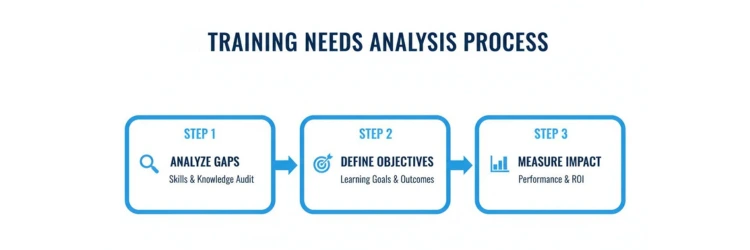
This simple flow shows how to connect the dots from analyzing gaps to defining objectives and, finally, to measuring the impact on the business.
This structured approach guarantees that every piece of content you develop directly supports a specific, measurable business outcome. A TNA provides a clear roadmap for identifying and validating these needs before you invest a single dollar in development.
Key Steps in a Training Needs Analysis
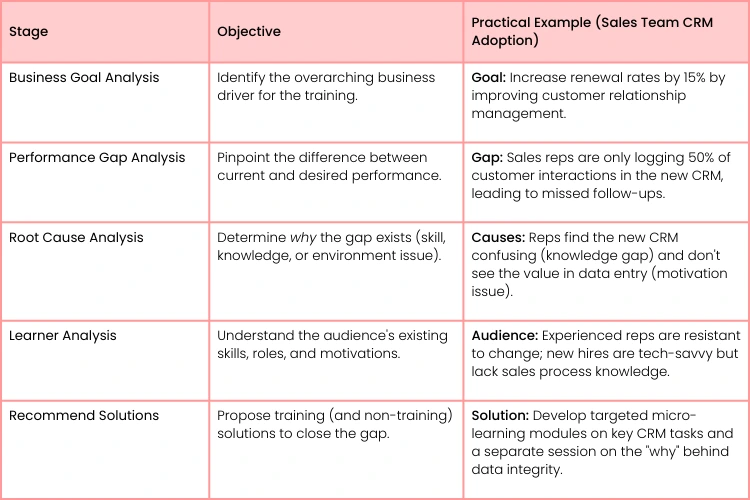
The table below breaks down the key stages.
By following these steps, you ensure the training you design is the right solution for the right problem. It’s a targeted approach that delivers measurable results.
Market trends absolutely confirm the need for this. With soft skills and technical programs now accounting for over 60% of corporate training, a one-size-fits-all approach just doesn't cut it anymore. And the payoff is huge—companies with high-quality, targeted materials can see 15-20% productivity gains. That's a serious return on investment. You can find more corporate training industry analysis and forecasts that highlight the value of getting this right.
Designing the Learning Experience
So, you've got your learning objectives locked in. What's next? This is where we move from what people need to learn to how they’re going to learn it. It's time to design the actual learning journey.
This isn't just about dumping a list of topics into a PowerPoint. You need to build a coherent path that takes your learners from where they are now to where they need to be. And the framework you choose to build that path is everything.
Choosing Your Instructional Design Model
This is where instructional design models become your best friend. They give you a structured process to make sure your training is logical, engaging, and actually hits the mark. The model you pick really depends on your project's complexity and timeline—there’s no one-size-fits-all blueprint.
- ADDIE Model (Analysis, Design, Development, Implementation, Evaluation): This is the classic, linear workhorse.
- Practical Example: Use ADDIE for annual compliance training on anti-money laundering (AML) where the content is stable, well-documented, and requires rigorous, step-by-step development and validation.
- SAM Model (Successive Approximation Model): This one is agile and iterative.
- Practical Example: Use SAM for training on a new marketing automation tool that is still in development. You can create a quick prototype of a module, get feedback from a pilot group, and refine it—all before the software is even finalized.
For example, always use the rigorous, step-by-step structure of ADDIE for a complex compliance course. But for a software rollout with weekly updates? An agile approach like SAM lets you adapt on the fly without having to start from scratch. If you want to dig deeper into this decision-making process, check out these 16 questions instructional designers must ask before kicking off a project.
The right model acts as your GPS. It ensures you don't get lost while developing your training and helps you reach your destination—learner competency—efficiently.
Structuring the content logically is just as critical. Always think of it like telling a story. You wouldn't start a "New Manager Training" program with complex performance review scenarios.
- Actionable Insight: Begin with foundational skills first. A practical structure would be:
- Module 1: Active Listening and Feedback Foundations
- Module 2: Setting Clear Expectations
- Module 3: Coaching for Performance, and finally
- Module 4: Navigating Difficult Conversations.
- This flow prevents people from getting overwhelmed and helps build their confidence along the way.
This focus on well-designed, digital-first experiences is more important than ever. The global training market is on track to hit USD 264.31 billion by 2032. In North America, which holds a 35.2% market share, companies rely heavily on advanced Learning Management Systems (LMS). The data shows that when training materials are well-designed, you can see 20-30% higher engagement. You can explore more insights on the growing training market to see where the industry is headed.
Developing Engaging and Accessible Content
Let's be honest: text-heavy slides are where learner engagement goes to die. If you want to create training that actually sticks, you have to think beyond static presentations and start acting like a multimedia producer. Dynamic, multi-format content is what grabs—and holds—attention.
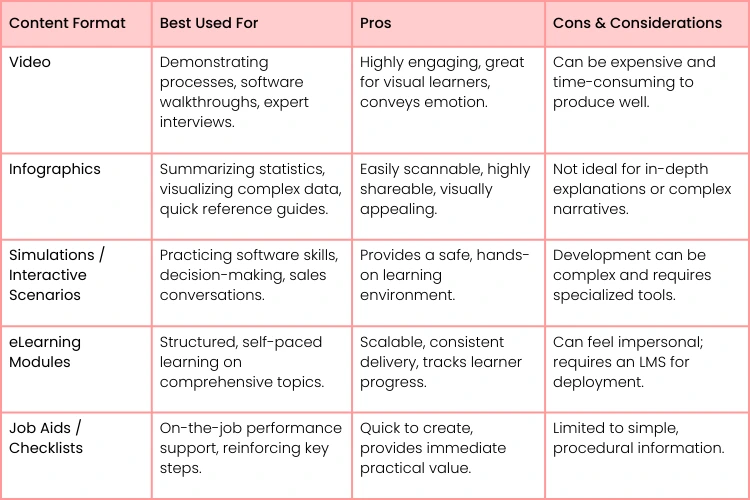
The trick is to match the format to the learning goal. A short, well-edited video is miles more effective for demonstrating a hands-on task than a wall of text. Got complex data to explain? A crisp infographic is your best friend. Need to provide risk-free practice for a new software? A simple simulation works wonders.
This approach is especially vital in vocational training, a sector that's booming with a 10.80% compound annual growth rate. In fact, using interactive elements like VR simulations can push knowledge retention for technical skills as high as 90%. It’s clear proof that how you present the information is just as important as the information itself.
Making Your Content Accessible for Everyone
Building accessible content isn’t just about ticking a compliance box. It's a fundamental part of good instructional design that makes the learning experience better for everyone. Following standards like the Web Content Accessibility Guidelines (WCAG) ensures your materials don't accidentally exclude people with disabilities.
Accessibility broadens your reach and signals a commitment to quality and inclusivity. Simple adjustments can make a world of difference, improving the experience for all learners, not just those who require assistance.
Here are a few practical, non-negotiable steps to get you started:
- Provide Alt Text: Every meaningful image needs alternative text that describes its purpose for those using screen readers. Don’t just write "chart"; write "Bar chart showing a 25% increase in Q4 sales after training."
- Offer Transcripts and Captions: All video and audio must have accurate, synchronized captions. A full transcript is also a must-have.
- Use Clear Fonts and Contrast: Stick to clean, simple fonts and ensure your text has a high-contrast ratio against the background. Use a free online contrast checker to verify your color choices.
- Structure with Headings: Use proper heading tags (H1, H2, H3) to create a logical structure. This makes your content far easier for both people and assistive tech to navigate.
Choosing the Right Format for Your Training Content
To help you decide, here’s a quick breakdown of common formats. Think about your specific learning objective, the complexity of the topic, and the resources you have available. This table can help you make a smart choice.
- Actionable Insight: For a "Project Management Fundamentals" course, use a blend of formats. Start with an eLearning module to cover core principles (scope, budget, timeline). Embed a short video interview with a senior PM. Include an interactive scenario where learners must allocate resources for a sample project. Finish with a downloadable checklist (job aid) for running a project kickoff meeting.
To speed up the process of creating both compelling and accessible materials, an AI Learning Material Creator can be a huge help. And if you're building a whole course from scratch, this guide has more tips and tricks for creating a successful online course that you'll want to check out.
Gauging Success: How Assessments and Feedback Close the Loop
So, you've delivered the training. How do you actually know if it made a difference? Proving your training’s impact is about more than just checking off a completion box; it's about seeing real changes in behavior and on-the-job skills.
This is where you need to get creative and move beyond basic quizzes.
- Practical Example: Instead of a multiple-choice test on customer service theory, create a practical assessment. Give learners three real (anonymized) customer complaint emails and require them to draft a response for each, applying the de-escalation techniques taught in the module. This shows if they can apply the concepts under pressure, not just remember them.
Blending In-the-Moment Checks with Final Evaluations
For a full picture of learning, you'll want to use a mix of assessment types from start to finish. We’ve found the most success when blending two key approaches.
- Formative Assessments: These are your quick, informal check-ins during the training.
- Practical Example: During a webinar on a new software feature, launch a quick poll: "On a scale of 1-5, how confident are you using the new reporting dashboard?" If most answers are 1s and 2s, you know you need to spend more time on it immediately.
- Summative Assessments: This is the big stuff—the final evaluations that measure overall mastery.
- Practical Example: After a sales negotiation training, the summative assessment could be a role-play scenario with a manager, scored against a predefined rubric of key skills like objection handling and closing.
By combining these ongoing pulse-checks with a final evaluation, you shift the focus from simple course completion to genuine capability. It helps ensure that you're not just teaching, but that your team is actually learning and retaining what matters.
Building a Continuous Feedback Loop
The process doesn't stop once someone submits their final project. Gathering feedback is absolutely essential for making your next training session even better.
- Actionable Insight: Don't just send a generic "rate this training" survey. Ask targeted questions like, "Which part of the training was least relevant to your daily work?" and "What is one specific tool or template from this session you plan to use this week?"
You need solid data to make smart improvements. To keep your materials relevant and effective, look into different strategies for collecting customer feedback effectively. This intelligence is exactly what you need to iterate and improve.
If you really want to dig into this, this detailed guide on how to measure training effectiveness can help you turn your assessments into a powerful engine for growth.
Deploying Your Training for Maximum Impact
Let's be honest: even the most brilliant training content is useless if it’s buried in a hard-to-find folder or delivered through a clunky, frustrating interface. The final, critical step is getting your materials into the hands of learners smoothly. This is all about the user experience.
Your delivery method really hinges on what you're trying to achieve. If you're building self-paced online courses, a Learning Management System (LMS) is your go-to. This is where you'll bump into technical standards like SCORM (Sharable Content Object Reference Model).
Think of SCORM as a universal language that allows your course to "talk" to the LMS. It's what lets you track crucial data like completion rates and assessment scores. Without it, you’re basically flying blind, with no real way to prove your training is actually working.
From Digital Files to On-the-Job Support
Deployment isn't just about launching an eLearning module and calling it a day. It's also about creating the support tools that reinforce learning long after a session ends. This is the real secret to bridging the gap between a training event and tangible, real-world results, a topic we dive into deeper in this guide on how to bridge the gap between virtual training and organizational impact.
So, what do these support materials look like in practice?
- Facilitator Guides: This is the script for instructors.
- Practical Example: A good facilitator guide includes not just what to say, but also prompts like, "At 15 minutes, pause and ask: 'Can someone share an example of when this situation occurred on a recent project?'" This ensures engagement.
- Quick-Reference Job Aids: A simple one-page PDF or infographic can be a lifesaver.
- Practical Example: After a training on new expense reporting software, provide a job aid with annotated screenshots showing the 5 key steps to submit a report. It's perfect for an employee to pull up right when they need it.
Before any launch, a final quality assurance check is absolutely non-negotiable. A simple pre-launch checklist can save you from the embarrassment of broken links, typos, or confusing navigation that will frustrate learners and undermine all your hard work.
Of course, even with the best-laid plans, questions always come up in the trenches of training development. Let's tackle some of the most common ones we hear.
How Long Should My Training Session Be?
This is the classic "it depends" question, but we can give you a better answer than that. The right length is dictated by the complexity of your topic and who you're training.
Trying to teach a detailed, multi-step software process? You might genuinely need a full 60 minutes. But if you're just rolling out a simple update to a company policy, a punchy 15-minute microlearning module will be far more effective. People will actually watch it.
Rule of thumb is this: keep it as short as you possibly can, but as long as it absolutely needs to be. Pinpoint a single, core learning objective for each session.
If a topic feels like it's dragging on, it probably is. That's your cue to break it down. Instead of a single, two-hour "New Manager Training" marathon, split it into more focused, digestible sessions:
- Part 1: Giving Feedback That Actually Works (40 min)
- Part 2: The Art of Delegating Tasks (40 min)
- Part 3: Running Productive Performance Check-ins (40 min)
This approach respects everyone's time and, more importantly, it helps people actually remember what you taught them.
How Can I Make Sure the Training Actually Sticks?
If you want people to remember what they learned, you have to get them involved. Engagement is the secret sauce for retention. A straight lecture is a recipe for forgotten information.
The key is to build in moments for learners to actively use the material.
- Actionable Insight: If you're teaching sales negotiation, don't just show slides with tactics. Throw them into a role-playing scenario where they have to negotiate a 10% discount with a "client" (played by you or another trainee) who has a specific budget objection. For hands-on technical skills, a lab or simulation isn't a nice-to-have; it's essential.
Another trick is the follow-up. Learning shouldn't stop the moment the session ends.
- Practical Example: A week after a time management workshop, send a follow-up email with the subject "Your 5-Minute Time Blocking Challenge". Ask them to reply with one task they successfully time-blocked that day. This simple action reinforces the behavior and sends a powerful message that the training mattered.
What’s the Best Way to Get Feedback on My Materials?
The biggest mistake you can make is waiting until after the training is delivered to ask for feedback. By that point, it's way too late to fix anything meaningful. You need to create a feedback loop right from the start.
Before you roll out the training to everyone, run a pilot session with a small, trusted group. These are your friendly critics.
Ask them specific, open-ended questions that get you real insights. Don't ask "Did you like it?" Instead, try these:
- "At what point did you feel the most confused or lost?"
- "What's one thing you'd change to make this more engaging?"
- "Which activity was the most helpful for you, and why?"
Actionable Insight: During the pilot, give each participant three sticky notes: green ("This was super clear/helpful"), yellow ("This was a bit confusing"), and red ("I'm totally lost"). Ask them to place the notes on a whiteboard next to the corresponding agenda items as you go. This gives you instant, visual feedback on which sections need the most work.
Ready to build skills that drive real career growth? At Uplyrn, we connect you with expert-led courses and a supportive community to help you achieve your goals. Start your learning journey with Uplyrn today.


Leave your thoughts here...
All Comments
Reply