









How to Improve Organizational Skills: Master Your Workflow

The truth is, getting organized is a skill anyone can learn. It's not some innate talent you're either born with or you're not. The secret is to build simple, reliable systems for your time, your tasks, and your workspace. It all starts by pinpointing exactly where things are falling apart and then applying proven methods to patch those leaks.
Jump To Section

Earn As You Learn
Earn 25% commission when your network purchase Uplyrn courses or subscribe to our annual membership. It’s the best thing ever. Next to learning,
of course.
Why Strong Organizational Skills Matter Now More Than Ever
Let's be real—feeling disorganized is so much more than just having a messy desk. It’s that quiet dread that follows you home, the one born from missed deadlines, feeling stuck in your career, and dealing with stress you just don't need.
Mastering your organizational skills is the single best way to take back control of your life, both at work and at home. It’s what separates a day spent frantically putting out fires from a day where you're proactively tackling meaningful, high-impact work.
From Chaos To Clarity
Think about two project managers, both juggling similar workloads. The first, Mark, lives in his inbox. His priorities are dictated by whoever emailed him last, and his to-do list is a chaotic jumble of sticky notes, a half-filled legal pad, and whatever he can manage to remember. He’s constantly working late, redoing tasks that slipped through the cracks, and apologizing for delays.
Then you have Sarah. She has a system. Her day is time-blocked, with specific slots carved out for deep work, meetings, and email. Every single task gets captured and prioritized in one digital tool. When a new request lands on her plate, it doesn’t throw her off course; it just gets logged in the system and handled when it's actually supposed to be. Sarah hits her deadlines, leaves the office on time, and feels completely in control.
The link between a good system and great results is impossible to ignore. A structured approach empowers you to take back your time, slash your stress, and focus on the work that truly moves the needle.
The Real Cost of Disorganization
A lack of structure doesn't just feel bad; it directly tanks your performance and well-being. Time and again, we’ve seen that organized professionals and teams don't just feel better—they perform better. Getting a handle on your organizational skills unlocks some pretty powerful benefits:
- Less Stress: A clear system moves all those to-dos from your head to a trusted place, freeing up massive amounts of mental energy.
- For example, instead of worrying about forgetting a follow-up email, you capture it in your to-do app with a due date. The mental load is instantly gone.
- Better Performance: When you’re focused on the right tasks at the right time, the quality of your work skyrockets.
- A practical example is blocking 90 minutes of "deep work" on your calendar to write a report, which prevents you from being derailed by minor emails.
- A Real Work-Life Balance: Being organized at work is what keeps work from creeping into your evenings and weekends, protecting your personal time.
- An actionable insight here is to perform a 10-minute "shutdown routine" at the end of each day, where you organize your tasks for tomorrow. This creates a clear boundary between work and personal life.
Learning how to stay organized at work isn't just about being neat. It's about building the foundation for a successful and sustainable career. In fact, you’ll see the clear importance of personal productivity and how it all connects to your biggest professional goals.

Pinpoint Your Organizational Weaknesses
Before you can even think about building a better system, you have to get brutally honest about what’s broken. Jumping into a new organizational method without first diagnosing your specific challenges is like trying to fix a car without ever looking under the hood.
To get truly organized, you have to start with a candid self-assessment.
This isn't about judging yourself; it's about gathering data. For one week, act like a detective investigating your own workflow. Where does your time seem to vanish? What specific tasks get pushed to tomorrow, every single day? What tiny frustrations pop up over and over again? A little awareness now pays off big time later.
Evaluate Your Core Systems
Let's start by looking at the three critical areas where chaos loves to hide. For now, don't try to fix anything. Just observe and take notes, either on your phone or in a simple notebook.
- Your Workspace (Physical and Digital): Take a hard look at your desk. Is it drowning in old papers and coffee mugs? What about your computer desktop—is it a chaotic mess of random files and screenshots? A cluttered environment almost always leads to mental clutter, making it impossible to focus.
- Actionable Insight: For one day, take a photo of your desk in the morning and evening. This visual evidence will highlight clutter patterns you might not notice otherwise.
- Your Time Habits: How does your day really start? If it's by immediately checking emails, you're letting your inbox run your life. Are you constantly derailed by notifications? Many people believe they have a focus problem when the real issue is a reactive workflow with zero structure.
- Practical Example: Track how many times you check your phone for non-work reasons in a single hour. The number will likely surprise you and reveal a major source of distraction.
- Your Task Management: Where do your to-do lists actually live? Are they scattered across sticky notes, buried in emails, and floating around in your head? If you don't have one single, trusted place to capture and organize what you need to do, things are guaranteed to fall through the cracks.
- Actionable Insight: For the next three days, every time a task comes to mind, write it on a single piece of paper. At the end, you'll have a tangible representation of how scattered your current "system" is.
Think about a freelance graphic designer juggling multiple clients. They might keep project notes in Google Docs, client feedback in their email, and deadlines on a wall calendar. When a client calls asking for a small revision, the designer wastes 15 minutes just trying to find the right file and the original request. The scattered system is the weakness, not their design skill.
The goal here is to spot these patterns. That moment you realize your email inbox has become your default to-do list is a breakthrough. It proves the problem isn't your work ethic; it's the system you're using.
This kind of self-evaluation is more critical than ever. With rapid industry changes, a staggering 44% of workers' core skills are expected to be disrupted in the next five years. This shift makes personal organization less of a "nice-to-have" and more of a core survival skill for staying relevant and productive. You can read more about this workforce disruption and what's holding employees back in a recent analysis on skills development.
By taking the time to pinpoint your specific organizational weaknesses, you can finally move from vague frustration to targeted action. You're no longer just "a disorganized person"—you now have a clear list of problems to solve.
Reclaim Your Time with Proven Management Methods
Time is the one resource you can never get back. So, why do so many of us let it slip through our fingers? Forget vague advice like "just be more productive". If you're serious about getting organized, you need real, field-tested methods to bring some much-needed structure to your day.
The goal isn't to magically create more hours. It's about shifting from a reactive mode—where your day is a constant scramble to put out fires—to a proactive one where you’re in the driver's seat. Let's look at a few powerful ways to make that happen.
Time Block Your Schedule for Deep Focus
Time Blocking is a game-changer. It's the simple act of scheduling every single minute of your day, treating your tasks like appointments you can't miss. Instead of a messy to-do list you might get to, you create a concrete, visual plan on your calendar. This builds a fortress around your time for the work that actually moves the needle.
A remote project manager's time-blocked calendar might look something like this:
- 9:00 AM - 9:30 AM: Triage Emails & Plan Day
- 9:30 AM - 11:30 AM: Deep Work: Draft Q3 Project Brief
- 11:30 AM - 12:00 PM: Team Check-in Meeting
- 12:00 PM - 1:00 PM: Lunch & Walk (Non-negotiable break)
- 1:00 PM - 2:30 PM: Client Calls & Follow-ups
- 2:30 PM - 3:00 PM: Buffer Time (for unexpected tasks)
- 3:00 PM - 4:30 PM: Deep Work: Review Financial Reports
This forces you to be honest about how long things take and gives you a clear defense against random distractions that derail your day.
- Actionable Insight: Start small. Time block just your morning for two days. This makes the habit easier to adopt before you commit to a full day.
Use the Pomodoro Technique to Beat Procrastination
Ever stare at a huge project and just... freeze? The Pomodoro Technique, developed by Francesco Cirillo, is your best weapon against that kind of procrastination. It works by breaking down your work into focused 25-minute sprints, with short breaks in between.
The beauty of it is how simple it is to start. Anyone can commit to just 25 minutes of work.
Imagine you have a massive report to write. Instead of panicking, you set a timer for 25 minutes and just write. No emails, no social media, just writing. When the alarm goes off, you take a 5-minute break. After four of these "pomodoros", you reward yourself with a longer 15-30 minute break. This method literally trains your brain to focus intensely for short, manageable periods.
- Actionable Insight: Use a physical timer instead of your phone. This prevents the temptation of checking notifications when you set or stop the timer.
Prioritize Ruthlessly with the Eisenhower Matrix
Not all tasks are created equal. The Eisenhower Matrix is a brilliantly simple tool for sorting your to-do list based on two key factors: urgency and importance. It gives you a clear framework for deciding what to tackle next, what to schedule, what to delegate, and what to drop completely.
"What is important is seldom urgent and what is urgent is seldom important." - Dwight D. Eisenhower
That single idea is the core of the matrix. For a team lead drowning in emails, meetings, and random requests, it's a lifesaver. You can get a much deeper dive with this guide on planning and prioritizing using the time management matrix.
Here’s a quick breakdown:
- Urgent & Important (Do): Think critical client issues or project deadlines. These get your immediate attention.
- Practical Example: A website server crash.
- Important & Not Urgent (Schedule): This is where the real magic happens—strategic planning, learning new skills, building relationships. You must schedule time for these.
- Practical Example: Blocking time to take an online course on a new software.
- Urgent & Not Important (Delegate): Many meetings and minor administrative tasks fall here. If you can pass it off, do it.
- Practical Example: Responding to an internal scheduling request that a team assistant could handle.
- Not Urgent & Not Important (Eliminate): Mindless web browsing, doom-scrolling, any activity that adds zero value. Be ruthless and cut them out.
- Practical Example: Sorting through old promotional emails.
Choosing Your Time Management Method
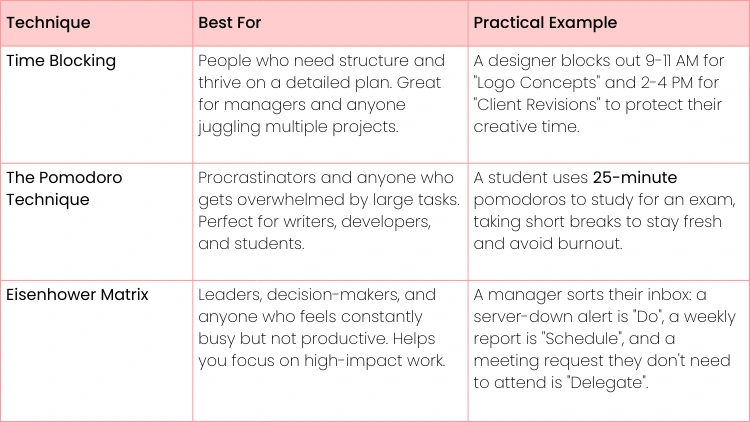
Finding the right method can feel overwhelming, but it really comes down to your personality and the type of work you do. There's no one-size-fits-all solution. This table breaks down these popular techniques to help you find your perfect match.
Ultimately, the best technique is the one you'll actually stick with. Don't be afraid to experiment. Try one for a week, see how it feels, and adjust. You might even find that combining elements from different methods works best for you. The key is to start taking intentional control of your time.
Build a Task Management System You Can Trust
Let's be honest, is your to-do list a disaster zone? If it’s a jumble of sticky notes, flagged emails, and vague mental reminders, you’re not alone. But you're also trying to build on a really shaky foundation.
A task management system you can actually rely on isn't about finding the slickest new app. It’s about creating a single source of truth for every single thing you need to get done. The real goal is to stop letting tasks bounce around in your head, because that just drains your energy and creates a constant hum of anxiety.
The 'Getting Things Done' Framework Simplified
The "Getting Things Done" (GTD) method is a game-changer for managing your commitments. It really just comes down to five core habits that, when you put them together, create a solid workflow for handling everything on your plate.
- Capture: The second a task, idea, or reminder pops into your head, write it down. Don't worry about organizing it yet—just get it out of your mind and into your designated inbox.
- Practical Example: Use a simple app like Google Keep or a pocket notebook. The tool doesn't matter, but using it consistently does.
- Clarify: Now, process what you captured. Is it something you can actually do? If a task takes less than two minutes, just do it immediately. If not, figure out the very next physical action you need to take.
- Practical Example: "Call plumber" is a perfect next action. "Fix sink" is not—it's a project.
- Organize: Put everything in its proper place. This means assigning due dates, adding it to a specific project list, or filing it away for reference later.
- Actionable Insight: Create specific lists like "@Calls", "@Emails" and "@Home" so you can batch similar tasks together.
- Reflect: Look over your lists regularly. A weekly review is absolutely critical for seeing the big picture and making sure your system stays up-to-date and trustworthy.
- Actionable Insight: Block 30 minutes in your calendar every Friday at 2:30 PM for your "Weekly Review". Treat it as an unbreakable appointment.
- Engage: Time to get to work. When you have a clear, organized list, you can confidently decide what to tackle next, knowing you’re not forgetting something important.
Break Down Your Projects into Actionable Steps
One of the biggest killers of productivity is seeing a huge project on your to-do list, like "Launch New Website". It’s so big and vague that it’s paralyzing, which makes it easy to put off. The secret is to chop it up into small, concrete, physical next actions.
A project is any outcome that requires more than one action step. Your job is to define those steps.
"Launch New Website" isn't one task; it’s a whole collection of them. Instead of that overwhelming item, your list should look more like this:
- Draft homepage copy for the new website.
- Email three web developers for project quotes.
- Schedule a meeting with the design team to review mockups.
This small shift makes huge projects feel manageable and helps you sidestep the overwhelm that leads to procrastination. You can find more practical ways to structure your to-do list with this task list template for prioritizing maximum productivity.
As you can see, great organization isn't about finding one magic bullet. It’s about combining different strategies—like time blocking or the Eisenhower Matrix—to fit what you need to do. The link between structured work and better output is becoming impossible to ignore. In fact, companies that invest in developing these skills have seen a 24% jump in productivity, and 53% of organizations now prioritize this kind of upskilling to close critical gaps.
Building a system you can truly trust is a cornerstone of that personal and professional development.
Design Your Workspace for Deep Focus
Think of your workspace as a silent partner in your productivity. If it's chaotic—whether it’s your physical desk or your computer desktop—it’s constantly sending your brain little signals that it’s okay to be distracted. To really get a handle on your organization, you have to consciously shape your environment for clarity and deep focus.
This isn’t just about a quick tidy-up. It's about building an intentional structure that removes friction and helps you do your best work. Starting with the physical desk is the best first step. A clear space really does lead to a clear mind.
Create Zones for Your Physical Desk
Instead of just shoving clutter into a drawer, try thinking like a chef organizing their kitchen. A chef has distinct stations for prepping, cooking, and plating. You can apply that same "zoning" logic to your desk to create a seriously efficient workspace.
- The Action Zone: This is the prime real estate right in front of you. It should only hold the essentials for the task at hand: your laptop or monitor, keyboard, mouse, and maybe one notebook. Everything else needs to go.
- Actionable Insight: At the end of each day, perform a "desk reset" where you clear everything out of the Action Zone except your keyboard and monitor.
- The Supply Zone: This area is within arm's reach but out of your direct line of sight. It’s perfect for desk organizers holding pens, a stapler, and other tools you use often. They’re accessible, but not distracting.
- Practical Example: Use vertical file holders for active project papers instead of letting them pile up flat on your desk.
- The Archive Zone: This is for everything else—reference books, long-term project files, and supplies you don't need every day. Think filing cabinets, shelves, or storage boxes.
- For example, a project manager might keep active binders in their supply zone, but all the completed project files get moved to the archive zone at the end of the month.
Your physical setup plays a massive role in your ability to focus. For some great visual inspiration, check out these 10 Brilliant Home Office Organizing Ideas to help you design a space that encourages deep work.
Tame Your Digital Environment
A messy digital space can be just as disruptive as a cluttered desk. A desktop covered in random files or an inbox that never seems to empty are huge sources of mental drain. You end up wasting precious energy just looking for things.
An organized digital world isn't about perfection. It’s about cutting down on decision fatigue. When you know exactly where a file is—and where to save the next one—you free up mental space for the work that actually matters.
A great place to start is with a logical folder structure. A simple but effective method is to organize by broad categories, then by year, and then by project. A freelance writer might use something like: Clients > 2026 > Client A > Project Kickoff.
Finally, it’s time to tackle your email with a system like "Inbox Zero". The goal isn't to delete everything; it's to process every single email so your main inbox stays clear. Try the "Four Ds" approach: Delete it, Do it (if it takes less than two minutes), Delegate it, or Defer it by moving it to a calendar event or a separate "To-Do" folder. This simple habit can transform your inbox from a source of stress into a clean transit hub for information.
Make Your New Organizational Habits Stick
So you’ve put in the work to build new systems for your time, tasks, and workspace. That’s a huge step. But the real challenge isn’t building the system; it’s making it last. An organizational system isn't a "set it and forget it" solution. It’s a living thing that needs regular attention to stay effective.
The secret here is a simple feedback loop. This is where a weekly review becomes your single most powerful tool. Block out just 30 minutes every Friday afternoon, and take an honest look at your week.
Ask yourself some direct questions. Did your time blocks actually protect your focus, or did constant "emergencies" blow them up? Did your to-do list guide your priorities, or did it just morph into another overwhelming list of chores?
Perform a Weekly System Tune-Up
A weekly review is not about beating yourself up over what went wrong. Think of it as a low-stakes opportunity to make small, intelligent adjustments. Your system should work for you, not the other way around. If it feels like a rigid cage, it's time for a tune-up.
Here’s what that looks like in the real world:
- What Worked: "Time blocking my mornings for deep work was a game-changer. I knocked out two major reports without getting sidetracked once."
- What Didn’t: "My digital file organization is a disaster. I wasted 20 minutes digging for a client file from last month."
- The Tweak: "This weekend, I’m dedicating one hour to re-organizing my 'Clients' folder. I'll structure it by year, then by project name."
A system that isn’t regularly reviewed and adjusted will eventually break. This weekly check-in is your quality control, preventing small cracks from becoming major system failures.
Commit to Continuous Learning
As your career grows and your responsibilities change, your organizational needs will evolve, too. Staying organized means you have to keep learning. Investing in your own development is how you stay ahead of the curve.
The data backs this up. Research shows that a whopping 91% of employees are hungry for relevant, skill-based training. When companies provide it, engagement can jump by 67%, which translates to a 17% spike in productivity. You can dig into the full research about employee development and see how targeted learning really moves the needle.
This is about more than just reading an article; it's about intentionally building on the foundation you've created. Once you master the basics, you'll naturally start looking toward more advanced skills in project management, leadership, or personal efficiency. Recognizing the power of routine is a fantastic starting point for a career built on clarity and impact.
Ready to take your organizational skills to the next level? Uplyrn offers a rich ecosystem of courses taught by industry experts, designed to help you master everything from advanced project management to effective leadership. Start your journey toward sustained growth and career mastery. Explore our courses today.


Leave your thoughts here...
All Comments
Reply