









How to Learn Java Programming - Your 2026 Roadmap

If you're mapping out your journey into programming, learning Java is a smart, strategic decision. The path can be broken down into three main stages: getting the fundamentals down, learning to use professional frameworks and tools, and finally, getting yourself ready for the job market. It's a real commitment, but the payoff is huge in the long run.
Jump To Section

Earn As You Learn
Earn 25% commission when your network purchase Uplyrn courses or subscribe to our annual membership. It’s the best thing ever. Next to learning,
of course.
Why Java is Still a Smart Choice for Developers in 2026
With new languages popping up all the time, you might wonder if Java is still relevant. The answer is a resounding yes. Java remains a cornerstone of software development, especially for large-scale enterprise systems, powerful backend services, and most Android apps.
It’s the engine behind critical systems at massive global companies. That means developers with solid Java skills are always in demand.
Enduring Popularity and Career Opportunities
The numbers don't lie. According to the TIOBE Index for January 2026, Java is still the third most popular language in the world, holding an 8.71% popularity rating. It has been a top contender for nearly three decades.
This stability translates directly into job opportunities. Projections show around 18.7 million new Java developer positions opening up by 2026. A 2025 analysis from Indeed confirms this, ranking Java as the third most in-demand programming language with a median U.S. salary of $116,000.
Breaking Down the Journey
The process is progressive. You start with the basics and build your way up to the tools and skills you'll need as a professional developer.
So, what does this path look like in practice? It’s a step-by-step process that ensures you don't get overwhelmed.
- Mastering the Fundamentals: You’ll start with the absolute basics—syntax, data types, and loops. From there, you'll dive into Object-Oriented Programming (OOP), which is the heart of Java's structure and power.
- Applying Your Knowledge: Once the basics feel solid, it’s time to build something real. You'll learn essential tools like the Spring Framework to create actual applications, like web APIs or the backend for a mobile app.
- Preparing for the Job Market: The final stretch is all about turning your skills into a career. This means building a project portfolio that shows off what you can do, practicing for technical interviews, and understanding what companies are looking for.
One of the reasons Java performs so well is that it’s a compiled language. This gives it a speed advantage in many scenarios. If you want to understand what that means, check out this guide on compiled versus interpreted languages.
This guide is designed to cut through the noise and show you exactly what it takes to become a skilled, hireable Java developer.
The big takeaway here is that learning Java isn't just about memorizing syntax. It’s about building a versatile skill set that employers are actively looking for. Its "write once, run anywhere" philosophy—thanks to the Java Virtual Machine (JVM)—is a core concept you'll get familiar with very early on.
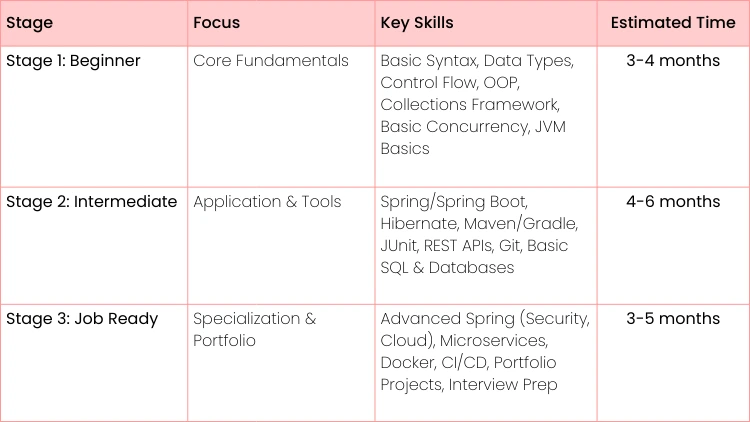
To help you visualize your path, here’s a quick overview of what you can expect at each stage.
Your Java Learning Roadmap at a Glance
This table gives you a clear, high-level look at the commitment and the key milestones you'll hit along the way. It’s all about building momentum from one stage to the next.
Building a Solid Foundation with Core Java Concepts
Every journey starts with that first step. For learning Java, that means getting your hands dirty with its fundamental building blocks. This is where you graduate from pure theory and start writing code that actually does something. It’s all about mastering the basic grammar—the syntax, data types, and control flow—that underpins every single Java application you'll ever build.
First things first, you'll need to grab a Java Development Kit (JDK). Think of it as your digital toolkit; it contains everything you need to compile and run Java code. Once you've got that installed, you can technically start writing your first program in a simple text editor.
Writing and Running Your First Program
Let's start with the classic "Hello, World!" program. It might seem small, but it's a powerful first exercise that reveals the core structure of a Java application.
// This is a simple Java program. // File name: "HelloWorld.java"
public class HelloWorld { // Your program begins with a call to main(). public static void main(String args[]) { System.out.println("Hello, World!"); } }
To bring this code to life, you'll pop open your terminal and perform two key actions:
- Compile the code: javac HelloWorld.java
- This command fires up the Java compiler. It takes your human-readable .java file and translates it into bytecode, creating a new HelloWorld.class file.
- Run the program: java HelloWorld
- This command launches the Java Virtual Machine (JVM), which then executes your bytecode. The JVM is the magic that makes Java's "write once, run anywhere" philosophy a reality.
This simple write, compile, and run cycle is the fundamental workflow for any Java developer. While it's great to understand how to do it manually, you'll quickly want to move to an Integrated Development Environment (IDE). Tools like IntelliJ IDEA, Eclipse, or VS Code automate this process and offer game-changing features like code completion and debugging that will dramatically speed up your work.
If you're just getting started with programming in general, this guide on how to learn programming for beginners offers some extra tips to get you going.
Mastering Control Flow
Once you can get a program running, the next step is making it smart. That means telling it what to do and when to do it using control flow statements like conditionals and loops.
A fantastic way to learn this is by building a simple number guessing game. A project like this forces you to use a few key concepts:
- Variables: To store the secret number and the user's guess (e.g., int secretNumber = 7;).
- Input: A way to get a guess from the person playing the game.
- If-Else Statements: To check if the guess is correct, too high, or too low.
- Loops: To let the user keep guessing until they get it right.
Here's a crucial tip to every new developer: don't just copy and paste code. Type every single character out yourself. This builds muscle memory and, more importantly, forces you to think about what each line is actually doing.
This hands-on approach of solving small, concrete problems is, without a doubt, the most effective way to learn Java. It turns abstract syntax into practical, working logic and truly cements your understanding of these core concepts.
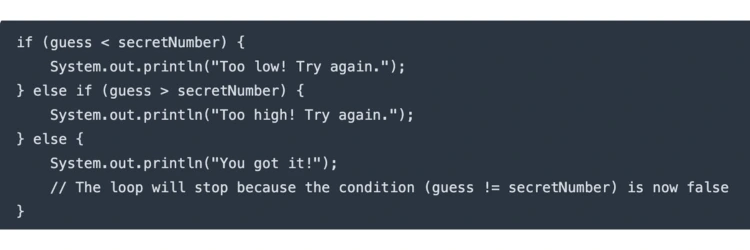
Here’s a quick look at the core logic you'd use, combining an if-else block inside a while loop:
Thinking in Java with Object-Oriented Programming
Once you’ve got a handle on the basic syntax, it's time to start thinking like a software architect. This is a big leap. It means moving beyond writing simple scripts and learning to design resilient, scalable systems using Object-Oriented Programming (OOP). Honestly, mastering OOP is the most critical step in learning Java—it's the very heart of the language.
The best way to really get OOP isn't by memorizing dry definitions. It’s about using real-world analogies. Think of it as creating digital blueprints for real things. In Java, these blueprints are called classes, and the actual things you build from them are called objects.
The Core Principles of OOP
OOP is built on four fundamental concepts that help you structure and protect your code. Let's break them down with some practical scenarios you'll actually encounter.
1. Encapsulation: Protecting Your Data
Imagine a bank account. You wouldn't want just anyone to be able to reach in and directly change your balance. That would be chaos. Instead, you have specific, controlled methods like deposit() and and withdraw() to interact with it.
That’s Encapsulation in a nutshell. It’s about bundling your data (like the account balance) and the methods that operate on that data into a single unit (the BankAccount class) while hiding the messy internal details.
Here’s a quick, actionable example of what that looks like in code:
public class BankAccount { // This balance is 'private', so it can't be changed directly from outside. private double balance;
public BankAccount(double initialBalance) {
if (initialBalance > 0) {
this.balance = initialBalance;
}
}// A public method to safely add money.
public void deposit(double amount) {
if (amount > 0) {
this.balance += amount;
}
}// A public method to see the balance.
public double getBalance() {
return this.balance;
}
By doing this, you prevent accidental or malicious changes. Your code becomes safer and a whole lot more predictable.
2. Inheritance: Building on What Exists
Inheritance is a powerful way to reuse code. It lets you create a new class that is a more specific version of an existing one. Think about a Vehicle class. A Car is a Vehicle, and a Truck is also a Vehicle. They both share common traits like speed and color, but they might have their own unique features.
- Parent Class (Superclass): Vehicle (with general properties like speed)
- Child Classes (Subclasses): Car, Truck (they inherit speed and can add their own things, like numberOfDoors for a Car or towingCapacity for a Truck)
This principle is all about efficiency. You write the common logic once in the parent class and simply extend it for more specialized child classes. No more copying and pasting code!
3. Polymorphism: One Action, Many Forms
Polymorphism sounds intimidating, but the idea is actually pretty simple: it’s the ability for something to take on many forms. In Java, this means you can have a single action (like a method name) that different objects perform in their own unique way.
Polymorphism is where your software design becomes truly dynamic and flexible. It allows you to write code that works with a general category of objects, without needing to know the specific type at compile time.
For instance, picture a makeSound() method. A Dog object would implement it to print "Woof!", while a Cat object would implement it to print "Meow!". You can treat both as general Animal objects, call makeSound() on them, and each will automatically do the right thing for its type.
4. Abstraction: Hiding the Complexity
Finally, Abstraction is all about hiding complex implementation details and only showing the features that are necessary. When you drive a car, you use the steering wheel and pedals—you don't need to know exactly how the engine, transmission, and electronics are all working together under the hood.
In Java, we often achieve this with abstract classes and interfaces. These tools define a contract of what a class should be able to do, without getting bogged down in how it does it. This approach forces other developers (or even your future self) to implement the required functionality, which leads to much more organized and maintainable code in the long run.

Getting Your Hands Dirty with Essential Java Frameworks and Tools
Once you’ve got a solid handle on Object-Oriented Programming, it’s time to move into the world of professional Java development. This is where frameworks and tools come into play. Modern applications aren't built from scratch; they're built on the shoulders of giants. These tools take care of the heavy lifting and repetitive boilerplate, letting you focus on building features that matter.
The biggest name you need to know is Spring, and more specifically, Spring Boot. It is, without a doubt, the industry standard for building everything from REST APIs to complex microservices. Spring Boot’s magic is its "convention over configuration" approach. In simple terms, it makes smart assumptions for you, allowing you to get a web server up and running with shockingly little code.
Diving into Spring Boot
So, what does this actually look like? Imagine you want to create a dead-simple web service. When someone hits a specific URL, you just want to return a "Hello, World!" message. With Spring Boot, this is surprisingly straightforward.
Here's a minimal example to show you what we mean:
import org.springframework.boot.SpringApplication;
import org.springframework.boot.autoconfigure.SpringBootApplication;
import org.springframework.web.bind.annotation.GetMapping;
import org.springframework.web.bind.annotation.RestController;@SpringBootApplication
@RestController
public class SimpleWebService {public static void main(String[] args) {
SpringApplication.run(SimpleWebService.class, args);
}@GetMapping("/hello")
public String sayHello() {
return "Hello, World!";
}
}
See those annotations like @RestController and @GetMapping? They're hints that tell Spring what this code is supposed to do. Behind the scenes, Spring Boot's auto-configuration kicks in and handles all the tedious server setup for you. This concept alone is a massive productivity booster.
One of the core principles you’ll encounter here is Dependency Injection (DI). Instead of your objects being responsible for creating their own dependencies (like a database connection), the Spring framework "injects" them where they’re needed. This makes your code more modular and a whole lot easier to test and maintain.
The Professional Developer's Toolkit
Beyond a core framework like Spring, any professional Java developer has a few other essential tools in their belt.
- Build Tools (Maven or Gradle): These tools are non-negotiable. They automate the entire build process and, critically, manage your project’s dependencies. Gone are the days of manually downloading library files (.jar files). You just declare what you need in a configuration file, and the tool fetches everything for you.
- Hibernate (ORM): When your application needs to talk to a database—which it almost always will—an Object-Relational Mapping (ORM) tool like Hibernate is a lifesaver. It lets you work with your database tables as if they were simple Java objects, saving you from writing mountains of raw SQL.
- CI/CD Pipelines: Continuous Integration and Continuous Deployment (CI/CD) automates how you test and release your code. Tools like Jenkins or GitLab CI are what allow teams to ship code quickly and reliably.
Looking at Java's ecosystem in 2026, it's clear the environment is more mature and supportive than ever. Spring Boot is still the king of the enterprise world, but alternatives like Jakarta EE, Quarkus, and Micronaut have carved out their own niches. For database work, Hibernate remains the go-to solution. This means you have a rich, stable set of tools to master as you grow. For more insights, you can read up on the current Java framework landscape.
Building a Portfolio That Gets You Hired
Theory will get you started, but a killer portfolio packed with hands-on projects is what ultimately lands you the job. This is your chance to connect all the dots—from core Java and OOP to advanced frameworks—and build tangible proof of your skills. The real goal here is to create applications that solve actual problems, showing potential employers you can deliver real value.
Don't just follow tutorials blindly. Start thinking like a developer from day one. Every project is an opportunity to sharpen your problem-solving chops, practice architectural design, and get used to a professional workflow. A portfolio isn't just a collection of code; it's the story of your journey and growth as a programmer.
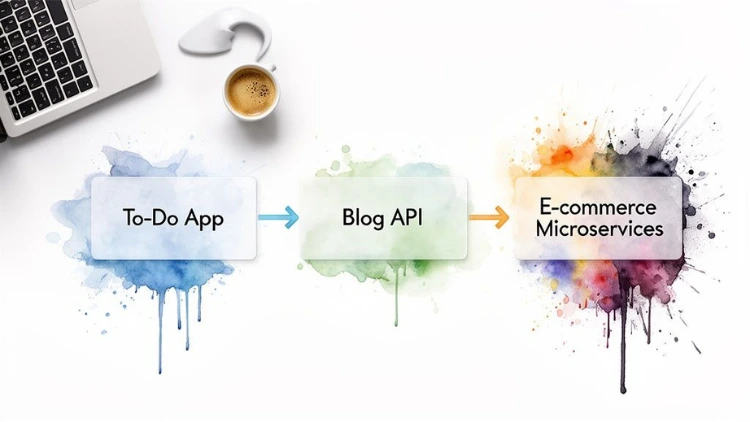
Beginner Project Idea: Console To-Do List
If you're just starting out, a console-based to-do list app is the perfect first project. It might sound basic, but it forces you to get your core Java concepts down cold without the distraction of a flashy user interface. Think of it as your first real test of applying what you've learned.
This project is fantastic because it directly reinforces your grasp of:
- Collections Framework: You'll use ArrayList to store and manage your list of tasks.
- User Input: The Scanner class becomes your best friend for handling commands like adding, removing, or viewing tasks.
- Control Flow: You'll build the main application loop with while and use switch or if-else statements to manage different user actions.
- Object-Oriented Programming: Creating a simple Task class with properties like description and isCompleted is a great introduction to modeling real-world data.
Intermediate Project Idea: RESTful Blog API
Once you've got core Java under your belt, it's time to build something that lives on the web. A RESTful API for a simple blog, built with Spring Boot, is the perfect next step. Honestly, this is the kind of thing modern backend developers do every single day.
Your mission is to build a service that lets a front-end application manage blog posts. This means implementing the essential CRUD (Create, Read, Update, Delete) operations. You'll get hands-on experience handling HTTP requests, working with JSON data, and hooking your app up to a database with Hibernate. To take your work to the next level, you have to ensure it's reliable. A great way to do that is by Mastering Unit Testing in Java.
Advanced Project Idea: Microservices E-commerce Platform
Ready for a real challenge? Building a microservices-based e-commerce platform will make your portfolio shine. This kind of project shows you can design and manage complex, distributed systems—a skill that's in incredibly high demand.
The "Expert Beginner" is a developer who masters a narrow set of skills and stops learning, believing they've reached the peak. Building increasingly complex projects like a microservices platform actively pushes you out of this comfort zone and forces continuous growth.
Instead of one monolithic application, you'll create separate, independently deployable services for key functions like users, products, and orders. These services will need to communicate with each other, likely through REST APIs or a message queue. This project throws you into the deep end with advanced concepts like service discovery, API gateways, and containerization with Docker.
It’s a massive undertaking, but it's an incredibly rewarding project that mirrors exactly how large-scale enterprise applications are built today. And if you're working on mobile projects, you might also find this guide on how to create a camera app in Android Studio useful.
Launching Your Career as a Java Developer
Knowing how to write Java code is one thing. Turning that skill into a career is another ballgame entirely. The job hunt is a skill in itself, so let's walk through how to build a resume that gets noticed, nail the technical interviews, and finally connect your Java knowledge to a real-world job.
First, the good news: the job market for Java developers is incredibly strong. Java is the backbone of the enterprise software world, powering mission-critical applications for countless large companies.
A quick look at job boards tells the story. You'll find 47,000 active job listings for Java engineers on DevJobsScanner and over 39,000 open positions on Indeed. This isn't a flash-in-the-pan trend; Java opens doors to some of the most stable, well-paying tech jobs out there.
Crafting a Resume That Highlights Your Projects
Your resume is your ticket to an interview. It has to do more than just list skills—it needs to tell a story about what you can build. Let your projects do the talking.
We recommend structuring your project descriptions using the Problem-Action-Result framework. It’s simple but effective.
- Problem: What was the goal? (e.g., "Needed a system to manage blog content.")
- Action: What did you do and what tech did you use? (e.g., "Built a RESTful API with Spring Boot and used Hibernate for database persistence.")
- Result: What was the outcome? (e.g., "Successfully implemented full CRUD operations for posts and users.")
This simple shift turns your portfolio from a list of exercises into a showcase of business solutions. That’s what recruiters and hiring managers want to see. For a deeper dive, check out this complete guide on how to get a software engineering job.
Preparing for Java Technical Interviews
Technical interviews are where you prove you really know your stuff. They're designed to test your problem-solving skills and your grasp of Java’s inner workings. You’ll be expected to go way beyond basic syntax.
Focus your prep time on these core areas:
- JVM Internals: Be ready to explain the ClassLoader, the different runtime data areas (like the heap and stack), and the execution engine.
- Garbage Collection: Understand how GC works, the difference between a major and minor GC, and the trade-offs between different garbage collectors.
- Concurrency: Get comfortable with terms like synchronized, volatile, and the entire java.util.concurrent package. You should be able to discuss common pitfalls like deadlocks and race conditions.
A classic interview question is explaining the difference between == and .equals(). The basic answer is easy (reference vs. value equality). But a great candidate will also discuss the hashCode() contract and why it’s critical to override it when you override .equals() for your own objects.
Mastering Java is one piece of the puzzle. The other is showing you can work efficiently and deliver value. Learning how to constantly improve developer productivity will serve you well throughout your entire career.
The Role of Java Certifications
This question comes up all the time: do you need a Java certification? The honest answer is, it depends. A certification is rarely a substitute for a solid portfolio and a strong interview, but it can be a smart move in certain situations.
Here’s when certifications are most useful:
- Validating Skills: If you don't have a formal computer science degree, a certification like the Oracle Certified Professional (OCP) can offer official validation of your expertise.
- Specialized Roles: In some large enterprise or government jobs, HR departments might use certifications as a screening filter to trim down the applicant pool.
- Boosting Confidence: The structured study required to pass a certification exam is a great way to solidify your understanding of the language's finer points.
At the end of the day, your projects and problem-solving abilities will always carry the most weight. Think of certifications as a potential supplement to your profile, not the main event.
FAQs for Aspiring Java Developers
Of course, as you get started on your path to learning Java, you're going to have some questions. It's only natural. Let's tackle some of the most common ones we hear from aspiring developers to help clear things up.
Is Java Still a Good Language to Learn in 2026?
Absolutely. In fact, it’s one of the smartest career moves you can make. Java isn’t just surviving; it’s thriving. It's the backbone for so many large-scale business systems, the entire Android mobile ecosystem, and a ton of big data tech.
This isn't just about a few niche uses. This deep industry integration means the demand for skilled Java developers is consistently high, which directly translates to excellent job security and very competitive salaries. Choosing Java is a solid bet on a long-term, stable career.
How Long Does It Take to Become Job-Ready?
This is the big one, isn't it? Based on experience seeing countless students through this journey, you should plan for 6 to 12 months of consistent, focused learning.
That timeline isn't just about watching videos. It means getting your hands dirty: truly understanding the core concepts, getting comfortable with a major framework like Spring Boot, and, most importantly, building 2-3 solid projects for your portfolio. Your personal timeline might be a bit shorter or longer depending on your background and how many hours you can put in each week.
Here's a key piece of advice: "job-ready" doesn't mean you know everything. No one does. It means you've built a strong enough foundation to solve real problems, learn on the fly, and start contributing to a team. Focus on that core competence, not just memorizing syntax.
What Is the Most Important Java Framework to Learn?
If you're aiming for a backend development job, the answer is clear: Spring Boot. Hands down, it's the most dominant framework in the industry for building the REST APIs and microservices that power modern applications.
Just look at job descriptions—proficiency in Spring is almost always a top requirement. Once you learn Spring Boot, you can rapidly build a web app that talks to a database, secures user access, and serves data to a front-end. These are the exact skills companies are desperate to hire for right now.
Do I Need a Computer Science Degree for a Java Job?
Nope. A formal CS degree is not a deal-breaker. We've seen many incredibly successful Java developers who are self-taught or came from a coding bootcamp. In the tech world, what you can do almost always trumps what's on a piece of paper.
Employers are looking for proof of your skills. Your ability to get hired will really come down to a few practical things:
- A strong project portfolio that proves you can build real-world applications.
- A deep understanding of OOP, data structures, and algorithms.
- How well you perform in technical interviews and show off your problem-solving chops.
A killer portfolio and a confident interview performance will open more doors than a specific degree ever will.
Ready to stop just reading and start building? Uplyrn offers a comprehensive skills ecosystem designed to take you from beginner to job-ready with expert-led courses and mentorship. Start your learning journey today.


Leave your thoughts here...
All Comments
Reply