









How to Learn SQL for Beginners: Practical Starter Guide

Let's be honest—learning SQL is one of the smartest career moves you can make right now. It's no longer a niche skill tucked away in the developer's toolkit. Instead, it’s become a core competency for anyone who wants to use data to make smarter decisions.
Whether you're in marketing, finance, operations, or tech, the ability to "speak" the language of data puts you in an incredibly powerful position.
Think about it this way: every modern company runs on data. Businesses are constantly collecting information, from tracking customer behavior to optimizing supply chains. SQL is the universal key that unlocks the value hidden inside those massive databases.
Knowing SQL means you don't have to wait for an analyst to pull a report for you. You can dive in yourself, ask your own questions, and find the answers needed to drive real results.
The Career Impact of Learning SQL
The demand for people who know their way around a database is skyrocketing, and that translates directly to career growth. More importantly, SQL skills are consistently linked to a 20-40% salary increase in data-focused roles. The language appears in job postings across almost every industry, driving a 25% year-over-year increase in related positions on platforms like LinkedIn. This isn't just a fleeting trend; it's a fundamental shift in what employers are looking for. They need people who can work with data independently.
By learning SQL, you're not just picking up a technical skill. You're gaining the ability to understand the story your data is telling—a competence that is invaluable in any role. You can learn more about its role as the unsung warrior of the data world in this post.
Ultimately, mastering SQL gives you a massive competitive edge. It signals to employers that you are analytical, proactive, and capable of turning raw numbers into actionable business intelligence. This skill is your ticket to more senior roles, higher earning potential, and a deeper impact on your organization.
Jump To Section

Earn As You Learn
Earn 25% commission when your network purchase Uplyrn courses or subscribe to our annual membership. It’s the best thing ever. Next to learning,
of course.
Setting Up Your Free SQL Playground
Alright, before you can write a single line of SQL, you need a place to actually do it. Think of this as your personal lab—a safe space where you can experiment, break things, and really learn without any pressure.
The goal isn't to become a database administrator overnight. It’s simply to get a practice environment up and running. The best part? You can get this done in under 15 minutes.
When you're just starting out, there are two main paths you can take: online sandboxes or a local setup on your own computer. Online tools like SQL Fiddle are fine for a quick test here and there, but they're not great for serious learning. You often can't save your work or handle anything more than a tiny dataset. A local environment, on the other hand, gives you full control and is exactly what you need for consistent practice.
Your Go-To Local Setup: SQLite
We always recommend starting with SQLite. It's a self-contained, serverless database engine, which is a fancy way of saying it's incredibly simple and doesn't require any complicated server setup. It’s perfect for learners.
To manage it, you'll want a free tool called DB Browser for SQLite. This combo is a fantastic, completely offline playground. You can create your own tables, import real-world datasets (like from a CSV file), and run all your queries right on your machine.
- Actionable Insight: Download a public dataset from Kaggle, like one on movie ratings or sales data. Use DB Browser's "Import" feature to load the CSV file into a new table. This immediately gives you real, complex data to practice with, far more interesting than a simple demo table.
For those of you new to coding in general, our this on how to learn programming for beginners offers some great foundational tips that go hand-in-hand with learning SQL.
Choosing Your Practice Environment
So, where should you practice? It really depends on your immediate goals. Here’s a quick breakdown to help you decide.
- Environment: SQLite with DB Browser
- Best For: Consistent, offline practice and small projects.
- Key Advantage: Full control, works anywhere without internet, and lets you save your progress.
- Environment: Online SQL Sandboxes
- Best For: Quick tests and sharing code snippets.
- Key Advantage: Zero installation required; just open a website and start typing.
For anyone truly starting from scratch, the SQLite and DB Browser combination is unmatched. It helps you build a solid foundation because you're managing a real database file on your own computer—a crucial, practical skill.
Down the road, as you get more comfortable, you’ll naturally get curious about the more powerful systems used in the professional world, like SQL Server or PostgreSQL. For those ready to level up from a basic playground, you can find great resources to master building a SQL Server environment.
But for now, let's just focus on getting your simple, effective playground set up.
Alright, let's get to the good stuff. This is where you actually start writing SQL.
The secret to learning SQL is realizing you don't need to memorize a hundred different commands. Nope. You just need to get really, really good at a handful of them. These are the commands that do all the heavy lifting, the ones you'll use every single day.
Think of them as your core toolkit. Get these down, and you can build just about anything.
The Absolute Basics: SELECT and FROM
Every single query you ever write will start with SELECT and FROM. It's the most fundamental concept: you're telling the database what you want to see and where to find it.
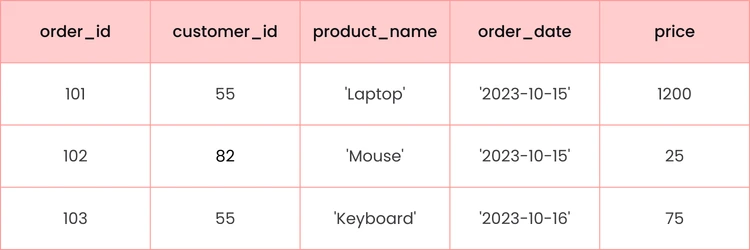
Let's imagine we're working with a simple database called customer_orders from an e-commerce store. If you just wanted to dump everything out of that database to see what's inside, your query is dead simple:
SELECT *
FROM customer_orders;
That little asterisk (*) is a wildcard that just means "give me all the columns". Easy, right? You've just written your first query.
Filtering and Sorting Your Data
Now, pulling all the data is fine for a quick peek, but it's rarely what you actually need. The real magic happens when you start filtering and sorting to find specific answers. That's where WHERE and ORDER BY come in.
The WHERE clause is your filter. It lets you lay down some ground rules for the data you want back. For instance, what if your boss only wants to see the orders placed by customer 55?
SELECT *
FROM customer_orders
WHERE customer_id = 55;
Boom. Just like that, you've narrowed thousands of potential rows down to just the ones that matter. You can also stack conditions together. Need to find all 'Laptop' orders that cost more than $1000? Just add an AND:
SELECT product_name, price
FROM customer_orders
WHERE product_name = 'Laptop' AND price > 1000;
Notice how we're now only asking for the product_name and price columns? This keeps your results clean and focused. As you get more advanced, you'll find other functions to clean up your data, like the SQL TRIM function and how it works, which is super handy for messy text fields.
Next up is ORDER BY, which does exactly what it sounds like: it sorts your results. Let's find our most expensive products and list them from highest price to lowest. The DESC keyword tells SQL you want it in descending order.
SELECT product_name, price
FROM customer_orders
ORDER BY price DESC;
Summarizing Data with GROUP BY
This is the command that takes you from just retrieving data to actually analyzing it. GROUP BY is all about summarizing—or aggregating—your data into meaningful chunks. You'll almost always see it used with functions like SUM(), COUNT(), or AVG().
Let's use it to answer a classic business question: "How much has each customer spent in total?"
SELECT customer_id, SUM(price) AS total_spent
FROM customer_orders
GROUP BY customer_id;
What this query does is brilliant. It groups all the rows together by customer_id, then calculates the sum of the price for each of those little groups. We even give that new calculated column a clean name, total_spent, using AS. You've just turned raw order data into real business intelligence.
Key Takeaway: Seriously, focus on these five commands: SELECT, FROM, WHERE, ORDER BY, and GROUP BY. If you can master them, you can answer the vast majority of questions that will ever be thrown at you. Practice them until they feel like second nature.
And there's a huge demand for these skills. The number of data jobs requiring SQL shot up by 35% between 2020 and 2025, and it’s a staple in over 70% of Fortune 500 companies. You can find tutorials that will help you master these SQL basics in under an hour to get started.
Later on, writing fast queries becomes just as important as writing correct ones. This guide has some great MySQL Query Optimization Tips that are worth bookmarking for when you're ready.
Connecting Datasets with SQL Joins
So far, we’ve been pulling data from one table at a time. That’s a good start, but in the real world, information is almost never that neat. Data is usually split across multiple related tables. This is where SQL JOINs come in and become your new best friend.
Imagine you're running an online store. You’ll have a table for customers (names, emails) and a separate table for orders (what was bought, when it was bought). JOINs are what let you connect these two tables to answer critical business questions like, "Which customers bought this specific product?"
Once you start combining tables, you can then filter, sort, and group the results to pull out some really powerful insights.
Understanding the Different Types of Joins
The real power of JOINs is unlocked when you know which type to use for the question you’re asking. While there are a few different kinds, you can get incredibly far by just mastering the main three.
Let's stick with our online store example. We have a customers table and an orders table.
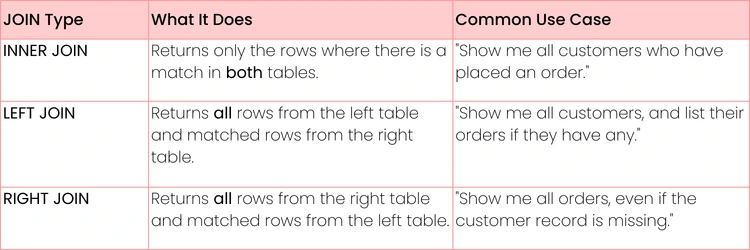
- INNER JOIN: This is your go-to for finding perfect matches. It only returns rows where the key you're joining on exists in both tables. If you want a clean list of customers who have actually placed an order, INNER JOIN is the tool for the job. It will completely ignore any customers who haven’t bought anything yet.
- LEFT JOIN: Think of this as "keep everything from the first table". It will return all the records from the "left" table (the one listed first) and any matching records from the "right" table. It's fantastic for finding what's missing. For example, a LEFT JOIN from customers to orders will show you all your customers, even the ones who have never bought a thing.
- RIGHT JOIN: This is simply the mirror image of a LEFT JOIN. It brings back all the records from the "right" table and any matching ones from the "left". It’s less common, but can be useful for data cleanup tasks, like finding orders that, for some weird reason, don't have a customer record attached.
Pro Tip: Always think of LEFT JOIN as your discovery tool. It’s perfect for answering questions like, "Which of our blog subscribers have never made a purchase?" or "Which products in our catalog have zero sales?"
Putting Joins into Practice
Let's write a quick query to see every customer who has placed an order, along with the product they bought. We need to connect the customers table to the orders table using the customer_id that exists in both.
SELECT
c.customer_name,
o.product_name
FROM
customers c
INNER JOIN
orders o ON c.customer_id = o.customer_id;
See that ON keyword? That’s where you tell SQL how the two tables are related. We also use aliases here (c for customers, o for orders) to keep the code cleaner and easier to read, which is a great habit to get into.
- Actionable Insight: Try changing INNER JOIN to LEFT JOIN in the query above. You'll now see all customers, including those who have a NULL (empty) value for product_name. This is a practical way to find customers who have signed up but haven't purchased anything yet—a perfect list for a marketing re-engagement campaign.
JOINs can feel a little abstract at first, but they click into place with practice. Don't be afraid to just try them out and see what results you get. As you get more comfortable, you can explore other powerful techniques. For instance, check out this guide on using SQL NOT EXISTS to discover records that don't match your query.
To help you decide which JOIN to use, here's a quick reference table you will find handy.
Choosing the Right SQL Join
Ultimately, the JOIN you choose completely depends on the story you're trying to tell with your data.
Building Your First SQL Mini-Projects
Reading about SQL is one thing, but actually using it to solve problems is where you'll really start to feel confident. Think of mini-projects as the perfect bridge between knowing the commands and knowing what to do with them.
This is your chance to put your SELECT, JOIN, and GROUP BY skills to the test in a way that feels real. The goal here isn't just to practice—it's to create something tangible you can add to your portfolio and talk about in an interview.
Analyzing Movie Rental Data
Let's start with a classic. Imagine you're an analyst for a video rental store, and your boss wants to know how to boost weekend business.
Your objective is simple: Identify the most popular movie genres rented out over the weekend.
To figure this out, you'll need to combine a few key skills:
- First, JOIN the tables connecting films, categories (genres), and rental transactions.
- Then, use a WHERE clause to filter for rentals that happened on a Friday, Saturday, or Sunday.
- Finally, GROUP BY the genre and use COUNT(*) to see which categories come out on top.
Practical Example: The final query might look something like this, giving you a ranked list of genres. The business could then use this to run a "Weekend Action Movie Marathon" promotion.
SELECT category.name, COUNT(rental.rental_id) AS rental_count
FROM rental
JOIN inventory ON rental.inventory_id = inventory.inventory_id
JOIN film ON inventory.film_id = film.film_id
JOIN film_category ON film.film_id = film_category.film_id
JOIN category ON film_category.category_id = category.category_id
WHERE EXTRACT(DOW FROM rental.rental_date) IN (5, 6, 0) -- Fri, Sat, Sun
GROUP BY category.name
ORDER BY rental_count DESC;
Finding Top E-commerce Customers
Now, let's step into an e-commerce scenario. Every online business wants to identify its most valuable customers. For this project, you'll dig into a sales database to find the most loyal buyers.
The mission: Generate a list of the top 10 customers by total spending.
Here’s the game plan:
- JOIN your customers and orders tables to link people to their purchases.
- Use SUM() to calculate the total amount spent for each customer.
- You'll need to GROUP BY the customer ID to make sure you're summing up all their orders together.
- Finish it off by using ORDER BY to sort them from highest to lowest spender and LIMIT 10 to get just the top ten.
This kind of analysis is gold for marketing teams looking to build loyalty programs. Being the person who can pull this data directly from the database makes you an incredibly valuable asset. If this sounds like your kind of work, you might want to check out this guide on how to become a data analyst.
Why This Method Works
Getting your hands dirty with project-based learning is incredibly effective because it forces you to apply concepts in a practical context. You're not just memorizing syntax; you're solving a puzzle.
It's no surprise that platforms built around this hands-on approach see impressive results. One popular platform, for instance, reports a 75% completion rate for its hands-on projects.
When you build projects, you're not just learning—you're building proof of your skills and gaining the confidence to tackle real-world tasks.
A Few Common Questions About Learning SQL
As you get ready to dive into SQL, you'll probably have a few questions swirling around. That's totally normal. Let's tackle some of the big ones right now to clear the path and keep you moving forward.
How Long Does It Really Take to Learn SQL?
This is the big one, isn't it? And the honest-to-goodness answer is: it depends entirely on what your goal is.
If you just want to learn the absolute basics—your SELECT statements, WHERE clauses, GROUP BY, and a simple JOIN—you can get the hang of that in a dedicated weekend. Seriously. But to get genuinely comfortable, the kind of comfortable where you can confidently tackle real business problems, most people find they need about 2-3 weeks of consistent, hands-on practice.
But let's be real: achieving true mastery, where you're writing mind-bendingly complex queries and fine-tuning them for peak performance, is a journey. That can take months, even years. The trick is to stop worrying about becoming a world-class expert overnight and instead focus on getting "job-ready".
The goal right now isn't perfection; it's building a solid foundation. Concentrate on understanding the core ideas and immediately applying them in small projects. You'll be amazed at how capable you feel after just a month of focused effort.
Is SQL Still a Big Deal Today?
Yes. An emphatic, resounding yes. In fact, it might be more important now than ever before.
There's a reason SQL has been the gold standard for relational databases for nearly 50 years: it just flat-out works. It’s the invisible engine behind almost everything you interact with, from your banking app to the e-commerce store you just browsed to the mobile game on your phone.
And while all sorts of new database technologies have popped up, SQL remains the universal language for talking to structured data. Knowing SQL swings doors wide open for roles in:
- Data Analysis: Pulling the exact data you need to find game-changing insights.
- Business Intelligence: Crafting the dashboards and reports that leaders depend on.
- Software Engineering: Building the logic that lets applications talk to their databases.
- Marketing Analytics: Digging into customer data to see what’s really working.
Learning SQL is more than just learning a programming language; it’s about learning the fundamental skill of asking smart questions of your data.
What's the Hardest Part About Learning SQL?
For almost everyone starting out, the toughest challenge isn’t memorizing commands like SELECT or FROM. The syntax is pretty straightforward. The real mental shift is learning to "think in sets".
Most of us are used to thinking procedurally, like following a recipe step-by-step. But SQL is declarative. You don't tell the database how to find the data; you just describe what data you want, and the database figures out the best way to get it for you. It's a different way of thinking that takes a little getting used to.
- Actionable Insight: To practice "thinking in sets", start by writing down the business question in plain English first (e.g., "I need a list of all products that cost more than $50"). Then, break it down into the pieces SQL needs: What columns do I want? (SELECT product_name, price), From what table? (FROM products), What's the rule? (WHERE price > 50). This bridges the gap between your intent and the code.
The other major hurdle? Getting the hang of JOINs. Visualizing how two or more tables connect, and picking the right type of JOIN for the question you're asking, can feel a bit abstract at first. The only way through this is practice. Sketch out the table relationships on a whiteboard. Play with real datasets. Experiment and see what breaks. Don't just read about JOINs—get in there and start joining.
Ready to build the practical skills that will define your career? At Uplyrn, we provide the expert-led courses you need to master SQL and other in-demand skills. Start your journey today!


Leave your thoughts here...
All Comments
Reply