









What is Knowledge Management System? A Definitive Guide

Ever had that frustrating feeling of knowing someone in your company has the answer to your question, but you have no idea who or where to find it? That's a classic knowledge silo problem, and it's exactly what a knowledge management system (KMS) is built to solve.
Jump To Section

Earn As You Learn
Earn 25% commission when your network purchase Uplyrn courses or subscribe to our annual membership. It’s the best thing ever. Next to learning,
of course.
What is a Knowledge Management System Explained
Think of a KMS as your company’s collective brain, all stored in one central, searchable place. It's a system designed to capture, organize, and share the wealth of information that’s usually scattered across emails, chat threads, documents, and—most importantly—your team's own minds.
Without a system like this, crucial information often walks out the door when an employee leaves. A KMS acts as a safety net, ensuring that expertise stays within the organization and is easily accessible to everyone who needs it.
For instance, a new sales rep could instantly pull up the best practices for handling a specific client objection instead of spending hours tracking down a senior team member. This immediate access is key to building a learning culture where people feel empowered to find answers and grow.
The goal is simple: stop reinventing the wheel. By making knowledge easy to find and use, a KMS helps teams make smarter decisions, get new hires up to speed faster, and keep everyone on the same page. The impact is huge—it's why the global KMS market has exploded into a multi-billion dollar industry.
A KMS isn’t just a fancy digital filing cabinet. It's an active ecosystem where your team’s collective intelligence grows, gets refined, and becomes a reliable source of truth for the entire organization.
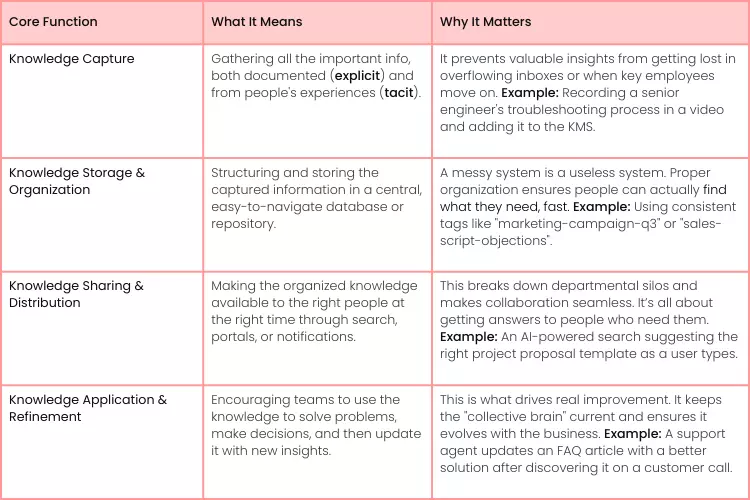
To really understand how it works, let's break down the core functions that every effective KMS performs. These four pillars work together in a continuous cycle to keep the information fresh, relevant, and valuable.

Core Functions of a Knowledge Management System at a Glance
This table shows the four essential jobs a KMS does, what they really mean in practice, and why they're so important for any team.
These functions create a powerful feedback loop. As your team applies the knowledge, they uncover new solutions and best practices, which are then captured back into the system, making it smarter and more useful over time.
The Core Components of a Modern KMS
Before we can really talk about what a knowledge management system is, we need to pop the hood and look at the moving parts. A modern KMS isn't just a single piece of software; it’s more like an ecosystem where different tools work together to make your company’s collective brainpower easy to find and use.
You can think of it like a four-cylinder engine. Each part is crucial for the whole system to run smoothly, and they all have one job: getting your team where they need to go, faster. Let's break down these four critical components.
The Knowledge Base
The knowledge base is the heart of the whole operation. It’s the central digital library where all the explicit, documented information lives. This isn't just some messy folder of Word docs; it's a structured home for everything from official company policies and product manuals to how-to guides and project recaps.
For instance, a customer support team's knowledge base is their bible. It holds articles detailing fixes for common technical glitches, giving agents a single source of truth to pull from. That means every customer gets the same accurate answer, every time.
Search Engine and Collaboration Tools
A killer search engine acts as your company's own private Google, letting people find exactly what they need in seconds. A good one won't just scan titles; it will dig through the full text of documents, wikis, and even past conversations to find the right answer.
Working alongside the search function are collaboration tools—things like internal forums, wikis, or Q&A channels. This is where the magic happens, turning that informal, "unwritten" knowledge stuck in employees' heads into something everyone can benefit from.
- For example, a junior designer might post a question in a forum to get feedback from a senior colleague, and that entire exchange becomes a searchable lesson for the next person who has the same question. Of course, protecting all that shared data is critical, which makes solid cloud security an absolute must for any KMS.
Actionable Insight: When you're testing out a KMS, throw a real-world, complex question at its search function. For example, search for "client feedback from the Q2 beta project." If it can't surface the right info quickly, your team simply won't use it, no matter how slick the other features are.
Finally, there’s the analytics dashboard. This is your command center for understanding how knowledge flows through your organization. It shows you which articles get the most views, what terms people are searching for, and—most importantly—where the knowledge gaps are. This data is gold for making the whole system smarter over time.

Exploring Different Types of Knowledge Management Systems
Not all knowledge management systems are created equal. Just like you wouldn't use a hammer to drive a screw, the right KMS depends entirely on what you need it to do. They can be massive, enterprise-wide platforms serving every department or highly specialized tools built for specific teams, like customer support or R&D.
Understanding these differences is key to making a smart investment. Some systems are fantastic at creating community-driven knowledge through forums and Q&A sessions. Others are designed for strict, top-down documentation and control.
On-Premise vs. Cloud-Based Platforms
The first major fork in the road is deciding between an on-premise system and a cloud-based one. An on-premise KMS is installed directly onto your company’s servers, giving your IT team total control over security and data. This used to be the only way, but it comes with a hefty upfront investment and a lot of ongoing maintenance.
On the other hand, a cloud-based (or SaaS) model is hosted by the vendor and accessed right through your web browser. This approach has quickly become the go-to for most modern businesses, and for good reason. Cloud-first deployment now makes up around 62.7% of the market and is only growing, which shows a clear preference for its flexibility and remote-work-friendly nature.
Here’s a quick look at Atlassian's Confluence, a classic example of a cloud-based KMS.
Notice the clean navigation on the left for different "spaces" (teams or projects) and the main area for creating documents together. It's built for ease of use.
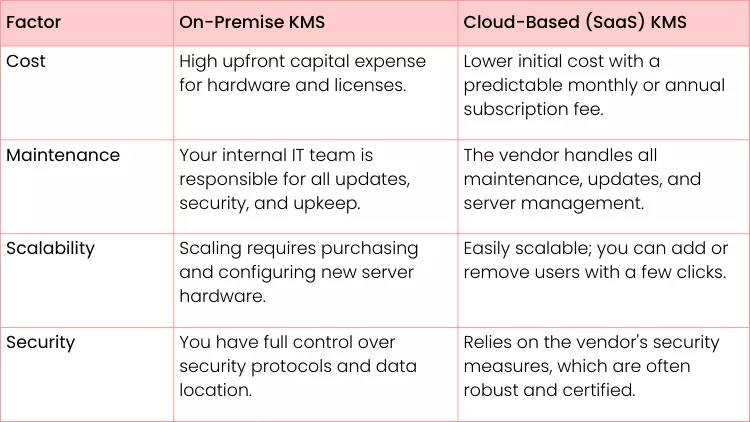
Your choice between on-premise and cloud isn't just technical—it's strategic. It dictates how you'll handle costs, security, scalability, and maintenance for years to come.
On-Premise vs Cloud-Based KMS: A Practical Comparison
Making the right call between on-premise and cloud-based systems is critical. This decision impacts everything from your budget to your IT team's workload. This table breaks down the practical differences to help you see which path aligns better with your company's resources and goals.
Actionable Insight: If you're a startup or small business, a cloud-based KMS is almost always the smarter choice. The low entry cost and zero maintenance overhead let you focus on growing your business, not managing servers. For a large enterprise in finance or healthcare with strict data residency laws, an on-premise solution might be a non-negotiable requirement.
The Real-World Payoff: What a KMS Actually Does For You
Let's move past the theory. A knowledge management system delivers real, measurable results that show up on your bottom line and in your team's day-to-day work. These aren't just buzzwords; they're practical upgrades that save time, cut costs, and genuinely help your people do their best work.
One of the first things you'll notice is how much faster new hires get up to speed. Instead of tapping a busy coworker on the shoulder for every little question, a new team member can jump into a central hub filled with process docs, training videos, and best practices. Practically speaking, this means a new marketing hire can independently learn your brand's voice and tone guidelines from a central article instead of interrupting the senior marketing manager multiple times.
It’s also a massive boost to your whole team's efficiency. Think about it: studies suggest employees can spend up to 20% of their day just trying to find the information they need to do their jobs. A solid KMS gives them that time back, letting them focus on high-value tasks instead of playing digital hide-and-seek with scattered files.
Creating Better Experiences for Customers and Employees
A well-oiled KMS is a total game-changer for customer support. When you build an external knowledge base with solid FAQs and how-to guides, you empower customers to find their own answers. This self-service approach can dramatically cut down on support tickets, freeing up your agents to tackle the really tough problems.
Internally, this same principle creates a more open and collaborative culture.
When knowledge is shared freely, it breaks down the walls between departments. It also stops crucial expertise from walking out the door when a key employee leaves. This is one of the most powerful long-term benefits you'll see.
From Smarter Decisions to Smoother Workflows
At the end of the day, a KMS helps everyone make smarter, faster decisions. When your leaders and teams have instant access to accurate data, past project details, and expert insights, they can act with confidence, not guesswork.
- For example, a project manager planning a new software launch can immediately search the KMS for "post-launch lessons" from previous projects, avoiding known pitfalls before they even start. This makes the whole organization more agile and ready to adapt.
Of course, to really get these benefits, the system needs to fit naturally into how people already work. For some great ideas on this, check out this guide on how to learn effectively in the flow of work. Bringing in a KMS isn't just about new software—it's about building a smarter, more connected organization from the inside out.
How to Choose the Right Knowledge Management System
Picking the right KMS can feel overwhelming, but a bit of structure goes a long way. The best place to start? Figure out what’s actually broken.
Are your remote employees constantly pinging everyone for the latest project files? Is your support team stuck in a loop, answering the same five questions every single day? Pinpoint those specific headaches first. This gives you a clear target to aim for, ensuring you find a system that solves real problems instead of just becoming another icon on your desktop.
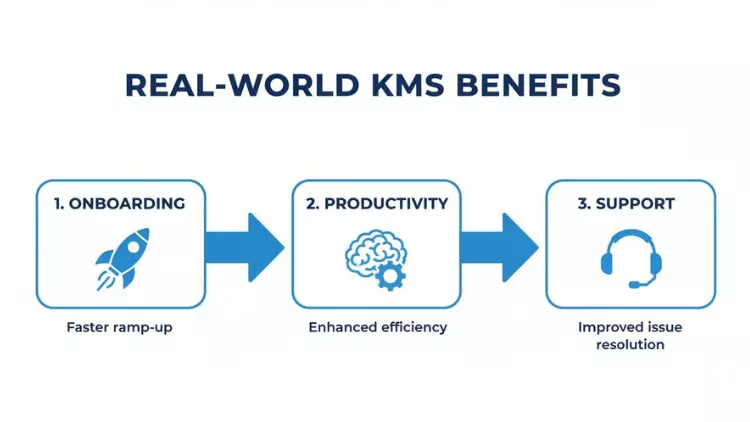
Once you know what needs fixing, you can start looking at your options with a genuine sense of purpose. A good KMS should have a ripple effect, making everything smoother.
As you can see, it all connects. Faster onboarding leads to more productive teams, which frees up your experts to solve tougher problems, ultimately improving customer support.
Creating Your Evaluation Framework
With your goals locked in, it’s time to build a framework for choosing your tool. But don't do this in a silo. Grab key people from different departments—sales, support, product, you name it. Getting their input is crucial for getting a complete picture of what the entire organization truly needs.
Next, make a must-have features list. A lightning-fast search function is absolutely non-negotiable. So are integrations with the tools your team already lives in, like Slack or Microsoft 365. If you're looking for practical ideas on how these systems come together, guides like How to Create a Knowledge Base with Notion and Sotion can offer some great real-world inspiration.
Actionable Insight: Before you sign any contracts, run a small pilot program. Pick a representative group of users (e.g., three support agents and two sales reps) and let them test drive your top choice for two weeks. This is hands-down the best way to see if a KMS actually fits your workflow and if people will bother to use it.
Many of the best systems today are cloud-based, which can make getting set up a whole lot easier. If you want to get a better handle on what that means, this guide on SaaS, PaaS, and IaaS breaks it all down.
Finally, narrow your list down to two or three vendors and ask for demos that speak directly to your pain points. A good vendor should be able to show you exactly how their platform solves the problems you identified from the get-go. This practical, problem-first approach ensures you end up with a tool that delivers real, lasting value.
Frequently Asked Questions About Knowledge Management Systems
Even after getting the hang of what a knowledge management system is, a few practical questions always seem to pop up. Let's tackle the most common ones we hear from decision-makers and teams to clear up any lingering confusion.
KMS vs. Cloud Storage
What’s the difference between a KMS and something like Google Drive?
Think of it this way: Google Drive is like a digital filing cabinet. It's fantastic for storing documents you already know exist. A KMS, on the other hand, is more like an intelligent, searchable library designed for discovery.
It goes way beyond just holding files. A good KMS has a powerful search that can actually read inside documents, supports internal wikis and Q&A forums, and even has built-in workflows for getting content reviewed and approved.
Here’s a real-world scenario. To find sales data in Drive, you probably need to know the exact file name or who created it. In a KMS, you could just search for "Q3 sales objections" and instantly pull up the official report, a discussion thread where senior reps shared how they handle those objections, and a quick training video on the topic. It's all about context, not just storage.
Encouraging Team Adoption
How do you get employees to actually use a new KMS?
This is the million-dollar question, isn't it? Getting people to adopt a new tool is always a challenge. The secret is to weave the KMS into their daily workflow so it doesn't feel like just another chore.
- Find Your Champions: In every department, there are people who are naturally enthusiastic about new tools. Identify these "knowledge champions" and empower them. They can sing its praises and provide peer-to-peer support, which is often more effective than top-down mandates.
- Integrate, Integrate, Integrate: Make it ridiculously easy to use. Connect your KMS with the tools your team already lives in, like Slack or Microsoft Teams. For example, enable a "/kms" slash command in Slack to instantly search the knowledge base without leaving the chat.
- Make It Genuinely Useful: Nothing kills adoption faster than outdated or irrelevant content. If the system consistently saves people time and helps them do their jobs better, they will use it. It's that simple.
Actionable Insight: The ultimate goal is to make the KMS the easiest and most reliable place to find answers. When it solves more problems than it creates, user adoption follows naturally. Start by migrating the 10 most frequently asked questions from your support team into the KMS to show immediate value.
Measuring System ROI
How do you measure the ROI of a knowledge management system?
Measuring the return on your investment isn't just about dollars and cents; it’s a mix of hard numbers and softer, but equally important, benefits.
On the quantitative side, you can track metrics like a reduction in the time employees spend searching for information or a drop in repetitive support tickets. You could even calculate the hours saved when a new hire gets up to speed 25% faster because they have a centralized onboarding hub.
Qualitatively, you can measure things like improvements in employee satisfaction, better collaboration between teams, and more confident decision-making. The best approach is to combine the system's analytics with direct feedback from employee surveys. That gives you the full picture of the impact it’s having.
Ready to build a culture of continuous learning and empower your team with the right skills? Uplyrn provides a dynamic learning ecosystem that connects your team with expert-led courses and mentors. Discover how Uplyrn can catalyze growth in your organization.


Leave your thoughts here...
All Comments
Reply