









Discover the Art of Animation: Your Ultimate Guide
At its heart, the art of animation is about breathing life into things that don't have it. Animators are modern-day magicians, taking static drawings, computer models, or even clay figures and giving them personality, character, and a story to tell—one painstaking frame at a time. It’s a delicate dance between raw artistic talent and disciplined technical skill.
Jump To Section

Earn As You Learn
Earn 25% commission when your network purchase Uplyrn courses or subscribe to our annual membership. It’s the best thing ever. Next to learning,
of course.
What is the Art of Animation Really?
Ultimately, animation is a clever trick played on our brains. It all hinges on a biological quirk called persistence of vision, where your mind retains an image for a split second after it has disappeared. When a series of images flashes by fast enough, our brains stitch them together, creating the seamless illusion of motion.
- A practical example is the classic flipbook. Each page has a drawing that is just a tiny bit different from the last. Flick through them, and suddenly that stick figure is alive and running. That simple, powerful concept is the engine behind everything from classic Looney Tunes shorts to the most stunning visual effects in a blockbuster film.
More Than Just Moving Pictures
But great animation is so much more than just making things move. It's a profound medium for connecting with an audience and telling a compelling story. An animator has to wear multiple hats: they are the artist, the actor, and the director all at once. Every choice—from the timing of a blink to the slump of a character's shoulders—is a deliberate act of storytelling.
This is where the real magic happens. The way a character hops with joy or drags their feet in defeat tells you everything you need to know without a single line of dialogue.
- An actionable insight here is to act out your scenes. Before you animate, stand up and perform the action yourself. Feel how your weight shifts and your body prepares for movement. This personal reference will make your animation far more authentic.
The art of animation is fundamentally about performance. You aren't just drawing a character; you're bringing a personality to life, making audiences believe in its thoughts and feelings through carefully crafted movements.
The Building Blocks of Animation
To pull off this illusion convincingly, animators rely on a shared visual language. Just as a painter uses color theory and composition, an animator uses principles like timing and spacing to control the rhythm and feel of a scene. Getting a handle on these fundamentals isn't just helpful; it's absolutely essential.
Before you can make your characters jump, fly, or feel, you have to master the foundational elements of art and principles of design. They are the bedrock upon which all visual storytelling is built, and they're your first step toward creating worlds that truly resonate.

Mastering the Principles that Bring Your Ideas to Life
To really get good at animation, you have to speak its language. That language is built on the 12 principles of animation. These aren't strict rules you have to follow, but more like time-tested guidelines that turn clunky, awkward movement into something fluid and believable. They’re the secret sauce that gives characters personality and makes animated worlds feel truly alive.
Think of them like a musician practicing scales. You drill them over and over until they become second nature. Once they're baked into your muscle memory, you can start creating truly expressive and powerful work.
Let's break down a couple of the most important ones with examples you can try right now.
Bringing Objects to Life with Squash and Stretch
If you learn only one principle, make it Squash and Stretch. This is arguably the most critical one because it gives your drawings a sense of weight, mass, and flexibility. The key is that an object's volume has to stay the same—if it gets longer (stretches), it must also get thinner.
- Practical Example: A classic exercise is animating a bouncing ball. A ball animated without this principle will feel like a rigid cannonball just moving up and down. But add some squash and stretch, and suddenly it's a rubber ball. It squashes flat when it hits the ground (showing impact) and stretches out as it falls and rebounds (showing speed and momentum). This one principle tells the audience everything about the ball's material and the physics of the world.
- Actionable Insight: Grab a simple animation app and draw a circle. On the next frame, move it down slightly and squash it horizontally. On the next, move it back up and stretch it vertically. Even with just three frames, you'll immediately see the life this principle adds.
Building Impact with Anticipation
Every big action needs a setup. In animation, we call this Anticipation. It's the preparation for a main movement, and its job is to draw the viewer's eye and build a little tension. It’s the subtle wind-up that makes the final action feel so much more powerful.
- Practical Example 1: Before a character throws a punch, they don't just jab their arm forward. They pull it back first. That pullback is the anticipation, signaling to the audience that a big, forceful motion is about to happen.
- Practical Example 2: For a character to jump high, they first have to bend their knees and crouch down low. This coiling action stores up energy and telegraphs the intent to leap.
- Actionable Insight: Film yourself jumping. Notice how far you bend your knees before you push off. Now, try animating that same jump, paying close attention to the number of frames you use for the crouch (anticipation) versus the jump itself. You'll find that giving the anticipation enough screen time makes the jump feel more powerful.
These foundational ideas are deeply connected to the core rules of all visual communication. You can see how they overlap by exploring the essential elements of graphic design. It's also fascinating to see how these classic principles are being adapted by modern tools, like an AI picture animator, which can bring static images to life with these very concepts.
Choosing Your Animation Style and Technique
So, you want to get into animation? The first big decision is figuring out how you want to bring your ideas to life. There's no single "right way" to do it. Instead, you'll find a few distinct paths, each with its own workflow, creative feel, and unique storytelling power.
Think of it like being an artist choosing a medium. Are you grabbing watercolors, a block of clay, or a digital tablet? All of them can create a masterpiece, but the process and the final result will be completely different. The four main styles in animation are 2D animation, 3D CGI, Stop Motion, and Motion Graphics.
The Four Main Animation Pathways
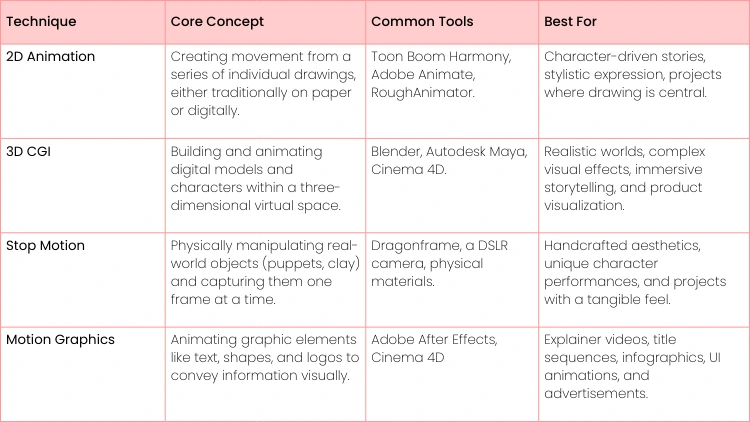
When most people hear "animation", they probably picture classic 2D animation. This is the art of drawing frame by frame, the very technique that built Disney's golden age. It’s having a major comeback in films like Spider-Man: Across the Spider-Verse and gives you incredible stylistic freedom. You can create anything from simple, snappy cartoons to lush, painterly worlds. If you're curious about a hands-on digital approach, this guide on rotoscoped animations with RoughAnimator is a fantastic starting point.
Then you've got 3D CGI (Computer-Generated Imagery), the engine behind Pixar's incredible stories and the jaw-dropping effects in modern blockbusters. Here, instead of drawing, you build and move digital models inside a three-dimensional space—it's a lot like being a virtual puppeteer. This style is perfect for crafting immersive, realistic worlds with a staggering amount of depth and detail.
- Actionable Insight: Don't just pick a style based on what you like to watch. Think about how you like to create. If you love sketching in a notebook, 2D might be your natural fit. If you enjoy building things and solving spatial puzzles, you might fall in love with 3D modeling.
Tactile Worlds and Dynamic Designs
For those who love working with their hands, stop motion offers a uniquely tangible process. This is where you physically move real-world objects, like the clay figures in Aardman's Wallace & Gromit or the intricate puppets in Coraline, and capture them one frame at a time. It's a meticulous process, but the result is a charming, handcrafted look that digital tools just can't replicate.
Finally, there's motion graphics, which is all about bringing graphic design to life. This technique is less about telling character-driven stories and more about animating text, logos, and shapes to communicate an idea clearly and effectively. It's the backbone of explainer videos, slick title sequences, and just about every digital ad you see. On top of traditional methods, exploring new AI-powered animated drawing tools can also open up some really interesting creative shortcuts.
To help you get a clearer picture, here's a quick breakdown of how these techniques stack up.
Choosing Your Animation Technique
Ultimately, the best way to choose is to jump in and try one. Don't worry about mastering everything at once—pick the one that sparks your curiosity the most and start creating.
Your First Animation Toolkit: What You Actually Need
Getting into animation can feel like you need a Hollywood studio's budget to even start. But that's just not true. The real secret is picking tools that fit the style you're going for—whether that's 2D, 3D, or something else entirely—without getting paralyzed by a million different options.
Honestly, your most important investment isn't the fanciest software; it's your time and dedication to practice.
For most people just starting out, the first hurdle is hardware. And while you can animate with just a mouse, a simple drawing tablet is an absolute game-changer. It just feels more natural and gives you way more control. You can find incredible entry-level tablets from brands like Wacom or Huion that are more than powerful enough to get you going with digital drawing and sculpting.
- Actionable Insight: Your first toolkit should empower you, not intimidate you. The best software is the one you actually open and use. Download one of the free options mentioned below and commit to opening it for just 15 minutes a day for one week. That consistency is more valuable than any expensive gear.
Choosing Your Animation Software
Okay, so you have a way to draw on your computer. Now what? The next step is software, and this is where so many aspiring animators get stuck. They think they need to drop hundreds of dollars on the industry-standard programs right away. This is a total myth.
The free and open-source software available today is unbelievably powerful. Seriously.
- Practical Example (2D): You can't go wrong starting with Krita or OpenToonz. Both are 100% free and packed with professional-grade, frame-by-frame animation tools. Use these to get the fundamentals down cold before you even think about paid options like Toon Boom Harmony.
- Practical Example (3D): Blender is the undisputed king of free software. It’s not just for animation; it’s a full 3D creation suite used for everything from indie games to big-budget visual effects. For a beginner, it easily goes toe-to-toe with expensive programs like Autodesk Maya.
When to Upgrade Your Gear
The final piece of the puzzle is your computer. Here's the good news: most modern laptops can handle basic 2D animation and even some simple 3D work just fine. Your initial focus should be on learning the craft, not on hardware specs.
You'll know it's time to upgrade when your computer starts to lag. Once you're working on projects with complex scenes or high-resolution textures and your machine is struggling to keep up, then you can start thinking about adding more RAM or a better graphics card.
As your skills grow, you'll eventually need to compile your animated scenes into a final video. When you get to that point, you can explore some of the top user-friendly video editing software for beginners to give your work that final layer of polish.
From Practice Projects to a Professional Portfolio
A strong portfolio is the key that unlocks doors in the animation industry. It’s the moment you stop just learning the art of animation and start proving you can do the work. The trick is to stop practicing aimlessly and instead focus on project-based exercises that build specific, marketable skills.
Start with the fundamentals. We know they can seem tedious, but these exercises aren't just doodles—they are the absolute building blocks of your professional reel. Even your early, simple work shows potential and a serious commitment to improving your craft.
Here’s an actionable roadmap to get you started:
- Animate a Bouncing Ball: This is the classic for a reason. It’s where you truly learn timing, spacing, and weight. Don’t just do one; show variations—a heavy bowling ball versus a light, bouncy rubber ball—to demonstrate your grasp of physics.
- Create a Simple Walk Cycle: A character's entire personality can be revealed in how they walk. Animate a confident strut, a tired shuffle, or a sneaky tiptoe. This is your first real test of bringing a character to life through movement.
- Produce a Short Lip-Sync Test: This one's huge. Record yourself saying a short, emotive line of dialogue and then animate a simple character speaking it. The real challenge is matching the mouth shapes while conveying the emotion behind the words.
Tailoring Your Portfolio for Specific Roles
As you start feeling more confident, you need to think about the specific jobs within an animation pipeline. A recruiter hiring a rigger is looking for a completely different skill set than one hiring a character animator. Your portfolio has to reflect the job you actually want.
- Actionable Insight: Your portfolio is your professional story. Don't just show what you can do; show what you love to do. A reel filled with passionate, focused work is far more compelling than one that tries to do everything.
For example, a Character Animator needs a reel jam-packed with expressive acting and dynamic body mechanics. A Rigger, on the other hand, should showcase deep technical skill. Their reel needs to feature functional, intuitive character rigs with clean controls that an animator would love to use.
Finally, an Effects (FX) Artist should create a reel that highlights believable natural phenomena. A great practical example for this is to create a 3-5 second clip of a campfire, focusing on the realistic movement of the flames, the rising smoke, and the glowing embers. When you tailor your work this way, you’re sending a clear signal to studios that you understand the role and are ready to contribute from day one.
Launching Your Career in the Animation Industry
Making the jump from a passionate student to a paid professional in animation has never been more within reach. But you can't just stumble into it; you need a game plan. The first step? Start building real connections in the industry. Get on platforms like LinkedIn and ArtStation, follow the studios you dream of working for, and actually engage with the artists whose work inspires you.
But let’s be honest, your most powerful asset is your demo reel. Think of it as your visual handshake—it has to make an immediate, lasting impression.
Crafting a Winning Demo Reel
Keep it short and sweet. The gold standard is under 60 seconds. Always, and we mean always, put your absolute best work right at the beginning. Most recruiters and hiring managers make a snap judgment in the first ten seconds, so make those seconds count.
- Actionable Insight: Before you post your reel, get feedback from at least three people—one who is an animator, one who is an artist in a different field, and one who knows nothing about animation. This will tell you if your work is technically sound, artistically appealing, and emotionally clear to a general audience.
If you really want to stand out, tailor your reel for the specific studio you’re applying to. Do your homework. Look at their style, the kind of projects they produce, and showcase work that proves you get their creative voice. This shows you’re not just mass-applying; you’re genuinely invested.
- Practical Example (Character Animator): Applying to a studio known for cartoony comedy? Lead with a short, snappy clip showing exaggerated facial expressions and physical gags. Applying to a VFX house? Start with a subtle, realistic performance showing nuanced emotion.
- Practical Example (FX Artist): Going for an FX Artist role? Pack your reel with dynamic, realistic simulations—fire, water, smoke, explosions—that look incredible.
The global animation market is set to explode, projected to hit an incredible USD 953.31 billion by 2035. That’s a massive pie, and skilled artists are needed to bake it. North America alone makes up nearly 34% of this market, showing just how hungry the industry is for fresh talent. You can read the full research about animation market growth to see the numbers for yourself.
Don't forget about the freelance world, either. It’s a fantastic way to get your foot in the door and start earning. Sites like Upwork or other creative job boards can help you land that first paid gig, which builds both your portfolio and your street cred.
In this field, learning never stops. It's a non-negotiable part of a long and successful career. For some real-world guidance on how to keep growing, check out this guide on how to become an artist with advice from actual artists. A true commitment to your craft is what will help you grab the incredible opportunities waiting in this industry.
At Uplyrn, we provide the skills and expert guidance you need to turn your creative passion into a professional career. Explore our courses and start building your future in animation today.


Leave your thoughts here...
All Comments
Reply