









How to Teach Online Courses: A Framework to Engage Learners
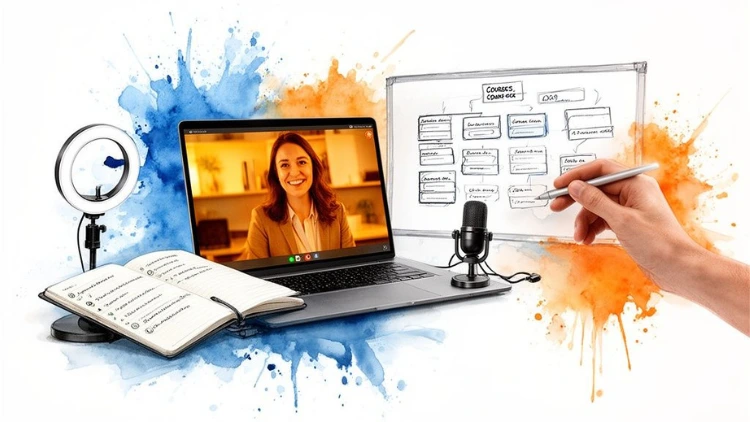
Thinking about teaching an online course? You're not just creating content; you're building a journey. That journey breaks down into four key parts: designing a curriculum that gets results, building content that actually engages people, fostering a real learning community, and then marketing your course to the right audience.
Get this framework right, and you've found a powerful way to connect with learners and turn your expertise into a thriving business.
Jump To Section

Earn As You Learn
Earn 25% commission when your network purchase Uplyrn courses or subscribe to our annual membership. It’s the best thing ever. Next to learning,
of course.
The Massive Demand for Online Learning
The entire world of education has been turned on its head, and you're in a prime spot to take advantage. People are flocking to online platforms to pick up new skills, climb the career ladder, or just dive into a passion project. This is a massive opportunity for anyone with knowledge to share.
This isn't some passing fad; it's a deep shift in how we learn. The eLearning industry saw a mind-boggling 900% growth spurt between 2000 and 2020. And it’s not slowing down. Projections show the market hitting somewhere between $370 billion and $400 billion by 2026.
What does that mean for you? It means there's a ready-made audience out there, actively looking for the very knowledge you have.
A Framework for Success
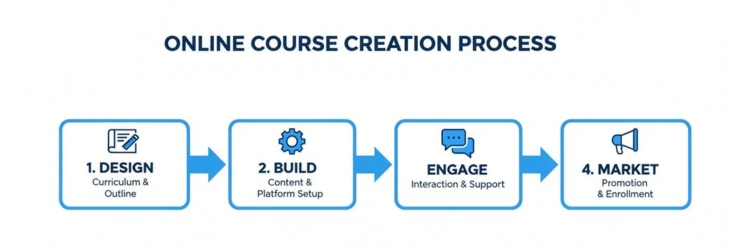
To tap into that demand, you need a solid plan. We've found it's best to break down how to teach online courses into four core stages, with each one setting up the next for success.
As you can see, success isn't just about recording some videos. It's a complete cycle that starts with smart design and carries all the way through to active student engagement and savvy marketing.
Your Core Framework for Teaching Online Courses
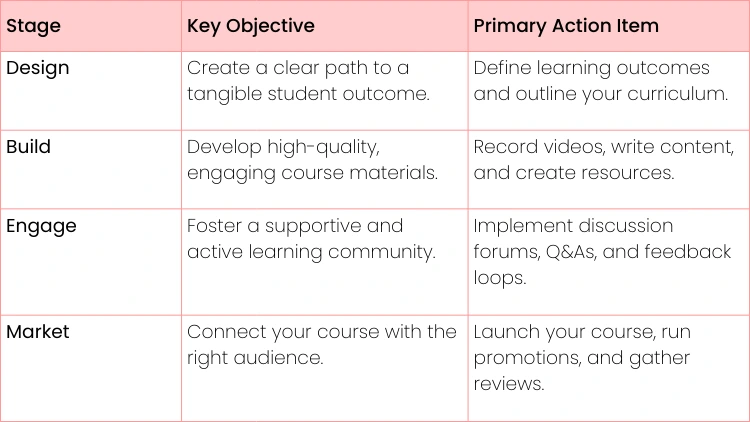
To help you get started, here's a quick look at the core framework we'll be exploring throughout this guide. Think of this as your roadmap.
The table below lays out the fundamental pillars of a successful course. We'll be diving much deeper into each of these action items.
We'll move beyond the basics, offering practical examples and steps you can take right away. For instance, instead of just telling you to "create video lectures" we'll show you how to structure them to hit specific learning goals. You'll also learn how to turn a dead course forum into a buzzing community. The incredible growth in the digital era of courses proves that with the right strategy, your expertise can reach a global audience.
A successful online course isn't just a collection of information. It's a structured experience designed to produce a specific transformation for the student.
This entire process is what platforms like Uplyrn are built to support, helping you bridge the gap between your expertise and eager learners everywhere. Whether you're a leadership coach, a watercolor artist, or a Python pro, there has truly never been a better time to start teaching online.
Designing a Course That Delivers Real Results
The biggest mistake creators make is jumping straight into recording lessons. They have all this knowledge and are excited to share it, but they skip the most critical step: the blueprint. A great online course isn't just a collection of videos; it’s a guided journey that creates a real transformation for your students.
It all begins with getting laser-focused on who you're teaching and what you’re promising to deliver.
Before you even outline a single module, you have to get crystal clear on your ideal student. Are they total beginners fumbling in the dark, or are they mid-career professionals looking to sharpen a specific skill? What keeps them up at night? What's the one big goal they're trying to achieve?
- Practical Example: Don't just say your course is for "everyone interested in public speaking". Instead, picture this person: “An ambitious junior manager who physically freezes up during team presentations and desperately wants the confidence to lead meetings without their voice shaking.” That level of detail will guide every single decision you make from here on out.
Crafting Action-Oriented Learning Outcomes
Once you know who you’re talking to, you can define your learning outcomes. Think of these as your contract with the student. They aren’t fuzzy concepts; they are concrete, measurable promises of what your students will be able to do by the end of your course.
- Actionable Insight: Always start your outcome statements with action verbs like "Design", "Build", "Analyze" or "Launch". A weak outcome like "Understand social media marketing" is forgettable. But "Launch and manage a profitable Facebook ad campaign from scratch" sells a tangible result. It gives your student a clear finish line to run toward.
Good outcomes are everything. They set expectations and build trust. Your entire curriculum should be built to deliver on these promises.
Structuring Your Curriculum Logically
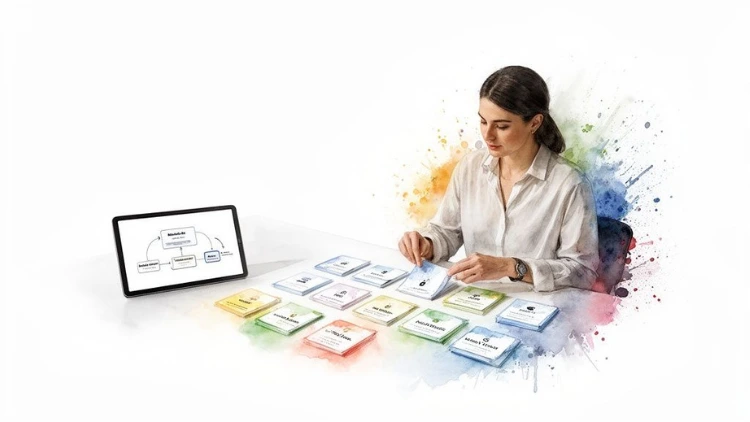
With your outcomes locked in, it’s time to map out the curriculum. This is where you organize your expertise into a logical flow of modules and lessons. You’re building a step-by-step path that takes your student from Point A (where they are now) to Point B (where they achieve the outcome).
Think of your course as a staircase. Each lesson is a single step, and each module is a landing. You can't just throw in random steps or expect people to leap across a missing section. It has to be sequential.
The secret to a great curriculum is reverse-engineering. Start with your final learning outcome and work backward, asking "What does a student need to know or do right before this?" for each step.
This is a game-changer for teaching online courses. Let's say your final outcome is "Design a professional logo in Canva". Working backward, your structure might naturally fall into place like this:
- Module 1: The Fundamentals of Good Design (Color theory, typography basics)
- Module 2: Mastering the Canva Interface (Tools, layouts, and shortcuts)
- Module 3: The Logo Design Process (Brainstorming, sketching, and vectorizing)
- Module 4: Your Final Project (Designing and presenting your own logo)
This kind of logical flow does more than just organize your content. It breaks down an intimidating goal into small, manageable wins, which is exactly what keeps students motivated and moving forward.
Building Your Content and Choosing Your Tools
Okay, your curriculum is mapped out. Now for the fun part: turning that blueprint into actual, engaging content your students will love. This is where you roll up your sleeves and create the videos, downloads, and activities that bring your expertise to life. The goal is to produce stuff that not only teaches but also keeps your students hooked from the first minute to the final lesson.
Here's a hard truth: a course that’s just a long series of talking-head videos will put people to sleep. To keep learners motivated, you need variety. Mixing up your content formats is the secret sauce for catering to different learning styles and keeping the energy high.
Matching Content Formats to Learning Goals
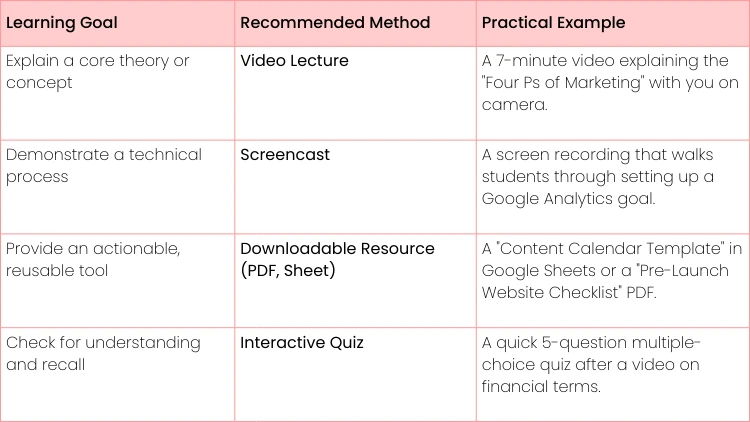
Choosing the right format really boils down to what you’re trying to teach in that specific lesson. Always ask yourself: what’s the most direct way to get this point across? Sometimes a simple, printable checklist is a thousand times more useful than a 10-minute video.
- Actionable Insight: The trick is to match the format to the learning goal. It’s not about using every format you can think of, but about choosing the best tool for the job.
Mixing these formats creates a much richer, more dynamic experience. This isn't just a hunch; it reflects what's happening in the professional world. In fact, 98% of corporations have adopted eLearning because it's just that effective. Students can absorb up to five times more information this way, especially in popular fields like business, IT, and health.
Setting Up Your Tech for Professional Results
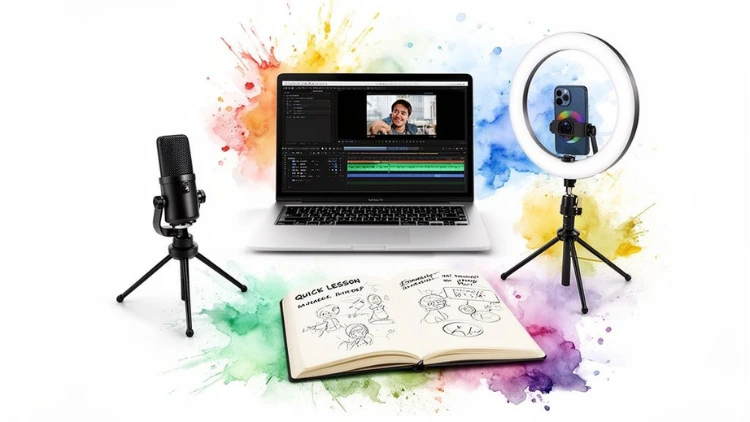
You absolutely do not need a Hollywood-level studio to create professional content. A few smart, affordable investments in your recording gear can make a world of difference in how students perceive your course's quality.
If you focus on only two things, make them crystal-clear audio and good lighting. Think about it—people will tolerate a slightly fuzzy video, but they will click away in seconds if they can't understand what you're saying.
A simple USB microphone and a ring light are the two most impactful, budget-friendly upgrades you can make. They instantly take your production value from "hobbyist" to "pro" and build immediate trust with your students.
Here’s what a basic, but effective, starter kit looks like:
- A Quality USB Microphone: Models like the Blue Yeti or Rode NT-USB are industry workhorses for a reason. They plug right into your computer and deliver crisp, clean audio without a fuss.
- A Ring Light or Softbox: Good lighting is non-negotiable. It gets rid of distracting shadows on your face and makes you look far more credible on camera. A basic ring light behind your webcam is a perfect starting point.
- A Stable Camera: Your laptop's built-in webcam might be okay in a pinch, but a dedicated 1080p external webcam will give you a much sharper, more professional image.
Beyond the hardware, you'll need the right software to pull it all together. Be sure to check out this guide on fantastic tools for any distance learning system to find software that can simplify everything from video editing to creating interactive lessons.
Once your tools are in hand and your first batch of content is created, you can start uploading it all into a platform like Uplyrn. From there, it's just a matter of arranging your lessons, adding quizzes, and attaching your resources to finally bring your course vision to life.
Fostering an Engaging Learning Community
Okay, you've built your course content. But don't pop the champagne just yet. The real work of teaching online is about to begin, and it revolves around your students. An empty forum or a silent group chat is more than just quiet—it’s a sign of a disengaged audience, which often tanks your completion rates.
A vibrant community, on the other hand, transforms a lonely learning experience into a shared journey. It’s what keeps students motivated, invested, and coming back for more.
This push toward interactive learning isn't just a trend; it's a necessity. With an estimated 570 million people projected to be taking online courses by 2027, the instructors who really succeed will be the ones who master student engagement. The magic formula? A solid mix of great video content, practical quizzes, and active peer forums. This is how you create a "sticky" course that people actually finish.
Sparking Meaningful Conversations
You can't just set up a forum and expect a lively debate to break out. You have to be the one to get the ball rolling. This means using strategic discussion prompts that dig deeper than a simple "yes" or "no". Your goal is to get students sharing their own unique experiences and points of view.
- Practical Example: Let's say you teach a social media marketing course. Instead of asking, "Do you use Instagram Stories?" (which gets a boring "yes"), try this: "Share a link to an Instagram Story you found compelling this week and explain what one element made it so effective." This simple shift encourages them to apply what they've learned, not just recall a fact.
This proactive approach is what builds momentum. To get this right, you'll need the right space for your students to connect.
Here's a powerful little trick: the "2x10 strategy". An instructor spends just two minutes a day for ten days straight having a non-course-related chat with a student. The results? It has shown an incredible 85% improvement in student behavior and engagement. Never underestimate the power of a personal connection.
Implementing Interactive and Collaborative Activities
Passive learning is the absolute enemy of engagement. You have to get your students out of their seats (metaphorically, of course) and doing things that require them to connect with you and, more importantly, with each other.
- Live Q&A Sessions: Host monthly "Office Hours" on Zoom. This is where students can show up and ask you anything in real-time. It provides huge value and shows them you're personally invested in their success.
- Peer-Review Assignments: Get students to critique each other's work using a simple, clear rubric you provide. In a writing course, for example, they could review a classmate's blog post draft and offer specific feedback on the hook, flow, and call-to-action. This builds skills and a sense of camaraderie.
- Project-Based Assessments: Use features, like the ones right here on Uplyrn, to create projects with clear milestones. Then, create a 'Showcase Your Work' thread in your community. This gives students a place to share their progress, get feedback from the group, and build a portfolio they can be genuinely proud of.

Marketing and Monetizing Your Online Course
You’ve poured your heart and soul into creating an incredible course. That’s a massive win, but the work isn’t over. Now you have to switch gears from creator to marketer. This is the moment you connect your course with the people who desperately need it and start turning your expertise into a real business.
The first hurdle is often the toughest: putting a price on your work. It can feel intimidating, we get it. But let's demystify it by looking at the most common pricing models.
Choosing Your Pricing Model
Your price tag should be a direct reflection of the value and transformation you’re promising. There's no magic number, but a few tried-and-true models work exceptionally well for online courses.
- One-Time Fee: This is the most straightforward approach. A student pays once for lifetime access. It’s clean, simple, and perfect for comprehensive, flagship courses that deliver a major result.
- Practical Example: A $97 one-time fee for a definitive course on "Become a Certified Project Manager".
- Payment Plan: To make a higher-priced course feel more manageable, you can break up the cost.
- For example, offering three payments of $37 instead of one lump sum of $97 can dramatically lower the barrier to entry and boost your sales.
- Tiered Access: With this model, you can create different price points that unlock different levels of access. A basic tier might offer just the core video lessons. A premium tier could add personal coaching, live Q&A sessions, or access to an exclusive community.
- Actionable Insight: For a photography course, a $27 "Core" tier could offer video lessons, while a $97 "Pro" tier adds a monthly group image review session with you.
To find your sweet spot, take a look at what other courses in your niche are charging and what’s included. More importantly, price your course based on the outcome you provide. A course that teaches a high-income skill will naturally command a much higher price than one focused on a hobby.
Crafting a Sales Page That Converts
Think of your sales page as your 24/7 salesperson. It’s where potential students will make the final call on whether your course is worth their investment. The secret here is to stop selling features and start selling results.
So, instead of a headline like "Learn SEO", try something that screams transformation: "Get Your Website on the First Page of Google". People don't buy courses; they buy the future version of themselves that your course helps create.
This same logic is key to understanding how to get tutoring clients—you’re not just selling time, you’re selling academic success. The mindset is identical for courses.
Your sales page should be an emotional journey. It needs to clearly identify the student's pain point, present your course as the definitive solution, and paint a vivid picture of their life after they succeed.
Make sure to sprinkle in student testimonials, a clear module-by-module breakdown, and a powerful call-to-action that makes enrolling the obvious next step.
Building Your Audience and Driving Sales
You can have the best course and the most persuasive sales page in the world, but you can't sell to an empty room. Building an audience before you launch is non-negotiable.
Your two best friends here will be email marketing and social media. Start by creating a valuable freebie—a checklist, a webinar, or even a mini-course—and offer it in exchange for an email address.
- Actionable Insight: If your course is about keto dieting, create a free "7-Day Keto Meal Plan & Shopping List" PDF. Promote this freebie on Instagram and in Facebook groups. This builds an email list of people who are your perfect potential customers.
Once you have people on your email list, you need to nurture that relationship. Don't just spam them with sales pitches. Send them weekly tips, share success stories from past students, and give them a behind-the-scenes look at your course.
By the time you're ready to launch, you’ll be talking to a warm audience of people who already know, like, and trust you. This is the bedrock of any successful launch strategy. You can dive even deeper into this with this complete guide on how to market online courses.
Common Questions About Teaching Online Courses
Even with the best-laid plans, questions are going to pop up. Every successful course creator we know had the exact same worries when they were just getting started. It's part of the process.
Let's cut through the noise and tackle some of the most common hurdles you'll face with practical answers.
How Much Time Does It Really Take to Create a Course?
There's no magic number here, but a good rule of thumb is to plan for 6 to 10 hours of work for every single hour of finished video. So, a three-hour course could take anywhere from 18 to 30 hours of scripting, recording, editing, and uploading.
- Actionable Insight: Don't try to boil the ocean on your first attempt. Start with a small, focused "micro-course" that solves one specific problem. For example, instead of "The Ultimate Guide to Digital Marketing", create a 90-minute course on "How to Run Your First Profitable Facebook Ad". This gets you a quick win and valuable feedback.
What If I’m Not a Tech Whiz?
You absolutely don't need to be. Modern course platforms are built for normal people, not developers. If you can post on social media or manage your email, you have the core skills.
Actionable Insight: Focus on just three key pieces of tech to start:
- A good USB microphone: This is non-negotiable. The Blue Yeti is a popular, user-friendly choice. Bad audio will sink your course faster than anything.
- Simple video editing software: Tools like Descript or Camtasia are built for beginners and have tons of tutorials.
- An all-in-one course platform: A platform like Uplyrn handles the tricky parts—from uploading lessons to taking payments—so you can focus on creating.
How Do I Know If My Course Idea Is Any Good?
The only real test of a good idea is whether someone is willing to pay for it. Before you spend months building a full course, you need to validate your idea.
- Practical Example: Create a detailed outline and a short "coming soon" sales page. Announce you're "pre-selling" the course at a discount to the first 20 students. Send this offer to your email list or post it on social media. If you get a handful of pre-orders, you know you've struck gold. If you get crickets, you've saved yourself months of work and can pivot to a new idea.
Don't ever build in a bubble. The single biggest mistake we see is creators building what they think people want. Let your audience co-create the course with you. Their feedback is everything.
How Much Money Can I Realistically Make?
Your earning potential really boils down to three things: the size of your audience, the price of your course, and how well you market it. An instructor who has spent time building an engaged email list can see a significant return right out of the gate.
- Practical Example: Let's do some simple math. If you have an email list of 1,000 engaged followers and you sell a $97 course, a conservative 2% conversion rate means 20 sales. That's $1,940 from a single launch. This isn't a get-rich-quick promise; it's a real, scalable business model. As your audience and marketing skills grow, those numbers can climb dramatically.
Ready to turn your expertise into a thriving online course? With Uplyrn, you get all the tools you need to build, market, and sell your knowledge in one place. Start creating your course today on Uplyrn and join a community dedicated to lifelong learning.


Leave your thoughts here...
All Comments
Reply