









How to Increase Productivity at Work and Reclaim Your Focus

To really boost your productivity, you first have to play detective. The whole game is about diagnosing your personal productivity drains before you even think about prescribing solutions. It all starts with tracking your time to get real data, figuring out what's actually eating up your day, and only then building a strategy to fix it. This guide gives you the practical examples and actionable insights needed to make lasting changes.
Jump To Section

Earn As You Learn
Earn 25% commission when your network purchase Uplyrn courses or subscribe to our annual membership. It’s the best thing ever. Next to learning,
of course.
Pinpointing Your Productivity Drains
Feeling busy isn't the same as being productive. We've all been there. The first real step to getting your focus back is to stop guessing where your time goes and start gathering hard evidence. Think of it as a personal 'productivity audit' to find the hidden leaks draining your time and energy.
So many people fall into the trap of treating symptoms instead of the root cause. You might download a slick new to-do list app, but what good is it if the real problem is the constant ping of notifications derailing your focus every five minutes? The goal here is to move from a vague sense of being overwhelmed to a crystal-clear picture of the culprits.
Identifying the Common Culprits
Before you can fix what’s broken, you have to know what it is. Productivity drains are sneaky; they often disguise themselves as urgent, must-do tasks. But by just watching your own habits for a week, you'll start to see patterns you never knew existed.
Some of the usual suspects include:
- Constant Context Switching: Jumping between emails, Slack messages, and your actual project work without ever finishing anything.
- A practical example is writing a report, getting a Slack message, answering it, seeing a new email, opening that, and then trying to remember what you were writing. This creates a ton of mental friction and just kills your momentum.
- Digital Distractions: The never-ending siren call of notifications from collaboration tools, social media pings, and news alerts that shatter your attention into a million tiny pieces.
- Actionable insight: Use your device's "Focus Mode" or "Do Not Disturb" during critical work blocks to eliminate these interruptions entirely.
- Unclear Priorities: When you start your day with a massive, unorganized list of tasks, you get decision paralysis. You end up spending more time deciding what to do than actually doing it. A simple fix is to identify your top 1-3 priorities the night before.
"Productivity is never an accident. It is always the result of a commitment to excellence, intelligent planning, and focused effort." – Paul J. Meyer
This simple process flow shows you exactly how to run your own audit.
This three-step flow—Track, Identify, Analyze—is a simple but incredibly powerful way to turn raw data about your workday into insights you can actually use.
Conducting Your Own Audit
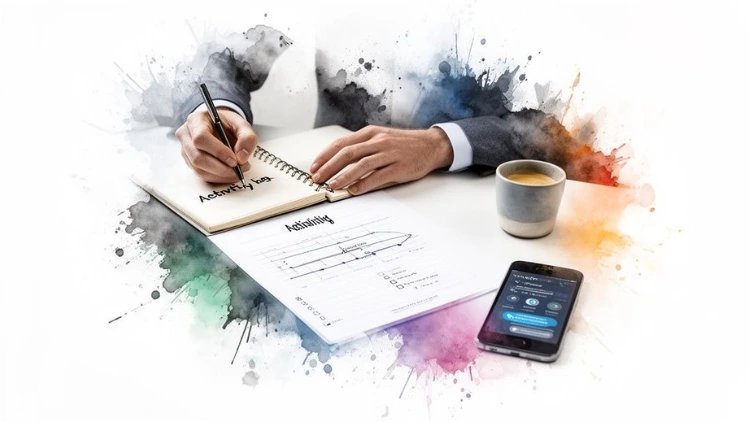
Getting started is easy. Just track your activities for a few days. You can use a simple notebook, a spreadsheet, or a dedicated time-tracking app like Toggl or Clockify. The tool itself isn’t as important as being consistent. Log what you're working on, but—just as importantly—log every single thing that interrupts you.
- For example, a project manager might be shocked to discover that 50% of their day is spent sitting in meetings where they barely even speak. An actionable insight from this discovery is to decline meetings without a clear agenda or propose sending a delegate. A writer might realize that checking email "for just a minute" actually eats up over two hours of their most creative morning time. The practical fix is to schedule two specific 30-minute blocks for email processing and close the tab the rest of the day.
Beyond digital drains, don’t forget the physical ones. Learning how to reduce eye strain from computer is crucial, as that fatigue can quietly tank your energy and focus throughout the day.
Once you have this data, the path forward becomes so much clearer. If you're ready to go deeper on this, check out this guide on how to organize your work without getting distracted.
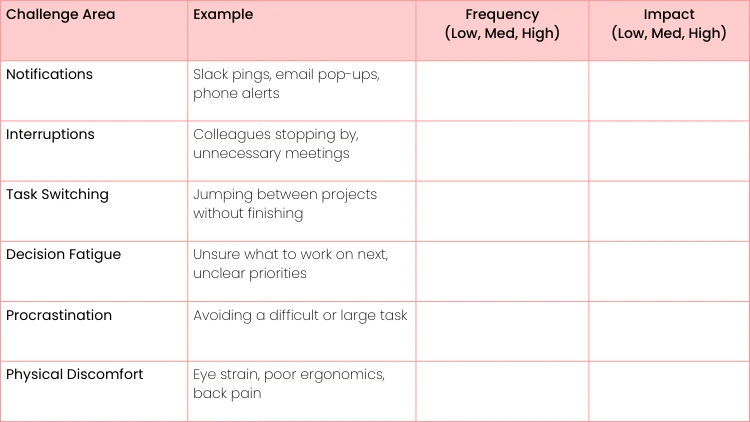
To help you get started, use this simple checklist. Just spend a week noting down what's getting in your way.
Your Personal Productivity Audit Checklist
Use this checklist to identify your primary productivity challenges over one week.
Once you've filled this out, you'll have a much better handle on where to focus your efforts first. You're not just guessing anymore; you're working with data.
Mastering Deep Work and Unlocking Your Focus
Now that you have a clear picture of what's draining your productivity, it's time to build your defenses. True productivity isn't about frantically juggling a hundred tiny tasks—it's about creating pockets of intense, uninterrupted concentration. This is the heart of deep work: the ability to focus without distraction on a cognitively demanding task.
Mastering this skill is what separates the merely busy from the truly effective. It's how you produce higher-quality work in less time, solve complex problems, and actually feel accomplished at the end of the day. The goal here is to shift from a state of constant reaction to one of intentional action.
Implementing Proven Focus Techniques
Knowing about productivity methods is one thing; actually weaving them into your daily grind is where the magic happens. Let's look at two of the most powerful and adaptable techniques: Time Blocking and the Pomodoro Technique.
Time Blocking in Action. Picture a marketing manager whose week is a chaotic mix of meetings, urgent requests, and creative strategy. Using time blocking, she carves out a two-hour "Content Strategy" block on her calendar every Tuesday and Thursday morning. She treats this block like an unbreakable appointment.
- An actionable insight here is to color-code these blocks in her digital calendar and share it with her team, setting clear expectations about her availability.
The Pomodoro Technique for Coders. Now think of a software developer staring down a complex coding sprint. Instead of trying to power through for hours on end, they use the Pomodoro Technique. They'll set a timer for 25 minutes of pure, focused coding, followed by a mandatory five-minute break to stand up and stretch.
- A practical example of using the break is to step away from the screen entirely—get water, look out a window—to reset the brain, not just switch to checking email. This cycle of focused sprints prevents burnout and keeps their problem-solving skills sharp all day long.
Deep work is like a superpower in our increasingly distracted world. The ability to shut out the noise and concentrate for extended periods is what allows you to move from simply completing tasks to producing truly exceptional results.
For many, self-assessment is the first step toward mastering deep work. In fact, learning how time auditing reveals focus as the real leverage can be a game-changer.
Creating a Focus-Friendly Environment
Your physical and digital surroundings have a massive impact on your ability to concentrate. You don't need a corner office, but you do need to be intentional about shutting down distractions. Even in a noisy open-plan office, a good pair of noise-canceling headphones can create a personal bubble of focus.
Taming your digital workspace is just as critical. This means turning off non-essential notifications, closing all those extra browser tabs, and fighting the urge to multitask.
- A practical example: Use a browser extension like OneTab to collapse all your open tabs into a single list, decluttering your screen instantly. A recent study highlights just how much our environment matters; remote workers enjoy 22% more deep-focus time each week compared to their in-office counterparts, mostly because they face fewer distractions.
The battle against distraction is constant. For a deeper dive into why juggling tasks is so damaging to your output, check out this article on the myth of multitasking. By consciously applying these techniques and designing a workspace that supports focus, you're building the foundation needed to truly boost your productivity and deliver your best work.
Building an Intelligent and Automated Workflow
Mastering deep focus is one half of the productivity puzzle. The other half? Building a smart workflow that does the heavy lifting for you. A truly effective system doesn't just organize your tasks—it actively clears the path so you can zero in on the work that actually moves the needle.
This is about moving beyond a simple to-do list and engineering a process that prioritizes, delegates, and automates for you. The goal is to get your workflow working for you, not against you. Instead of constantly feeling like you're putting out fires, you'll have a framework that brings clarity and order to your day, freeing up precious mental energy for high-impact work.
Prioritize with Precision
Let’s be honest: not all tasks are created equal, yet a standard to-do list treats them as if they are. A far better approach is to use a prioritization framework like the MoSCoW method. It’s a simple but surprisingly powerful system for making smarter decisions about where to invest your time.
You just categorize tasks into four buckets:
- Must Have: These are the non-negotiable, mission-critical tasks. For a product manager, this might be "Finalize specs for the Q3 feature launch." It has to get done.
- Should Have: Important, but not quite as time-sensitive. An example? "Review user feedback from the last sprint." It's valuable, but the world won't end if it slides a day.
- Could Have: Nice-to-have tasks that you can tackle if time permits. Think of things like, "Organize the shared project folder."
- Won't Have (This Time): This is key. These are tasks you explicitly decide not to do right now, like "Research new analytics tools." You acknowledge it but park it for later.
An actionable insight is to apply this method at the start of each week, creating a clear roadmap and preventing less important "Should Have" tasks from derailing your "Must Have" goals.
Embrace Intelligent Automation
The real game-changer in modern productivity is automation. So many of us burn hours every week on repetitive, low-value tasks that drain our energy and focus. Figuring out how to automate them is like giving yourself the gift of time.
Automation isn't about replacing people; it's about amplifying our potential. By offloading the mundane, we free ourselves up for the creativity, strategy, and deep thinking that humans do best.
Think about the repetitive parts of your job. Do you spend an hour every Monday morning compiling the same sales report? Is your inbox constantly flooded with routine customer questions?
- A practical example of automation is setting up a rule in your email client that automatically files any email with "weekly report" in the subject line into a specific folder, keeping your main inbox clean.
Tools like Zapier can connect your apps to handle simple data entry, while email filters and templates can manage routine communications. When you streamline these processes, you'll be amazed at how much time you get back. A great workflow is also a key part of an effective knowledge management system, ensuring information flows smoothly without manual intervention.
Let AI Be Your Assistant
Generative AI is quickly becoming the ultimate assistant for boosting personal output. With global employee engagement sitting at just 21%, tools that slash tedious work are more important than ever. The data is compelling: workers using generative AI are saving an average of 5.4% of their work hours. A whopping 79% report they're more productive and spend less time on boring tasks.
Instead of spending an hour slogging through a dense 30-page report, ask an AI tool to summarize the key takeaways in a few bullet points.
- An actionable insight is to create a prompt template for tasks you do often, like "Summarize the following text into 5 bullet points, focusing on action items for the marketing team." Use it to draft a routine follow-up email or to brainstorm ideas for your next presentation.
This isn't about letting AI do your job. It's about delegating the grunt work so you can focus on the strategic, high-level decisions that require your unique expertise.

Designing Your Workspace for Peak Performance
Your environment sends powerful signals to your brain. It's one of the most overlooked—and most powerful—factors in your productivity. An intentionally designed workspace, whether it’s your physical desk or your digital desktop, acts as a silent partner in your quest for focus.
This isn’t about just making things look nice; it’s about engineering a space that removes friction and makes deep, concentrated work the default setting. The core idea here is to create clear boundaries. When you sit at your desk, it should be an unmistakable signal to your brain that it’s go-time. This means clearing away the clutter, putting what you need within arm's reach, and getting rid of anything that doesn't serve the task at hand.
Taming Your Physical and Digital Environments
Think of your physical desk as the command center for your focus. A simple but incredibly effective strategy is the "ready-to-work" setup. At the end of each day, take five minutes to clear your desk, leaving out only what you need for your very first task the next morning. It’s a small ritual, but it completely eliminates that morning indecision and lets you dive straight in.
Of course, in our world, you have to conquer your digital workspace, too. Digital minimalism isn't about ditching your tools. It’s about making them serve you, not the other way around.
Here are a few practical steps to get started:
- Silence the Noise: Go on a notification-killing spree. Aggressively turn off non-essential alerts on your computer and phone. A single ping can derail your train of thought for several minutes. Seriously.
- A practical example is disabling badge notifications (the little red dots) on your phone apps so you aren't visually tempted.
- Organize with Intent: Create a logical, repeatable folder structure for your files. A simple system like Projects > [Client Name] > [Project Name] means you never have to waste precious mental energy hunting for a document again.
- Embrace the Inbox Zero Philosophy: Treat your inbox like a processing station, not a to-do list graveyard. Try to touch each email only once—either reply to it, archive it, delete it, or move the action item to a dedicated task list.
Your environment is a mirror of your mind. A cluttered desk or a chaotic desktop often reflects a cluttered and distracted mental state. By taking control of your space, you're taking control of your focus.
The principles of organizing your physical space can have a profound impact on your mental clarity.
Building Keystone Productivity Habits
Beyond your physical and digital setup, your daily routines are the true bedrock of sustained performance. The secret isn't a massive overhaul but building keystone habits—small, consistent actions that naturally trigger a cascade of other positive behaviors. These habits build momentum that can carry you through the entire day.
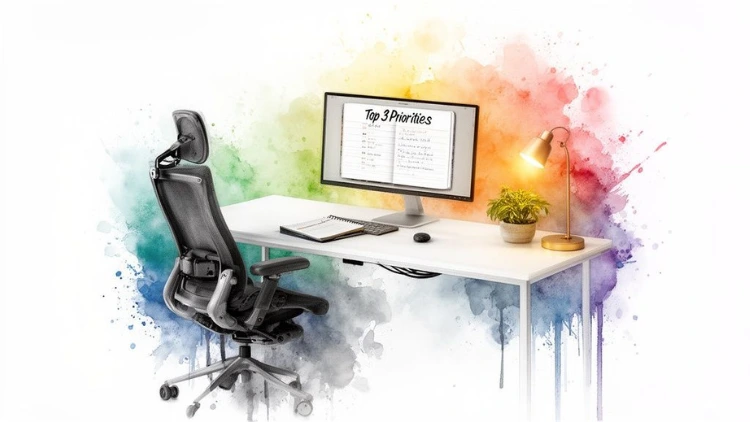
One of the most powerful keystone habits you can adopt is planning your day the night before. Before logging off, take ten minutes to identify your top three priorities for tomorrow. Write them on a sticky note and slap it on your monitor. When you start work, your mission is already defined. This simple act prevents you from getting sucked into the black hole of your inbox and reacting to everyone else's agenda.
Another game-changer is the "two-minute rule". It’s simple: if a task takes less than two minutes to complete, do it immediately instead of putting it off.
- A practical example is responding to a quick clarifying question on Slack right away instead of letting it linger. This prevents all those tiny items from piling up and turning into a huge source of mental clutter and stress.
How Upskilling Becomes Your Ultimate Productivity Hack
Real, lasting productivity isn't just about managing your calendar better. It’s about becoming fundamentally better at what you do. Seeing continuous learning as another task on your to-do list is a mistake—it's a direct investment in your own efficiency. Think of it as upgrading your internal operating system.
When you master a new skill, you can completely overhaul your workflow. Tasks that used to eat up hours can suddenly become simple, ten-minute processes. This is where upskilling stops being a vague professional development goal and turns into a powerful, practical strategy to get more done.
From Manual Drudgery to Automated Flow
Picture a marketing analyst who spends half a day, every single week, manually pulling data from different sources into one giant spreadsheet. They clean it, wrestle with pivot tables, and finally produce a report. It’s tedious, slow, and a prime spot for human error to creep in.
Now, imagine that same analyst spends just a few hours learning advanced spreadsheet functions, a few macros, or a beginner's course in a tool like Tableau. That four-hour manual grind? It's now a ten-minute, one-click process. The time they get back isn't a one-time bonus; it's a dividend that pays out every single week, freeing them up for the strategic work they were actually hired to do.
Skill development is the ultimate form of leverage. Learning one new skill can eliminate dozens of hours of repetitive work, giving you back your most valuable asset: time.
This isn't just for data nerds. A practical example for a project manager who learns a new agile methodology is that they can slash meeting times and get everyone on the same page faster by implementing daily 15-minute stand-up meetings. A writer who gets good with an AI writing assistant can blast through first drafts, saving their best energy for creative editing and refinement.
Bridging the Skills Gap for a Real Payoff
The link between training and output is crystal clear. Companies that invest in proper employee training see 17% greater productivity. It's not just a top-down view, either; 82% of employees say that learning new skills directly boosts their output.
This effect is even more dramatic with new tech. A whopping 75% of workers who used AI in the last year reported that it made them more productive and improved the quality of their work. The opportunity is massive, especially since a skills gap still exists.
The key is making learning a part of your regular routine. For some great, practical strategies on this, check out this guide on how to learn effectively in the flow of work.
Creating Your Personal Upskilling Plan
To really make learning a productivity hack, you have to be strategic. Don't just learn for the sake of learning. Zero in on the specific skills that will solve your biggest daily bottlenecks.
Here's a simple, actionable way to start:
- Pinpoint Your Biggest Time Sinks: Look at your last week. What were the top three tasks that drained your time or caused the most headaches?
- A practical example: "Manually formatting the weekly client report."
- Find a Skill-Based Solution: Is there a tool, technique, or piece of software that could make those tasks easier? It could be anything from learning advanced search operators in Gmail to taking a mini-course on a no-code platform like Zapier. For the report example, the solution might be "Learn to create a report template in our analytics software."
- Block Out Learning Time: Treat learning like a critical meeting. Schedule short, consistent sessions in your calendar. You'd be amazed what 20 minutes a day can do over a few weeks.
This isn’t about adding more to your plate. It's about sharpening the axe so you spend less time chopping.
Keeping the Momentum Going (and Smashing Through Plateaus)
Let's be real. Starting a new productivity system is the easy part. You're fired up, you're organized, and you're crushing your to-do list. But what happens in a few weeks when that initial excitement wears off?
That's when the real work begins. The biggest challenge isn't setting up the system; it's making it stick for the long haul. Progress will inevitably stall. The key isn't to be perfect, but to build a resilient framework that can weather the inevitable dips in motivation.
First things first: you have to measure what matters. Just "feeling" more productive is too vague and won't keep you going when things get tough. Instead, track a few simple, concrete numbers.
- A practical example is to log your "deep work" hours each week in a spreadsheet or tally up how many high-priority tasks you knocked out. Seeing that hard data is incredibly motivating—it’s tangible proof that your new habits are actually making a difference.
How to Spot and Overcome a Plateau
Even the most well-oiled machine needs a tune-up now and then. Hitting a productivity plateau isn't a sign of failure. Think of it as a check-engine light—it’s just a signal that something needs your attention.
You'll know you've hit one when you see these classic signs:
- The spark is gone: Techniques like Pomodoro that once felt like a superpower now just feel like a chore.
- You're spinning your wheels: You're putting in the same effort, but your output has noticeably dropped.
- Procrastination sneaks back in: You find yourself dodging those big, important tasks you used to tackle head-on.
When you spot these signs, it's time to pull over and look under the hood.
- An actionable insight is to schedule a 30-minute "Productivity Review" on your calendar for the last Friday of each month. Ask yourself what’s genuinely working and what’s not. Maybe your time blocks are too rigid for a new, chaotic project, or maybe your priorities have completely shifted.
Your productivity system isn't a set-it-and-forget-it blueprint. It's a living, breathing framework that has to adapt to your ever-changing work, energy levels, and life. The goal is consistent progress, not rigid perfection.
Ultimately, keeping your momentum comes down to two things: celebrating the small wins to keep your morale high and—this is the big one—respecting the power of rest. Burnout is the ultimate productivity killer. Scheduling real, intentional downtime isn't a luxury; it’s a non-negotiable part of any high-performance cycle.
Got Questions About Workplace Productivity?
People often ask for the "silver bullet" to solve all their productivity woes. While it's a bit more nuanced than that, some common questions come up again and again. Let's tackle them head-on.
What's the Single Most Effective Way to Get a Quick Productivity Boost?
If you had to pick just one, it would be the Pomodoro Technique. It's a game-changer for getting immediate results, especially when you're feeling overwhelmed or tend to procrastinate.
The concept is simple: work in focused 25-minute sprints, then take a short break. This single-tasking approach trains your brain to concentrate, beats back mental fatigue, and makes even the biggest projects feel like a series of small, achievable steps.
- An actionable insight is to download a simple timer app for your desktop or phone to make it effortless to start your first Pomodoro session right now.
How Can I Possibly Stay Productive with All These Meetings and Emails?
This is a classic. The key isn't to work faster but to fiercely defend your focus time. The best tool for this is Time Blocking.
- A practical example is to block off 90 minutes every morning from 9:00 to 10:30 AM for your most important task and label it "Focus Time: Do Not Schedule". Treat this block like you would a meeting with your CEO—it is non-negotiable. For the email monster, kill the notifications. Seriously. Designate specific times of the day to check and respond in batches, such as 11:00 AM and 4:00 PM. This stops the constant flow of interruptions that derail your real work.
So many people get stuck here because they confuse being busy with being productive. The first step is to get ruthless about your priorities with something like the Eisenhower Matrix.
This isn't just about making a to-do list; it's about separating what feels 'Urgent' from what is genuinely 'Important'. Your biggest wins come from the tasks that are important but not necessarily urgent. Shifting your energy to those activities is how you move from just putting out fires to making real, long-term progress.
Ready to turn productivity into your greatest strength? At Uplyrn, we provide the courses and expert guidance to help you master new skills, automate your workflow, and advance your career. Start your learning journey with Uplyrn today!


Leave your thoughts here...
All Comments
Reply